
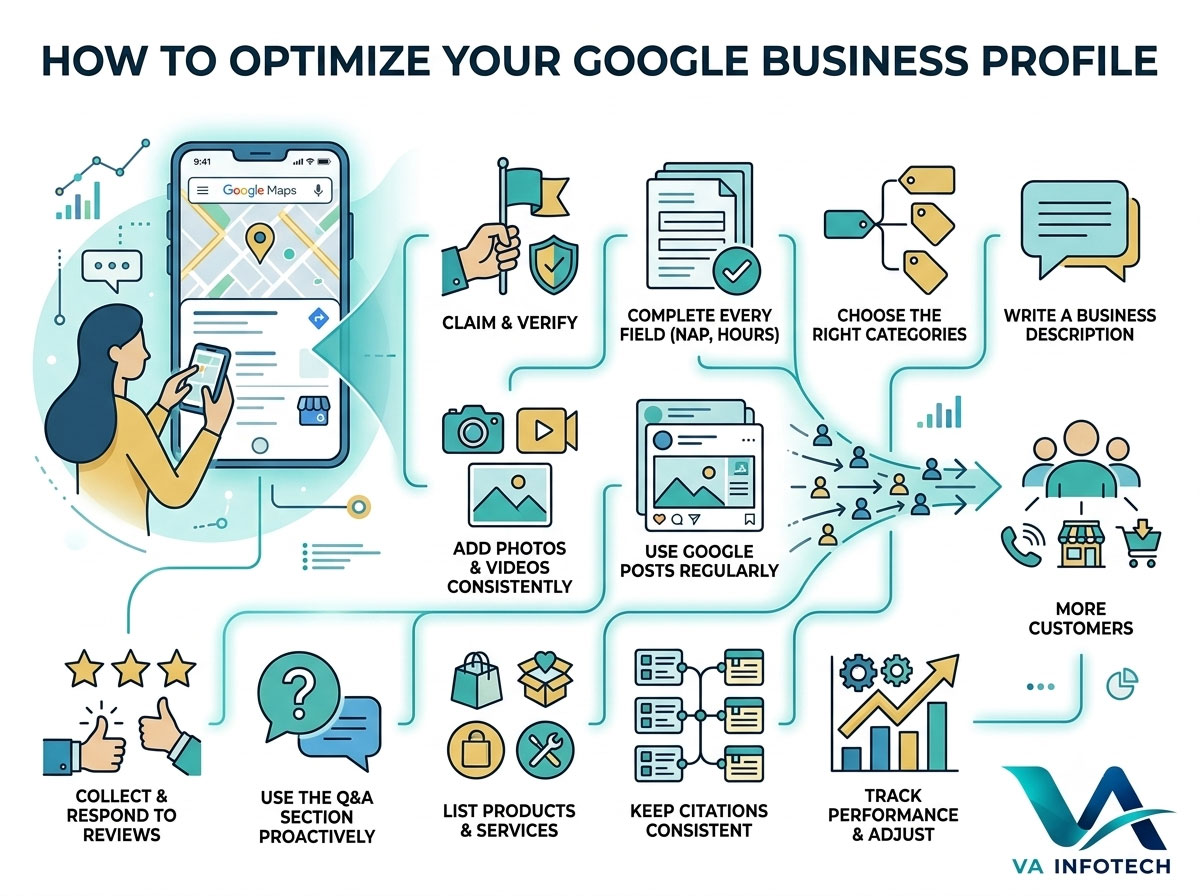
Search “plumber near me,” “best bakery in Ahmedabad,” or “dentist open now,” and the first thing you see isn’t a website — it’s a map, a cluster of business names, a star rating, and a handful of photos. That block of results is the Google Business Profile (GBP), formerly known as Google My Business, and for most local businesses, it’s the single most influential piece of digital real estate they own.
The problem is that most businesses claim their profile once, fill in a phone number, and never touch it again. That’s a missed opportunity. Google Business Profile isn’t a static listing — it’s a living, ranking signal that Google actively evaluates based on completeness, accuracy, engagement, and freshness. A neglected profile quietly loses visibility to competitors who are putting in the work, even if their actual business isn’t better.
This guide walks through exactly how to optimize your Google Business Profile — field by field, decision by decision — so it does what it’s supposed to do: turn nearby searches into paying customers.
Why Google Business Profile Optimization Matters So Much
Before getting into the how, it’s worth understanding why this one listing carries so much weight.
Local searches — anything with “near me,” “in [city],” or an implied location — now make up a massive share of all Google searches, and they convert far better than generic national queries. Someone searching “car service near me” isn’t casually browsing. They’re ready to call, visit, or book, often within hours. Google Business Profile is the primary way your business shows up for exactly that kind of high-intent search, both in the Local Pack (the map and three-listing block at the top of search results) and in Google Maps itself.
Unlike your website, where ranking depends heavily on backlinks, content depth, and domain authority, your Business Profile ranking depends on a different mix of signals: relevance, distance, and prominence — and prominence is where optimization does the most work. A complete, active, well-reviewed profile consistently outranks a thin, outdated one, regardless of how big the business behind it is.
In other words, this is one of the few areas in digital marketing where a small business can genuinely outrank a much larger competitor, simply by doing the fundamentals properly and consistently.
Step 1: Claim and Verify Your Profile
This sounds obvious, but a surprising number of businesses are operating with an unclaimed or unverified profile — which means someone else could technically edit your business information, and you’re locked out of key features like posts, messaging, and insights.
To claim your profile:
- Search your business name on Google or go directly to Google Business Profile Manager.
- If a profile already exists (often auto-generated from map data), claim it. If not, create a new one.
- Verify ownership — usually via a postcard mailed to your business address, though phone or email verification is sometimes available depending on your business category and location.
Until verification is complete, most of the optimization steps below either won’t be available or won’t be trusted by Google. This is step zero, not an optional add-on.
Step 2: Fill Out Every Field Completely and Accurately
Google explicitly favors complete profiles over incomplete ones, and incomplete information also directly costs you customers — someone who can’t find your hours or exact address will simply choose the next listing.
At minimum, this means:
- Business name — exactly as it appears on your signage and website. Don’t stuff keywords into your name field (“Va Infotech — Best Web Design Ahmedabad”); Google’s guidelines explicitly prohibit this and it can get your listing suspended.
- Address — precise and consistent with how it appears everywhere else your business is listed online (more on this under citations below).
- Phone number — a local number where possible, not a generic toll-free line, since it signals local presence.
- Website URL — link to your homepage or, better, a location-specific landing page if you operate in multiple cities.
- Business hours — including special hours for holidays. An outdated “closed” status during business hours is one of the fastest ways to lose a ready-to-buy customer.
- Service areas — if you serve customers at their location rather than a storefront, define this clearly instead of leaving it blank.
Every one of these fields is a small trust signal, and together they form the profile “completeness score” Google factors into local ranking.
Step 3: Choose the Right Categories
Category selection is one of the most underrated ranking factors in the entire profile. Google uses your primary category, in particular, to understand what kind of business you are and which searches you should appear for.
A few principles here:
- Pick the most specific primary category available, not the broadest one. “Web Design Company” is more precise than “Marketing Agency,” and precision helps you rank for the searches that actually match your business.
- Add secondary categories for every genuine additional service you offer, but don’t pad the list with categories that only loosely apply — irrelevant categories can dilute relevance rather than expand it.
- Revisit this periodically. As your business adds services, your categories should evolve with it. A business that’s added ecommerce development, for example, should make sure that’s reflected, not just implied on the website.
Step 4: Write a Business Description That Actually Describes You
The business description field is a genuine opportunity to communicate what makes you different — not just a place to repeat your name and address. Google gives you up to 750 characters; use them.
A strong description typically:
- Leads with what you do and who you do it for, in plain language.
- Mentions your city or service area naturally, without keyword-stuffing it into every sentence.
- Highlights a genuine differentiator — years in business, specialization, certifications, or a specific outcome you’re known for.
- Avoids promotional language, discounts, or links, which Google’s guidelines discourage in this field.
This isn’t a major direct ranking factor on its own, but it directly affects conversion — it’s often the deciding factor between two similarly-rated businesses in the same search results.
Step 5: Add Photos and Videos — Consistently
Profiles with photos receive significantly more engagement than those without, and businesses that add photos regularly tend to see more direction requests and website clicks than those that upload once and stop.
What to prioritize:
- Exterior photos, so customers can recognize your location from the street.
- Interior photos, especially for service businesses like clinics, salons, or restaurants where the environment itself is part of the decision.
- Team and “in action” photos, which build trust far more effectively than stock imagery.
- Product or work-sample photos, updated regularly rather than uploaded once at setup.
- A short video, which Google now supports directly and which tends to stand out against static competitor listings.
Treat this the same way you’d treat your product photography on your website — genuinely useful, high-quality images consistently outperform generic or stock visuals, both for engagement and for how seriously customers take the listing.
Step 6: Use Google Posts Regularly
Google Posts function similarly to a social media feed directly inside your Business Profile — updates, offers, events, and announcements that appear to anyone viewing your listing.
This is one of the most underused features on most profiles, largely because posts expire after seven days (except event and offer posts) and businesses forget to keep them current. But active posting is also a freshness signal Google can factor into visibility, and it gives you a free, direct channel to promote offers, new services, or seasonal updates without waiting for a website update to go live.
A simple, sustainable approach: one post a week, tied to something genuinely current — a new service, a seasonal offer, a recent project, or an upcoming event.
Step 7: Collect and Respond to Reviews — Deliberately
Reviews are one of the strongest prominence signals Google uses, and they’re also the single biggest factor in whether a customer chooses you over the next listing down. Star rating, review volume, review recency, and how you respond to reviews all factor in.
A few practical points:
- Ask directly. Most satisfied customers won’t leave a review unprompted, but will if asked at the right moment — right after a positive interaction, with a direct link to make it effortless.
- Never buy or fake reviews. This violates Google’s policies outright and risks the entire profile being suspended — a risk that isn’t worth whatever short-term boost it might provide.
- Respond to every review, positive and negative. A thoughtful response to a negative review — acknowledging the issue and describing the fix — often does more for trust with future customers than the negative review does damage.
- Keep review velocity steady rather than spiky. A business that generates two or three reviews a month consistently signals more organic trust than one that gets fifty in a single week and then goes quiet.
Step 8: Use the Q&A Section Proactively
The Questions & Answers section lets anyone — not just verified customers — post a question about your business, and anyone can answer, including other users. Left unmanaged, this can end up with incorrect or outdated answers sitting at the top of your listing.
The fix is simple but often skipped: seed the section yourself with the questions customers actually ask (parking availability, appointment requirements, payment methods, etc.), and monitor it regularly so new questions get an accurate answer from you before anyone else weighs in.
Step 9: List Products and Services Explicitly
Beyond the general business description, Google Business Profile allows you to list individual products and services with their own names, descriptions, and prices. This gives Google more specific content to match against specific searches (“website redesign quote,” “ecommerce store setup cost”) rather than relying solely on your general category.
For a service business, this section functions almost like a mini version of your services page — and it’s worth keeping in sync with whatever your website actually offers, rather than letting it go stale.
Step 10: Keep Your Citations Consistent Everywhere
Your Google Business Profile doesn’t exist in isolation — Google cross-references your business name, address, and phone number (commonly abbreviated as NAP) against how they appear on other directories, industry listings, and citation sites. Inconsistencies — a slightly different address format, an old phone number still listed somewhere — quietly undermine the trust signal your GBP is trying to send.
Periodically auditing where your business is listed and correcting mismatched details is tedious but genuinely impactful, particularly for businesses that have moved locations or changed numbers in the past few years.
Step 11: Track Performance and Adjust
Google Business Profile provides built-in performance data — how customers found you (direct search vs. discovery search), what actions they took (calls, direction requests, website clicks), and how your photos are performing relative to similar businesses.
This data is worth checking monthly rather than ignoring entirely. A sudden drop in direction requests, for example, often points to an hours or address issue worth investigating immediately, before it costs another week of lost visits.
Common Mistakes That Quietly Hurt Local Visibility
- Keyword-stuffing the business name field — this violates Google’s guidelines and risks suspension.
- Leaving hours outdated, especially around holidays.
- Ignoring negative reviews instead of responding professionally.
- Uploading photos once and never again.
- Choosing a broad primary category instead of the most specific accurate one.
- Letting a Q&A section sit unmanaged, allowing inaccurate answers to stay visible.
- Treating the profile as a one-time setup task instead of an ongoing part of local marketing.
Most of these cost nothing to fix — they’re simply easy to forget once the initial listing is live.
How This Fits Into a Broader Local Marketing Strategy
An optimized Google Business Profile is powerful on its own, but it works best as part of a wider local visibility strategy, not in isolation:
- Is your website’s on-page SEO supporting your local rankings? A strong Business Profile paired with weak website Search Engine Optimization leaves visibility on the table — the two reinforce each other. Our Local SEO Checklist for Businesses in India covers the website-side fundamentals that pair directly with profile optimization.
- Have you run a full technical audit recently? Inconsistent NAP data and technical SEO issues often go hand in hand — our Complete SEO Audit Checklist for Business Websites is a useful starting point to check both at once.
- Are you reinforcing your local presence on social channels too? Social Media Marketing helps keep your business visible between searches, not just at the moment someone looks you up.
- Is paid search filling the gap while your organic and local rankings build? Pairing PPC Setup and Marketing with local SEO can accelerate visibility while your Business Profile authority compounds naturally.
- Is your website itself built to convert the traffic your profile sends it? A well-optimized profile sends more visitors to your site, but a slow or dated site still loses them at the door — it’s worth pairing this with a look at your Website Design.
- Is your broader digital strategy joined up? Digital Marketing services tie local SEO, paid search, and content together instead of treating each as a separate, disconnected effort.
Final Thoughts
Google Business Profile optimization isn’t a one-time setup task — it’s an ongoing part of how local customers discover and choose your business. Complete information, accurate categories, active posting, genuine reviews, and consistent citations all work together to build the kind of prominence Google rewards with visibility, and the kind of trust that turns a search into an actual customer.
The businesses winning local search right now aren’t necessarily the biggest — they’re the ones treating their Business Profile as seriously as their website, updating it regularly, and responding to the customers engaging with it.
If your Google Business Profile hasn’t been reviewed in a while, or you’re not sure it’s pulling its weight against local competitors, Va Infotech’s Search Engine Optimization service includes local visibility audits built around exactly this — profile optimization, citation consistency, and the on-site SEO that supports it. You can also browse more guides like this on our blog.
Frequently Asked Questions
How long does it take to see results after optimizing a Google Business Profile? Some changes, like adding photos or correcting hours, can influence customer behavior within days. Ranking improvements from broader optimization — categories, reviews, and citation consistency — typically show measurable movement within four to eight weeks.
Do reviews really affect ranking, or just conversion? Both. Review count, rating, recency, and your response rate all factor into Google’s prominence signal, in addition to directly influencing whether a customer picks your business over a competitor.
Can I have more than one Google Business Profile for one business? Only if you have genuinely separate physical locations. Creating duplicate listings for a single location violates Google’s guidelines and can get both listings suspended.
Is Google Business Profile optimization enough on its own, or do I still need SEO for my website? They work together, not as substitutes for each other. Your Business Profile drives visibility in Maps and the Local Pack; website SEO drives visibility in standard organic search results — most local businesses need both to fully cover how customers search.
What’s the single highest-impact change most businesses should make first? For most neglected profiles, it’s completing every field accurately and picking the correct primary category — these two changes alone often produce the most noticeable shift in visibility.
Written by VA Infotech — a full-service digital agency in Ahmedabad specializing in local SEO, Google Business Profile optimization, website design, and conversion-focused digital marketing. Get in touch to talk through your local visibility strategy.