A website can look modern, load reasonably well, and still struggle to rank on Google because of technical SEO problems hiding underneath the surface.
Broken links, incorrect redirects, poor website architecture, duplicate URLs, slow pages, indexing problems, missing structured data, and mobile usability issues can all affect how search engines discover, understand, and index your website.
That is why a technical SEO audit should be an important part of every SEO strategy.
In this guide, Va Infotech explains how to perform a technical SEO audit step by step, even if you are not an SEO expert. You will learn what to check, which problems matter most, and how to create a practical technical SEO checklist for your website.
If you want to understand the bigger picture first, you can also read our Complete SEO Audit Checklist for Business Websites.
What Is a Technical SEO Audit?
A technical SEO audit is a detailed examination of the technical elements of a website that can affect search engine crawling, indexing, rankings, performance, and user experience.
Unlike a content audit, which focuses mainly on keywords and content quality, a technical SEO audit looks at the foundation of your website.
A technical audit normally checks:
- Website crawlability
- Search engine indexing
- Robots.txt
- XML sitemap
- HTTPS and SSL
- Website speed
- Core Web Vitals
- Mobile responsiveness
- URL structure
- Canonical tags
- Redirects
- Broken links
- Duplicate content
- Structured data
- Internal linking
- Website architecture
- JavaScript rendering
- Image optimization
- Security and technical errors
The goal is simple: make it easier for search engines to crawl, understand, and index your website while providing a better experience for visitors.
Why Is a Technical SEO Audit Important?
Search engines need to access and understand your website before individual pages can compete effectively in search results.
Imagine creating an excellent blog post but accidentally blocking Google from crawling it. Your content may be valuable, but the technical setup prevents it from reaching its full SEO potential.
A technical SEO audit helps identify these hidden problems.
For example, your audit may discover:
- Important pages are accidentally set to noindex.
- Your sitemap contains outdated URLs.
- Several pages return 404 errors.
- Your website has redirect chains.
- Images are unnecessarily large.
- Mobile pages are difficult to use.
- Multiple URLs display the same content.
- Canonical tags are incorrectly configured.
- Important pages are buried too deeply in the website structure.
Fixing these issues creates a stronger technical foundation for your SEO strategy.
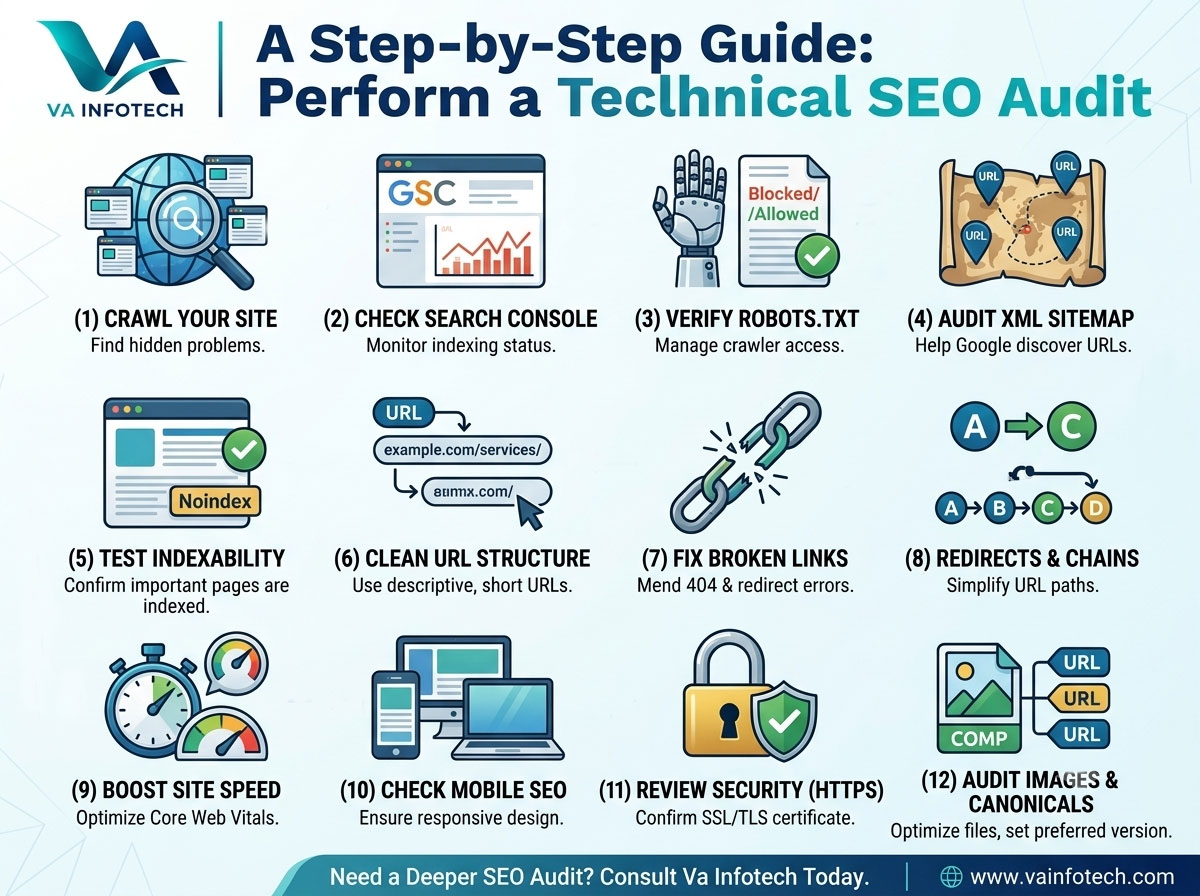
Step 1: Crawl Your Website
The first step in a technical SEO audit is crawling the website.
A crawler simulates how search engine bots discover pages and links throughout your website.
Popular SEO crawling tools include Screaming Frog, Semrush, Ahrefs and similar platforms.
During the crawl, look for:
- 404 pages
- 301 redirects
- Redirect chains
- Redirect loops
- Duplicate URLs
- Missing title tags
- Duplicate title tags
- Missing meta descriptions
- Multiple H1 headings
- Orphan pages
- Canonical problems
- Non-indexable pages
- Internal linking problems
For a small website, you can manually inspect important pages. For a larger website, a crawling tool can save significant time.
The important point is not simply to collect errors. You need to determine which errors actually affect important pages and organic search performance.
Step 2: Check Google Search Console
Google Search Console should be one of the most important tools in your technical SEO audit.
Open your verified property and review:
- Indexing
- Pages
- Sitemaps
- Core Web Vitals
- HTTPS
- Security issues
- Manual actions
- Search performance
- Links
The indexing report is particularly useful.
Look for pages that Google has discovered but has not indexed.
Not every excluded page is a problem. Some pages should intentionally remain outside Google’s index.
For example, you may not want search engines indexing:
- Login pages
- Certain admin pages
- Internal search results
- Duplicate URLs
- Some filter combinations
- Private content
The goal is to determine whether important commercial and informational pages are indexed correctly.
Step 3: Check Your Robots.txt File
Your robots.txt file provides instructions to search engine crawlers about which areas of a website they may or may not crawl.
Usually, the file can be found at:
yourdomain.com/robots.txt
Check whether important directories or pages are accidentally blocked.
For example, blocking an important folder containing product, service, or blog pages could prevent search engines from properly crawling those resources.
However, remember that robots.txt should not be treated as a universal method for removing pages from Google’s index.
During an audit, compare your robots.txt rules with the pages you actually want Google to crawl and index.
Step 4: Check Your XML Sitemap
An XML sitemap helps search engines discover important URLs on your website.
Your sitemap should generally contain:
- Important indexable URLs
- Canonical URLs
- Working pages
- Current URLs
Avoid filling your sitemap with:
- 404 pages
- Redirected URLs
- Noindex pages
- Duplicate URLs
- Unimportant URLs
After checking the sitemap, make sure it has been submitted through Google Search Console.
A common technical SEO mistake is allowing an old sitemap to remain active after a website redesign or URL restructuring.
If your website has recently been redesigned, the sitemap deserves extra attention.
Step 5: Check Website Indexability
Crawling and indexing are not exactly the same thing.
A page can exist on your website but still not be eligible for indexing.
Check important pages for:
- noindex directives
- Canonical tags
- Robots restrictions
- HTTP status codes
- Incorrect redirects
- Duplicate versions
- Rendering problems
Your most valuable pages should generally be accessible, indexable, internally linked, and associated with the correct canonical URL.
Create a list of your most important pages and verify each one individually.
For a business website, this could include:
- Homepage
- Main service pages
- Product pages
- Category pages
- Location pages
- Important blog posts
- Contact page
Step 6: Analyze Your URL Structure
A clean URL structure makes websites easier for users and search engines to understand.
For example:
example.com/seo-services/
is generally easier to understand than:
example.com/page?id=48392
Keep URLs:
- Short
- Descriptive
- Readable
- Consistent
- Relevant to the page
Avoid unnecessarily complicated URL structures.
If you change an existing URL, remember to properly redirect the old URL to the new one.
Do not change URLs simply to insert keywords if the existing URL already performs well. SEO improvements should be based on a genuine benefit rather than changing URLs for the sake of changing them.
Step 7: Find and Fix Broken Links
Broken links create poor user experiences and can make website maintenance more difficult.
During your technical SEO audit, look for:
- Internal 404 links
- Broken external links
- Incorrect URLs
- Deleted pages
- Old product links
- Broken navigation links
Internal broken links should receive particular attention because they can prevent users and crawlers from reaching useful pages.
If a page has permanently moved, use an appropriate 301 redirect where necessary.
If a page has been intentionally removed and there is no useful replacement, you should not automatically redirect everything to the homepage. The solution should match the user’s intent and the original page.
Step 8: Check Redirects
Redirects are an essential part of technical SEO, especially after a website redesign or migration.
Check for:
Redirect chains
Example:
A → B → C → D
Ideally, the old URL should redirect directly to the final relevant URL.
Redirect loops
Example:
A → B → A
This can prevent the page from loading correctly.
Incorrect redirects
An old service page should generally redirect to the most relevant new service page rather than an unrelated homepage.
VA Infotech’s Website Redesign service specifically focuses on URL mapping and protecting existing SEO value during redesign and migration projects.
Step 9: Test Website Speed and Core Web Vitals
Website performance is an important part of modern SEO and user experience.
Use tools such as Google PageSpeed Insights and Google Search Console to evaluate performance.
Pay attention to Core Web Vitals, including:
- LCP — Largest Contentful Paint
- INP — Interaction to Next Paint
- CLS — Cumulative Layout Shift
Common causes of slow websites include:
- Large images
- Unoptimized JavaScript
- Excessive CSS
- Poor hosting
- Too many third-party scripts
- Unnecessary plugins
- Poor caching
- Unoptimized fonts
- Large video files
Start with the biggest performance problems rather than trying to optimize every tiny element.
For example, reducing a 5 MB hero image can have a much larger impact than spending hours optimizing a tiny icon.
Step 10: Check Mobile SEO
Google primarily uses the mobile version of websites for indexing.
Therefore, your technical SEO audit must include mobile testing.
Check:
- Responsive design
- Font size
- Button sizes
- Navigation
- Forms
- Pop-ups
- Images
- Tables
- Horizontal scrolling
- Page speed
- Content consistency
Open your most important pages on multiple mobile devices or screen sizes.
Ask a simple question:
Can a new visitor easily understand and use this page on a smartphone?
If the answer is no, mobile optimization should become a priority.
VA Infotech’s Website Design services focus on responsive layouts, performance, mobile optimization and technical SEO foundations.
Step 11: Check HTTPS and Website Security
Your entire website should use HTTPS.
Check that:
works correctly and that HTTP versions redirect appropriately where required.
Also look for:
- SSL certificate problems
- Mixed content
- Security warnings
- Malware issues
- Outdated software
- Vulnerable plugins
- CMS security problems
Technical SEO and website security often overlap.
Keeping your website properly maintained can help prevent technical problems from becoming larger issues.
VA Infotech provides Website Maintenance services covering security updates, backups, monitoring, technical troubleshooting and ongoing website care.
Step 12: Review Canonical Tags
Canonical tags help search engines understand which URL should be considered the preferred version when multiple URLs contain similar or duplicate content.
For example, a product or category page may be accessible through several URL variations.
Check whether canonical tags:
- Point to the correct URL
- Use absolute or properly configured URLs
- Are not pointing to irrelevant pages
- Are not conflicting with redirects
- Match your preferred indexing strategy
Incorrect canonical implementation can sometimes cause important pages to be excluded from search results.
Step 13: Check Structured Data and Schema Markup
Structured data helps search engines understand specific information about a page.
Depending on your website, relevant schema types may include:
- Organization
- LocalBusiness
- Article
- Product
- BreadcrumbList
- Service
- FAQ
Do not add schema simply because it is available.
Use structured data that accurately represents the content on the page and follows current search engine guidelines.
Validate your implementation with appropriate testing tools and fix errors that could prevent eligible rich-result features.
Structured data can also contribute to better machine understanding of your website’s entities and content.
Step 14: Audit Internal Links
Internal linking is one of the easiest technical and content SEO improvements to overlook.
Every important page should be connected to other relevant pages on your website.
For example, a blog post about technical SEO can naturally link to:
- SEO services
- Website design
- Website redesign
- Website maintenance
- Other relevant SEO articles
Use descriptive anchor text rather than repeatedly using phrases such as “click here.”
Internal links help users discover additional information and help search engines understand relationships between pages.
A good internal linking structure can also help distribute authority throughout your website.
Step 15: Check Your Website Architecture
Website architecture describes how your pages are organized.
A simple structure might look like:
Homepage
→ Services
→ SEO Services
→ Technical SEO
→ Blog
→ SEO Articles
Important pages should not be unnecessarily buried deep inside the website.
Review your navigation and determine whether visitors can reach important information easily.
A clear website structure also helps search engines understand the hierarchy and relationships between your pages.
Step 16: Audit Images
Images can create both performance and accessibility problems when they are poorly optimized.
Check:
- Image file size
- Image dimensions
- Alt text
- File names
- Modern image formats
- Lazy loading
- Responsive images
For example, instead of:
IMG_4589.jpg
use a meaningful filename such as:
technical-seo-audit-checklist.jpg
Alt text should describe meaningful images accurately. Avoid stuffing keywords into every image’s alt attribute.
Step 17: Review JavaScript and Rendering
Modern websites often depend heavily on JavaScript.
If important content only appears after JavaScript executes, you need to make sure search engines can properly access and understand that content.
Pay special attention to:
- Navigation
- Product information
- Main content
- Internal links
- Metadata
- Structured data
If important content is not available to crawlers in a reliable way, it can create indexing and rendering problems.
This is particularly important for JavaScript-heavy eCommerce platforms and custom web applications.
Step 18: Check Analytics and Conversion Tracking
Technical SEO is not only about rankings.
You also need accurate data to understand whether organic traffic is producing business results.
Check that:
- Google Analytics 4 is working
- Google Search Console is verified
- Important conversions are tracked
- Contact forms are measured
- Phone leads are tracked where possible
- Ecommerce transactions are recorded correctly
For example, increasing organic traffic from 1,000 visitors to 2,000 visitors sounds impressive.
But if those visitors generate zero leads, traffic alone is not enough.
SEO should ultimately support business goals.
Step 19: Check AI Search Readiness
Modern technical SEO should also consider how search and AI systems understand website information.
AI-powered search experiences increasingly rely on clearly structured, trustworthy and well-connected information.
Review whether your website has:
- Clear organization information
- Consistent business details
- Structured content
- Descriptive headings
- Relevant schema
- Strong internal linking
- Author and business credibility signals
- Clear answers to common customer questions
This area is becoming increasingly important as search behavior changes.
VA Infotech also provides Large Language Model SEO services focused on semantic content, structured information and visibility across AI answer engines.
Step 20: Create a Technical SEO Action Plan
After completing your audit, do not simply keep a spreadsheet full of errors.
Prioritize the problems.
A simple priority system can be:
High Priority
Fix immediately:
- Important pages blocked from crawling
- Incorrect noindex tags
- Major indexing problems
- Broken redirects
- Website downtime
- Critical security problems
- Major mobile issues
Medium Priority
Fix next:
- Slow pages
- Broken internal links
- Duplicate metadata
- Poor internal linking
- Canonical problems
- Image optimization
Low Priority
Improve over time:
- Minor metadata improvements
- Small URL refinements
- Less important technical warnings
- Additional structured data opportunities
This approach prevents your team from wasting time fixing minor issues while major SEO problems remain unresolved.
Technical SEO Audit Checklist
Use this quick checklist whenever you audit a website:
- Crawl the website
- Check Google Search Console
- Review indexing status
- Check robots.txt
- Check XML sitemap
- Test important URLs
- Find 404 errors
- Check redirects
- Remove redirect chains
- Review URL structure
- Test HTTPS
- Check mobile usability
- Test Core Web Vitals
- Optimize images
- Review canonical tags
- Check structured data
- Audit internal links
- Review website architecture
- Check JavaScript rendering
- Verify analytics
- Check conversion tracking
- Review security
- Evaluate AI search readiness
- Prioritize and document fixes
How Often Should You Perform a Technical SEO Audit?
There is no single schedule that works for every website.
For most business websites, a comprehensive audit every six months is a practical starting point.
However, perform additional checks after:
- Website redesigns
- Domain migrations
- CMS changes
- Hosting migrations
- Major URL changes
- Large content updates
- Plugin updates
- Major development releases
- Significant traffic drops
For websites that change frequently, monthly technical monitoring can be more appropriate.
VA Infotech’s SEO audit guidance also recommends regular technical checks and emphasizes additional auditing after redesigns and migrations.
Common Technical SEO Mistakes to Avoid
Some of the most common mistakes include:
1. Focusing Only on Keywords
Keywords are important, but great content cannot compensate for serious crawlability or indexing problems.
2. Ignoring Mobile Performance
A website that looks excellent on desktop but performs poorly on mobile can create a poor user experience.
3. Changing URLs Without Redirects
Changing URLs without a proper redirect strategy can cause lost traffic and broken links.
4. Installing Too Many Plugins
Plugins can add functionality, but unnecessary plugins may increase security, maintenance and performance problems.
5. Fixing Everything at Once
Not every warning has the same SEO impact. Prioritize issues based on business importance and search visibility.
6. Auditing Once and Forgetting About SEO
Websites constantly change. New pages, deleted content, software updates and redesigns can create new technical issues.
How Va Infotech Can Help With Technical SEO
A technical SEO audit can become complicated when a website has hundreds or thousands of URLs, an eCommerce platform, custom functionality, multiple categories or a history of redesigns.
Va Infotech provides SEO and digital solutions designed to improve website performance, search visibility and long-term growth.
Our services include:
- Search Engine Optimization
- Website Design
- ECommerce Website Design
- Website Redesign
- Website Maintenance
- Large Language Model SEO
- Digital Marketing
- Web Hosting
Our approach combines website development, technical SEO, performance, maintenance and digital marketing rather than treating each area as completely separate.
If your website has technical SEO issues, the first step is to identify the real problems before making unnecessary changes.
Related Va Infotech Articles
If you want to learn more about SEO and website performance, these related articles can help:
The Complete SEO Audit Checklist for Business Websites — A broader SEO audit covering technical SEO, on-page SEO, content, off-page SEO and AI search.
How Much Does Website Development Cost in India in 2026? — Understand website development costs, SEO requirements, eCommerce development and maintenance expenses.
How to Know When Your Business Website Needs a Redesign — Learn the signs that your website may need a redesign and how a redesign can affect SEO.
Final Thoughts
A technical SEO audit is the foundation of a healthy search engine optimization strategy.
You can publish excellent content and target valuable keywords, but technical problems can prevent search engines from properly discovering, crawling, indexing and understanding your website.
The best approach is to audit your website systematically.
Start with crawling and indexing. Then check your sitemap, robots.txt, URLs, redirects, site speed, mobile performance, structured data, internal links, security, analytics and AI search readiness.
Most importantly, don’t try to fix every warning simply because an SEO tool displays it.
Prioritize problems that affect important pages, users, conversions and search visibility.
A technically healthy website gives your content and SEO strategy a stronger foundation for long-term organic growth.
If you want professional help identifying and fixing technical SEO problems, Va Infotech can evaluate your website and create a practical SEO improvement strategy based on your business goals.
Want help applying this to your website?
Tell us about your business and goals. We will review your site and suggest clear next steps, free of charge.