Most business owners only think about their website twice: the day it launches, and the day something breaks. In between, the site quietly sits there — same homepage banner, same team photo, same “2023” copyright in the footer — while the business behind it has changed completely.
That gap is more expensive than it looks. An outdated website doesn’t just look neglected to visitors; it tells search engines the same thing. Google favors websites that show real signs of activity, relevance, and maintenance. A site that hasn’t been touched in two years is competing against sites that are updated weekly, and it’s losing ground even if nobody notices immediately.
So how often should a business website actually be updated? There isn’t a single number that fits every business, but there is a practical framework: some things need attention every week, some every month, some every quarter, and a few only every few years. This guide breaks all of it down.
Why Website Update Frequency Matters More Than You Think
A website isn’t a brochure you print once. It’s closer to a storefront — and storefronts that never change their window display, restock their shelves, or fix a broken sign eventually stop attracting foot traffic.
There are three main reasons update frequency matters:
1. Search engines reward freshness. Google’s crawlers revisit active websites more often than stale ones. Frequent, meaningful updates (not just changing a comma) signal that your site is maintained and relevant, which can support both crawl frequency and rankings.
2. Security risks increase over time. Outdated CMS versions, plugins, and themes are one of the most common ways business websites get hacked. Every month a site goes without updates is another month those vulnerabilities sit exposed.
3. User expectations shift fast. Visitors judge credibility in seconds. Outdated design trends, broken layouts on newer phone models, or pricing and contact information that’s no longer accurate all quietly damage trust — and conversions.
If you want a deeper look at the technical side of this, our guide on how to perform a technical SEO audit step by step covers how search engines evaluate a site’s health beyond just content freshness.
The Short Answer: A Tiered Update Schedule
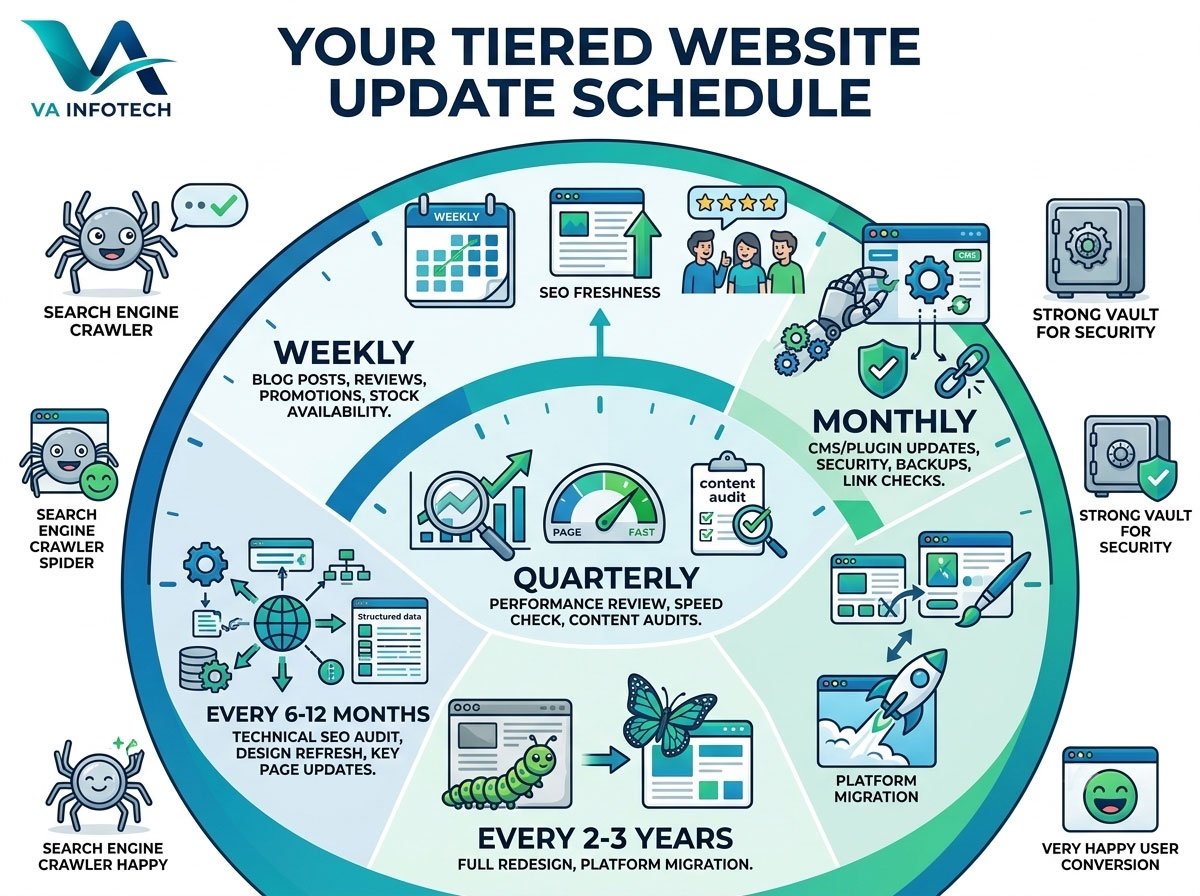
Instead of asking “how often should I update my website,” it’s more useful to ask “which parts of my website need which update frequency.” Here’s the framework we recommend to clients:
| Frequency | What to Update |
|---|---|
| Weekly | Blog content, social proof, promotions, stock/availability |
| Monthly | Plugin/CMS updates, broken link checks, analytics review |
| Quarterly | SEO performance review, page speed check, content audits |
| Every 6–12 months | Technical SEO audit, design refresh of key pages, imagery |
| Every 2–3 years | Full website redesign or platform migration |
Let’s break each of these down in detail.
Weekly Updates: Keep the Site Feeling Alive
Weekly updates are usually the lowest-effort, highest-frequency category, and they matter more than most businesses assume.
What belongs here:
- New blog posts or article updates
- Fresh testimonials, reviews, or case studies
- Current promotions, offers, or seasonal messaging
- Updated product or service availability
- Event announcements or company news
Publishing consistently — even one solid blog post a week — gives search engines a reason to crawl your site more often and gives return visitors a reason to come back. It also compounds over time: a business with 150 published articles has far more ways to rank for long-tail search queries than a business with 12.
If content strategy is where you’re stuck, this is also where SEO and content work overlap directly with our Search Engine Optimization services, which focus on exactly this kind of ongoing content cadence.
Monthly Updates: Protect What You’ve Built
Monthly maintenance is where most businesses fall behind — not because it’s difficult, but because nothing visibly breaks until it suddenly does.
What belongs here:
- CMS core, plugin, and theme updates
- Backup verification (not just backup creation — actually testing that a restore works)
- Broken link and 404 checks
- Contact form and checkout testing
- Basic analytics and traffic review
- Malware and security scans
Skipping these for a few months rarely causes an immediate problem. Skipping them for a year is how businesses end up with a hacked site, a broken checkout nobody noticed for weeks, or a contact form that’s been silently failing since March.
This category is essentially what Website Maintenance as a service exists to solve — ongoing security updates, backups, monitoring, and troubleshooting so nothing quietly rots in the background.
Quarterly Updates: Step Back and Measure
Every three months, it’s worth pulling out of day-to-day content and maintenance to look at performance with fresh eyes.
What belongs here:
- Reviewing which pages are gaining or losing organic traffic
- Checking Core Web Vitals and page speed scores
- Auditing underperforming or outdated blog content
- Reviewing internal linking between new and old content
- Comparing conversion rates across key landing pages
Quarterly is also a good cadence to revisit keyword targeting. Search intent shifts, competitors publish new content, and pages that ranked well a year ago can quietly slide if nothing is refreshed. A short content refresh — updating statistics, adding a missing section, tightening a title tag — can often recover rankings faster than writing something new from scratch.
Every 6–12 Months: The Deeper Technical Pass
This is where a lighter check-in isn’t enough anymore, and a full technical review earns its place.
What belongs here:
- A complete technical SEO audit (crawlability, indexing, redirects, structured data, mobile usability)
- Reviewing and updating visual design on key pages — hero images, banners, outdated stock photography
- Checking that all service, pricing, and team information still reflects the current business
- Reviewing site architecture as new pages have been added
- Evaluating whether your site is structured well for AI-driven search and answer engines, not just traditional results
We put together a full walkthrough of this process in our guide on how to perform a technical SEO audit step by step, and a broader version in the complete SEO audit checklist for business websites if you want to check more than just the technical layer.
If your business has also expanded into new products, services, or markets since launch, this is usually the point where a partial redesign — new service pages, updated navigation, refreshed messaging — makes more sense than trying to patch the existing structure indefinitely.
Every 2–3 Years: The Full Redesign Conversation
Even with consistent weekly, monthly, and quarterly upkeep, every website eventually reaches a point where incremental updates aren’t enough. Design trends shift, technology stacks age, page speed expectations rise, and businesses simply outgrow the site they launched with.
Signs it’s time for a full redesign rather than another round of updates:
- The design looks visibly dated compared to competitors
- Mobile experience feels clunky despite being “responsive”
- The site is slow no matter how much you optimize images and caching
- Adding new pages or features requires awkward workarounds
- Your business has repositioned, rebranded, or expanded significantly
- Conversion rates have plateaued despite steady traffic
We cover this in more depth in how to know when your business website needs a redesign, including the specific signals worth tracking before committing to a full rebuild.
If you do decide a redesign is the right move, the biggest risk isn’t the new design itself — it’s losing existing SEO value during the transition. Our Website Redesign service is built specifically around protecting rankings through proper URL mapping and redirects during migration, rather than treating a redesign as a purely visual refresh.
For businesses evaluating cost before committing, our breakdown of how much website development costs in India in 2026 is a useful starting point for budgeting a redesign or new build.
What Happens If You Don’t Update Your Website Regularly
It’s worth being direct about what neglect actually costs, since the consequences build up slowly rather than all at once:
- Search rankings decline gradually. Competitors publishing fresh, relevant content will eventually outrank a stagnant site, even one with strong historical authority.
- Security risk compounds. Outdated plugins and CMS versions are one of the most common entry points for website attacks.
- Conversion rates quietly drop. Outdated pricing, dead links, or an unclear value proposition erode trust faster than most business owners expect.
- Mobile usability degrades. New devices, screen sizes, and browser updates can break layouts that worked fine when the site launched.
- Content becomes irrelevant or inaccurate. Old blog posts referencing outdated statistics, discontinued products, or expired offers actively hurt credibility.
None of these show up as a single dramatic failure. They show up as a slow decline in traffic, leads, and trust — which is exactly why they’re easy to ignore until the numbers become impossible to explain any other way.
Building a Realistic Update Routine
For most small and mid-sized businesses, a workable routine looks like this:
- Assign ownership. Someone — internally or through an agency — needs to be responsible for maintenance, not “whoever has time.”
- Put maintenance on a calendar, not a mental to-do list. Monthly and quarterly tasks are the ones most likely to get skipped without a fixed schedule.
- Separate content updates from technical maintenance. They require different skills and different cadences, and treating them as one task usually means neither gets done well.
- Review analytics before deciding what to update. Update the pages losing traffic or generating the least engagement first, rather than updating whatever feels outdated visually.
- Budget for a redesign every few years, rather than being surprised by it. Treat it as a planned investment cycle, not an emergency response to a site that’s fallen too far behind.
How Va Infotech Can Help
Keeping a business website current touches several disciplines at once — content, security, performance, SEO, and design — which is exactly why so many businesses let it slide. It’s rarely one big task; it’s a lot of small, recurring ones that are easy to deprioritize.
Va Infotech supports this across the full lifecycle of a website:
- Website Design — for new builds and page-level refreshes
- Website Redesign — for full rebuilds with SEO-safe migration
- Website Maintenance — for ongoing security updates, backups, and monitoring
- ECommerce Website Design — for stores that need regular catalog and platform updates
- Search Engine Optimization — for consistent content and ranking maintenance
- Large Language Model SEO — for staying visible as AI-driven search grows
- Digital Marketing and Social Media Marketing — for keeping outreach as fresh as the website itself
- Web Hosting — for the infrastructure that supports frequent, reliable updates
Rather than treating design, SEO, security, and content as separate projects, our approach connects them — because a website that’s technically sound but content-stale, or content-fresh but technically neglected, still underperforms.
Final Thoughts
There’s no single correct answer to “how often should a business website be updated” — but there is a wrong answer, and it’s “only when something breaks.”
A realistic routine looks like this: weekly content updates to stay active, monthly maintenance to stay secure, quarterly reviews to stay competitive, a deeper technical pass every 6–12 months, and a full redesign conversation every 2–3 years. Businesses that follow something close to this rhythm tend to see steadier organic growth, fewer security incidents, and a site that never falls far enough behind to need a panicked overhaul.
If it’s been a while since your website had any real attention, the most useful first step isn’t a full redesign — it’s an honest audit of where things currently stand. Va Infotech can help assess your site’s current state and build a realistic update plan based on your business goals, not just a generic checklist.
Related Va Infotech Articles
- The Complete SEO Audit Checklist for Business Websites
- How to Perform a Technical SEO Audit Step by Step
- How to Know When Your Business Website Needs a Redesign
- How Much Does Website Development Cost in India in 2026?
- How to Choose a Website Development Company in India
Want help applying this to your website?
Tell us about your business and goals. We will review your site and suggest clear next steps, free of charge.