
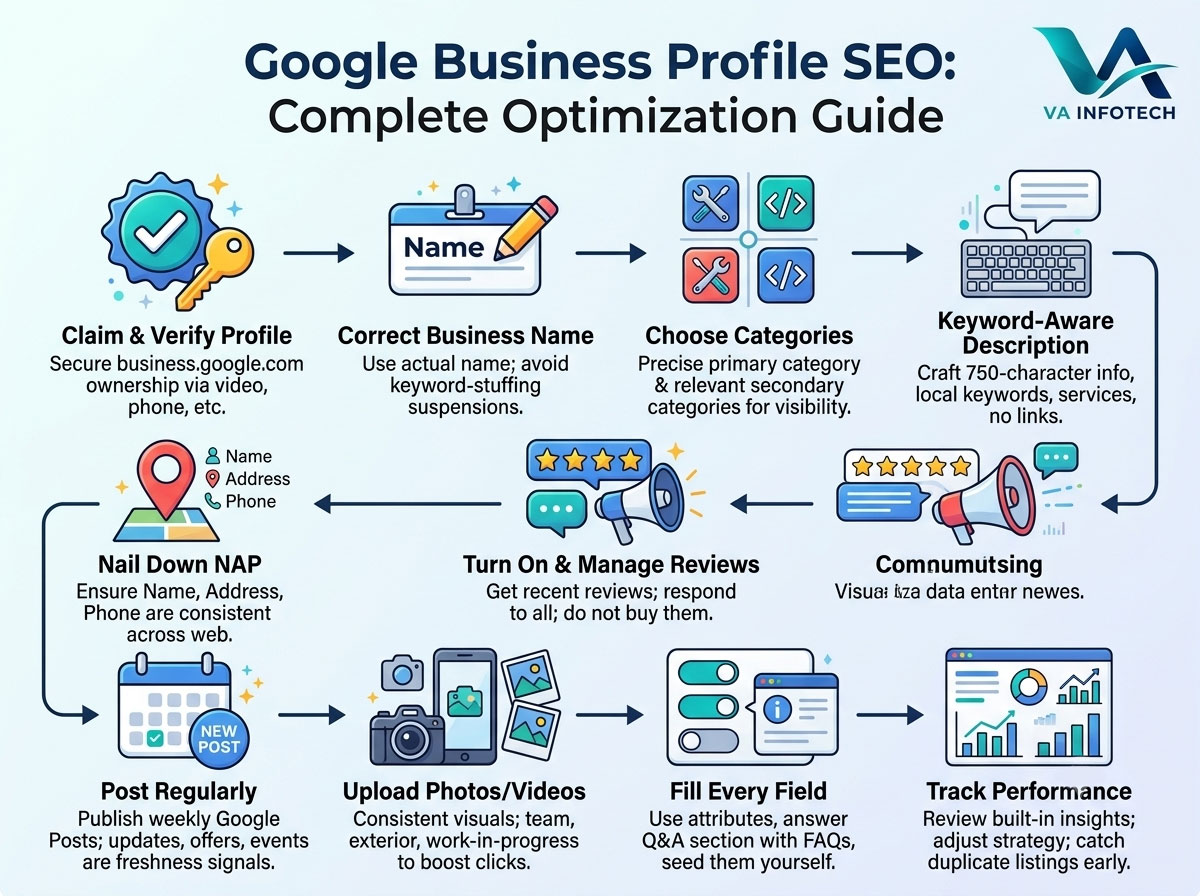
If you run a local business and you’re not showing up in the Google Map Pack when someone nearby searches for what you sell, your Google Business Profile is almost certainly the reason — not your website, not your ads, not your reviews alone. Google Business Profile (GBP), formerly Google My Business, is the single most influential ranking factor for local search visibility, and most businesses only fill in about half of it.
This guide walks through every part of a Google Business Profile that actually affects ranking, in the order that moves the needle fastest, so you can go from “listed” to “showing up first.”
What Google Business Profile SEO Actually Means
Google Business Profile SEO is the process of optimizing your free Google listing so it ranks higher in two places: the Local Pack (the three map results that appear above organic results for local searches) and Google Maps itself. It’s separate from — but closely tied to — your website’s traditional SEO.
Google ranks local listings using three core factors:
- Relevance — how well your profile matches what the searcher typed.
- Distance — how close your business is to the searcher or the location they searched.
- Prominence — how well-known and well-reviewed your business is, both on Google and across the web.
You can’t do much about distance. You can influence relevance and prominence almost entirely through the steps below, and that’s where the actual work lives.
Step 1: Claim and Fully Verify Your Profile
This sounds obvious, but a huge percentage of local businesses operate on an unclaimed or unverified listing, which caps how high Google will ever rank you — an unverified profile is treated as unreliable, no matter how good the rest of it looks.
Claim your profile at business.google.com, and complete verification through whichever method Google offers for your business type: postcard, phone, email, video, or instant verification if you’re already verified through Google Search Console for your domain. Video verification has become far more common in 2026 for service-area and newly listed businesses, so don’t be surprised if that’s your only option — walk through your storefront or work vehicle on camera exactly as instructed.
Step 2: Get Your Business Name Exactly Right
Your Business Profile name should be your actual, real-world business name — nothing more. Adding keywords like “Best Plumber in Ahmedabad — ABC Plumbing” to game rankings is against Google’s guidelines and is one of the fastest ways to get a listing suspended. Google’s algorithm and its manual review teams both actively look for keyword-stuffed business names, and the penalty (a suspended, invisible listing) is far worse than any short-term ranking boost.
If your legal name already contains a location or service descriptor, that’s fine — just don’t add anything that isn’t printed on your signage or invoices.
Step 3: Choose the Right Primary and Secondary Categories
Category selection is arguably the highest-leverage field on your entire profile, and it’s the one businesses get laziest about.
Your primary category should be the single most accurate description of your core business — not the broadest one, and not a stretch. A “website design company” should pick that exact category rather than the more generic “computer service” or “marketing agency,” because Google weights the primary category heavily when matching your listing to search intent.
From there, add every secondary category that genuinely applies. There’s no real downside to adding relevant secondary categories, and each one is a chance to surface for an additional set of searches. A web design agency, for example, might reasonably add categories for website designer, internet marketing service, e-commerce service, and web hosting company — as long as each one reflects a service actually offered.
Re-check your categories every few months. Google periodically adds new, more specific categories, and switching from a generic one to a newly available, more precise category can produce a visible ranking shift within weeks.
Step 4: Write a Complete, Keyword-Aware Business Description
The business description field doesn’t carry as much direct ranking weight as categories, but it’s still indexed and still read by Google’s systems — and it’s one of the few places you get to explain, in your own words, exactly what you do and who you do it for.
Use your full 750-character allowance. Open with what you do and where you do it, mention your core services naturally (not stuffed), and include your city or service area at least once. Avoid links, phone numbers, and promotional language like “best” or “#1” — Google disallows these in the description field, and profiles that include them can be flagged during review.
Step 5: Nail Down Your NAP Consistency
NAP stands for Name, Address, and Phone number, and consistency across every place your business appears online — your website, GBP, Facebook, directory listings, industry associations — is one of the more underrated local ranking signals.
If your website footer says “+91 9924241667” and your Google Business Profile says “099242 41667,” that inconsistency, multiplied across dozens of directories, makes it harder for Google to confidently confirm your business is legitimate and consistently located where you say it is. Run a quick audit: pull up your listing on Google, your website footer, and any directories you’re listed on (Justdial, IndiaMART, Sulekha, industry-specific directories), and make sure the name, address, and phone number match exactly, character for character, everywhere.
Step 6: Turn On and Actively Manage Reviews
Review count and review recency are two of the strongest prominence signals Google uses, and they’re also the factor most business owners neglect until it’s too late.
A few things matter more than most owners realize:
- Recency beats raw volume. A business with 40 reviews, half of them from the last 90 days, will often outperform a business with 200 reviews that stopped getting new ones two years ago.
- Respond to every review, not just the negative ones. Google’s own guidance treats owner responses as an engagement signal, and it also demonstrably influences whether a customer reading reviews decides to convert.
- Never buy or incentivize reviews. This is explicitly against Google’s policies, and profiles caught doing it — whether through review-gating apps or paid review services — risk having reviews wiped or the listing suspended entirely.
- Ask at the right moment. The highest response rates come from asking right after a completed service, not days later, ideally with a direct link (Google will generate one from your profile) rather than asking customers to search for you themselves.
Step 7: Post Regularly Using Google Posts
Google Posts are the update/announcement feature inside your Business Profile that lets you publish offers, events, product updates, and general news directly to your listing. They expire after seven days (except event posts, which run until the event ends), which means an active posting habit is itself a freshness signal Google can measure — a dormant profile with no posts in six months reads very differently to Google’s systems than one updated weekly.
A simple, sustainable cadence — one to two posts a week covering offers, recent projects, or seasonal updates — keeps your profile “active” in Google’s eyes without requiring a content team.
Step 8: Upload Photos and Videos Consistently
Businesses with more photos on their profile receive measurably more requests for directions and more clicks through to their website, and photo count is one of the easier levers to pull since it requires no writing.
Cover the basics: exterior shots (so people can recognize your storefront from the street), interior shots, team photos, and photos of your actual product or work in progress — completed projects for a service business, product shots for a retailer. Upload new photos regularly rather than in one bulk session; a steady trickle signals an active, real business more convincingly than a one-time upload of fifty images followed by silence.
Step 9: Fill In Every Attribute and Q&A Field
Attributes — wheelchair accessible, outdoor seating, online appointments, women-led, identity attributes, payment methods accepted — seem minor individually, but they’re additional matching signals Google uses to surface your listing for filtered and voice searches (“wheelchair accessible restaurants near me,” for instance).
The Q&A section is worth actively managing too, not just leaving open. Seed it yourself with the three or four questions customers actually ask most often — hours during holidays, whether you offer free estimates, parking availability — and answer them from your own business account. This preempts customers from posting incorrect or outdated answers to their own questions, which happens more often than most owners expect.
Step 10: Track Performance and Adjust
Google Business Profile includes built-in performance insights showing how customers found you (direct search vs. discovery search), what actions they took (calls, website clicks, direction requests), and how your visibility trends over time. Review this monthly rather than ignoring it until something goes wrong — a sudden drop in visibility is often the first sign of a duplicate listing, a suspended status, or a competitor overtaking you on a category or review count, and catching it early makes it far easier to fix.
Common Google Business Profile Mistakes That Quietly Hurt Rankings
- Keyword-stuffing the business name — the single fastest way to trigger a suspension.
- Using a P.O. box or virtual office as your address for a business that isn’t genuinely staffed there, which violates Google’s guidelines for physical location listings.
- Letting hours go stale, especially around holidays — inaccurate hours hurt both rankings and customer trust when people show up to a closed business.
- Ignoring duplicate listings. Multiple listings for the same business (often created accidentally by data aggregators or a previous agency) split your reviews and ranking signals instead of consolidating them. Search your business name on Google Maps periodically to check.
- Treating the profile as “set and forget.” Google rewards active, regularly updated profiles over static ones — the businesses that treat GBP as an ongoing channel, not a one-time listing, are consistently the ones holding top Local Pack positions.
How Google Business Profile SEO Connects to Your Broader SEO Strategy
Local Pack rankings and organic website rankings influence each other more than most business owners realize. A well-optimized website with strong on-page and technical SEO gives Google more confidence in your prominence signals, which supports your Local Pack position — and a strong Local Pack presence sends qualified local traffic back to your site, which supports your organic rankings in turn. Neither one performs at its full potential in isolation.
If you’re specifically targeting customers in one city or region, pairing your Google Business Profile work with a dedicated local SEO strategy — location pages, local citations, region-specific content — tends to compound results faster than optimizing GBP alone. It’s also worth extending the same consistency principles to how AI tools and answer engines describe your business, since optimizing for how ChatGPT and other AI search tools surface businesses increasingly draws from the same NAP and category signals as Google itself.
Final Thoughts
Google Business Profile SEO isn’t a one-time setup task — it’s an ongoing channel that rewards businesses for staying active: fresh photos, regular posts, prompt review responses, accurate hours, and periodic audits for duplicate listings or category drift. The businesses winning the Local Pack in their industry usually aren’t doing anything exotic; they’re simply doing every one of the steps above consistently, while their competitors do two or three of them once and stop.
Start with verification and category accuracy if you do nothing else this week — those two alone typically produce the fastest visible movement. Then build review generation and posting into a regular habit, and the rest compounds from there.
If you’d rather have this managed for you, Va Infotech’s Search Engine Optimization service includes full Google Business Profile setup, optimization, and ongoing management as part of a complete local and organic SEO strategy — so your visibility on Google Search and Google Maps grows together instead of one being neglected while you focus on the other. It pairs well with our Digital Marketing and Social Media Marketing services for businesses that want their local presence supported across every channel, and our Large Language Model SEO service if you also want your business surfacing correctly in AI-powered search and chat tools.
Explore more SEO and local marketing guides on the Va Infotech blog, including The Complete SEO Audit Checklist for Business Websites, Local SEO Checklist for Businesses in India, and Google Ads vs Meta Ads: Where Should Your Business Advertise?
Written for Va Infotech — www.vainfotech.com | 209, Ashwamegh Elegance, Near Kalyan Jewellers, Ambawadi, Ahmedabad 380006 | +91 9924241667 | info@vainfotech.com