Launching a redesigned website feels like crossing a finish line — but hitting “publish” too early is one of the most common (and costly) mistakes businesses make. A rushed launch can wipe out months of SEO rankings, break critical user flows, and quietly cost you leads for weeks before anyone notices. At VA Infotech, we’ve guided hundreds of businesses through website redesign projects, and almost every disaster we’ve fixed traces back to skipping a pre-launch checklist.
This guide walks through everything you need to verify — technically, visually, and strategically — before your new website goes live. Whether you’re redesigning a small business site or a complex eCommerce platform, this checklist will help you launch with confidence instead of crossed fingers.
Why a Pre-Launch Checklist Matters
A website redesign touches nearly every part of your digital presence: your URL structure, your content, your design system, your SEO equity, and your backend infrastructure. Change any of these carelessly and you risk:
- Losing organic rankings built up over years, sometimes overnight
- Breaking forms, checkout flows, or navigation that customers rely on
- Introducing security vulnerabilities in a fresh codebase
- Alienating returning visitors who can’t find what they used to
- Tanking page speed with unoptimized new assets
None of these problems are theoretical — they happen to real businesses that treat “redesign” as a purely visual upgrade instead of a full technical and strategic migration. A proper checklist turns launch day from a gamble into a controlled, predictable process.
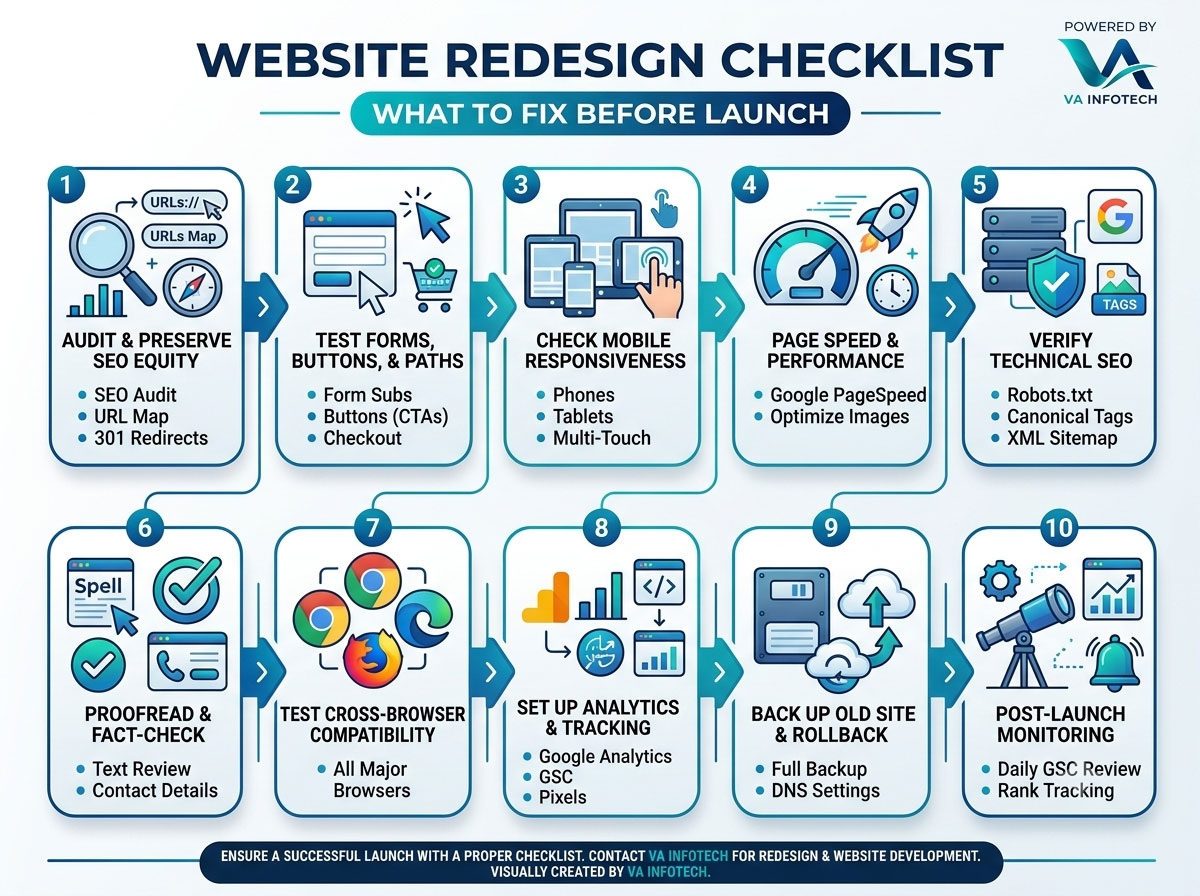
1. Audit and Preserve Your SEO Equity
This is the single biggest risk in any redesign, and it deserves top priority.
Map every old URL to its new equivalent. Before you touch anything, crawl your existing site and create a complete inventory of live URLs, along with their traffic and backlink data. Every page that’s being renamed, merged, or removed needs a corresponding entry in your redirect map.
Set up 301 redirects, not 302s. A 301 redirect tells search engines the move is permanent and passes on nearly all the page’s ranking value. A 302 signals a temporary move and search engines won’t transfer authority the same way. Skipping redirects entirely is the fastest way to turn years of ranking progress into a pile of 404 errors.
Preserve your meta titles, descriptions, and header structure wherever the underlying content hasn’t fundamentally changed. If you’re rewriting content anyway, make sure new titles and descriptions still target the keywords that were driving traffic.
Keep your XML sitemap accurate and resubmit it in Google Search Console the moment you launch. An outdated sitemap pointing to old URLs will confuse crawlers at exactly the moment you need them to re-index your site quickly.
If your redesign involves any significant restructuring, it’s worth having a dedicated Search Engine Optimization review before launch rather than after — fixing a ranking drop is far harder than preventing one.
2. Test Every Form, Button, and Conversion Path
Your redesign might look sharper, but if a visitor can’t submit a contact form or complete checkout, none of the visual polish matters.
- Test every contact form, quote request form, and newsletter signup — including the confirmation message and the email notification that should land in your inbox
- Click through every call-to-action button on every template, not just the homepage
- Verify that click-to-call links actually dial correctly on mobile
- Confirm that any live chat, chatbot, or booking widget loads and functions
- If you run an online store, walk through the entire purchase flow: add to cart, apply a coupon, enter shipping details, and complete a real test transaction
For businesses running an online store, this step is especially critical — a broken checkout during a redesign launch translates directly into lost revenue. Our eCommerce Website Design team treats end-to-end transaction testing as a non-negotiable launch gate, not an afterthought.
3. Check Mobile Responsiveness Across Real Devices
Desktop previews lie. A layout that looks perfect on a 27-inch monitor can break entirely on a mid-range Android phone or an older iPad.
- Test on actual devices where possible, not just browser emulators
- Check navigation menus, especially hamburger menus and mega-menus, on touch screens
- Verify that tap targets (buttons, links) are large enough to tap accurately
- Look for text that overflows its container or images that get cropped awkwardly
- Confirm forms are usable with on-screen keyboards, without fields hidden behind the keyboard
With mobile traffic making up the majority of visits for most industries, a mobile-first review isn’t optional polish — it’s the primary experience most of your visitors will actually have.
4. Run a Full Page Speed and Performance Check
A beautiful redesign that loads slowly will lose visitors before they ever see it. Page speed also directly affects search rankings, so this step serves both user experience and SEO.
- Run your key pages through Google PageSpeed Insights or a similar tool and address any red flags
- Compress and properly size all images — a common culprit behind bloated new designs
- Eliminate render-blocking scripts and defer non-critical JavaScript
- Enable browser caching and, where appropriate, a content delivery network (CDN)
- Check Core Web Vitals — Largest Contentful Paint, Cumulative Layout Shift, and Interaction to Next Paint — since these are direct ranking factors
5. Verify Technical SEO Fundamentals
Beyond redirects, a handful of technical details are easy to overlook but hugely consequential:
- robots.txt — make sure your staging environment’s “disallow all” rule hasn’t accidentally carried over to production
- Canonical tags — confirm every page points to the correct canonical URL, especially if you have similar content across categories or filters
- Structured data (schema markup) — reimplement or update schema for reviews, products, articles, and local business information
- SSL certificate — confirm HTTPS is active sitewide with no mixed-content warnings
- 404 and error pages — design a helpful custom 404 page and verify it returns an actual 404 status code, not a 200
It’s worth remembering that technical SEO increasingly extends beyond traditional search engines. AI-driven answer engines and chat-based search tools are becoming a real source of discovery traffic, so structuring your content clearly for both crawlers and language models pays off. Our guide on how to optimize your website for ChatGPT search covers this shift in more depth, and our Large Language Model SEO service is built specifically around it.
6. Proofread and Fact-Check Every Page
Design teams focus on layout; content often gets a final pass far too late. Before launch:
- Spell-check and grammar-check every page, including footers and legal pages
- Verify that phone numbers, email addresses, and business hours are current
- Check that every internal link points to the correct new page, not a broken or outdated URL
- Confirm pricing, product specs, and service descriptions are accurate and match what your sales team is currently quoting
- Make sure legal pages — privacy policy, terms of service, cookie notices — reflect any new tools or tracking you’ve added
7. Test Cross-Browser Compatibility
Not everyone browses in the same environment you designed and tested in. Check your redesigned site in:
- Chrome, Safari, Firefox, and Edge, on both desktop and mobile
- At least one older browser version if your audience skews toward less frequent updaters
- Both light and dark OS-level themes, if your CSS responds to system preferences
Pay particular attention to custom fonts, animations, and any JavaScript-heavy interactive elements — these are the most common places where cross-browser rendering breaks down.
8. Set Up Analytics and Tracking Before Day One
It’s remarkably common for a new site to launch with tracking code missing or misconfigured — meaning the first days or weeks of post-launch data simply don’t exist.
- Confirm Google Analytics (or your analytics platform of choice) is firing correctly on every template
- Reconnect Google Search Console and submit your updated sitemap
- Reinstall and test conversion tracking for any ad platforms you run — Google Ads, Meta, LinkedIn, etc.
- Set up goal or event tracking for key actions: form submissions, purchases, downloads, calls
- Verify cookie consent tools are functioning and not blocking legitimate tracking
If paid traffic is part of your growth strategy, this step is especially urgent — a gap in conversion tracking during a live PPC Setup and Marketing campaign can silently waste ad spend for days before anyone notices the numbers look off.
9. Back Up the Old Site and Prepare a Rollback Plan
Even with thorough testing, launches occasionally go wrong. Before you flip the switch:
- Take a full backup of your existing live site — files, database, and configuration
- Document your DNS settings so you can revert quickly if needed
- Have a clear rollback procedure written down, not just understood informally
- Schedule the launch for a low-traffic window, giving your team time to monitor and react
10. Plan for Post-Launch Monitoring
Launch day isn’t the finish line — it’s the start of a monitoring period. For at least the first two weeks:
- Watch Google Search Console daily for crawl errors, indexing issues, or manual actions
- Monitor keyword rankings for your priority terms to catch early drops
- Check server logs or uptime monitoring for unexpected errors
- Keep an eye on bounce rate and conversion rate compared to your pre-launch benchmarks
- Be ready to make quick fixes — redirect gaps and broken links tend to surface in the first few days
Ongoing technical health doesn’t stop after the first two weeks, either. Many businesses fold routine monitoring into an ongoing Website Maintenance plan so that performance, security, and uptime stay consistent long after the initial launch excitement fades.
Bringing It All Together
A successful website redesign isn’t just about a fresh coat of visual paint — it’s a coordinated technical migration that touches SEO, user experience, performance, and infrastructure all at once. Treating pre-launch testing as a formal checklist, rather than a quick once-over, is what separates redesigns that grow a business from redesigns that quietly undo years of progress.
If you’re planning a redesign and want a team that treats every one of these steps as standard practice — not an afterthought — VA Infotech’s Website Redesign and Website Design services are built around exactly this kind of rigorous, SEO-safe launch process. We also recommend reading our related guides on how to perform a technical SEO audit step by step and how to choose a website development company in India for more context before you begin.
Ready to redesign your website without the risk? Talk to our team and let’s plan a launch that protects your rankings and grows your business from day one.
Want help applying this to your website?
Tell us about your business and goals. We will review your site and suggest clear next steps, free of charge.