Talk To An Expert

+91 9924241667

Web Design

How to Know When Your Business Website Needs a Redesign
Web Design

How to Know When Your Business Website Needs a Redesign

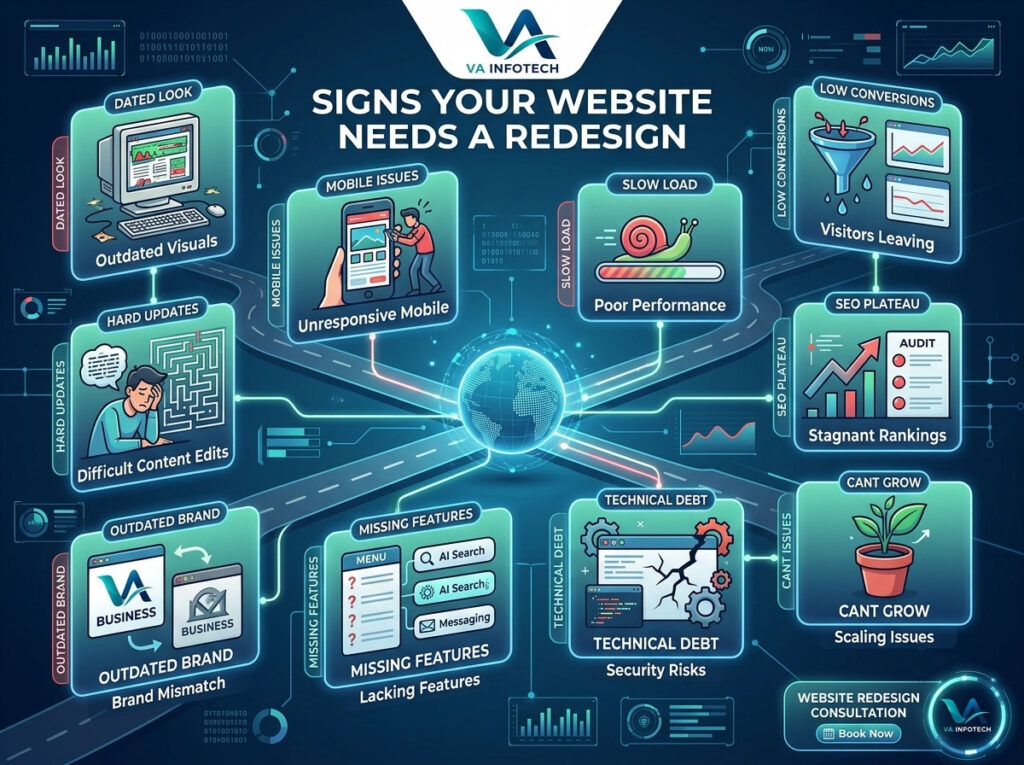
Most business owners don’t wake up one day and decide to redesign their website for fun. It usually starts with a nagging feeling — the site looks a little tired, a customer mentions it’s hard to use on their phone, or you glance at your analytics and wonder why nobody sticks around past ten seconds. The tricky part is knowing whether that feeling is worth acting on. Is your website actually holding your business back, or does it just need a few small tweaks? A full redesign is a real investment of time, budget, and effort, so it’s worth knowing the difference between “this could use a refresh” and “this is actively costing us customers.” This guide walks through the clearest signs that your business website needs a redesign, what usually causes them, and how to decide what kind of update actually makes sense for your situation. Why This Question Matters More Than It Used To A website used to be a digital brochure — something you built once and left alone for years. That’s no longer true. Search engines now reward fast, secure, mobile-first websites. Visitors expect sites to load in a couple of seconds and to work just as well on a phone as a laptop. And increasingly, AI-powered search tools are reading and summarizing websites before a person ever clicks through, which means outdated structure and thin content can quietly remove you from the conversation entirely. In other words, a website that was perfectly fine in 2021 can be a genuine liability in 2026 — not because anything “broke,” but because the bar for what counts as a good website keeps moving. If you’re weighing this against a brand-new build, it also helps to understand how much website development actually costs in India in 2026 so you can compare a redesign against starting fresh. With that context, here are the signs worth paying attention to. 1. Your Website Still Looks Like It’s From a Different Decade This is the most obvious sign, and usually the first one people notice — just not always about their own site. Dated fonts, clip-art-style graphics, cramped layouts, and low-resolution images all signal one thing to a visitor: this business hasn’t kept up. Design trends shift for good reasons — better readability, better accessibility, better use of screen space. A site that hasn’t been touched in five or more years is almost certainly using patterns that feel clunky next to modern competitors, even if the content itself is still accurate. Ask yourself: If a new customer landed on your homepage right now with zero context, would the design make them trust you, or wonder if you’re still in business? 2. It Doesn’t Work Well on Mobile More than half of web traffic today comes from phones, and for many industries it’s considerably higher than that. If your site was built before responsive design became standard, or if it was “made mobile-friendly” as an afterthought, visitors are probably dealing with: Google also uses mobile-first indexing, meaning it primarily evaluates the mobile version of your site when deciding how to rank you. A weak mobile experience doesn’t just frustrate visitors — it directly limits your visibility in search. 3. Pages Take Too Long to Load Page speed is one of those things nobody thinks about until it’s costing them. Research on user behavior consistently shows that a large share of visitors abandon a page if it takes more than a few seconds to load — and that abandonment rate climbs the longer they wait. Slow load times are usually a symptom of deeper technical debt: bloated code, unoptimized images, outdated plugins, or hosting that isn’t suited to your traffic. If your homepage takes more than three seconds to become usable, that’s a strong signal your site’s foundation needs attention, not just its appearance. 4. Traffic Is Fine, But Nobody Converts This is one of the most frustrating patterns for business owners: the visitors are showing up, but they’re not calling, booking, or buying. A high bounce rate combined with low conversions usually points to one of a few underlying issues: If you’re running an online store, this pattern is especially costly. It’s worth reviewing your setup against a proper eCommerce website design checklist, since even small friction points in checkout — extra steps, unclear shipping costs, poor mobile forms — can quietly drain revenue every month. 5. Updating Content Feels Like a Chore Your website should be easy for your team to manage. If publishing a blog post, updating pricing, or swapping out a banner image requires calling a developer every time, that’s not a minor inconvenience — it’s actively discouraging you from keeping the site current. And a site that doesn’t get updated tends to fall further behind on all the other issues in this list. A modern content management system should let your team make routine updates confidently, without fear of breaking something. If your current platform can’t do that, it’s a strong argument for rebuilding on more flexible foundations. 6. Your SEO Performance Has Plateaued or Declined Search rankings are one of the more measurable ways to tell your website’s technical health is slipping. If your organic traffic has been flat or falling despite consistent effort, the root cause is often structural: poor site speed, missing schema markup, broken internal linking, weak mobile usability, or outdated on-page SEO fundamentals. Before jumping straight to a redesign, it’s worth running a proper audit to confirm what’s actually wrong. Our complete SEO audit checklist for business websites walks through exactly what to check. In many cases, the audit itself makes the case for a redesign clear — because so many SEO issues trace back to the way a site was originally built. It’s also worth thinking beyond traditional search. AI-driven search tools now summarize and cite websites directly in their answers, which means how your content is structured matters more than ever. If you’re not familiar with this shift yet, our guide to

How Much Does Website Development Cost in India in 2026?
Web Design

How Much Does Website Development Cost in India in 2026?

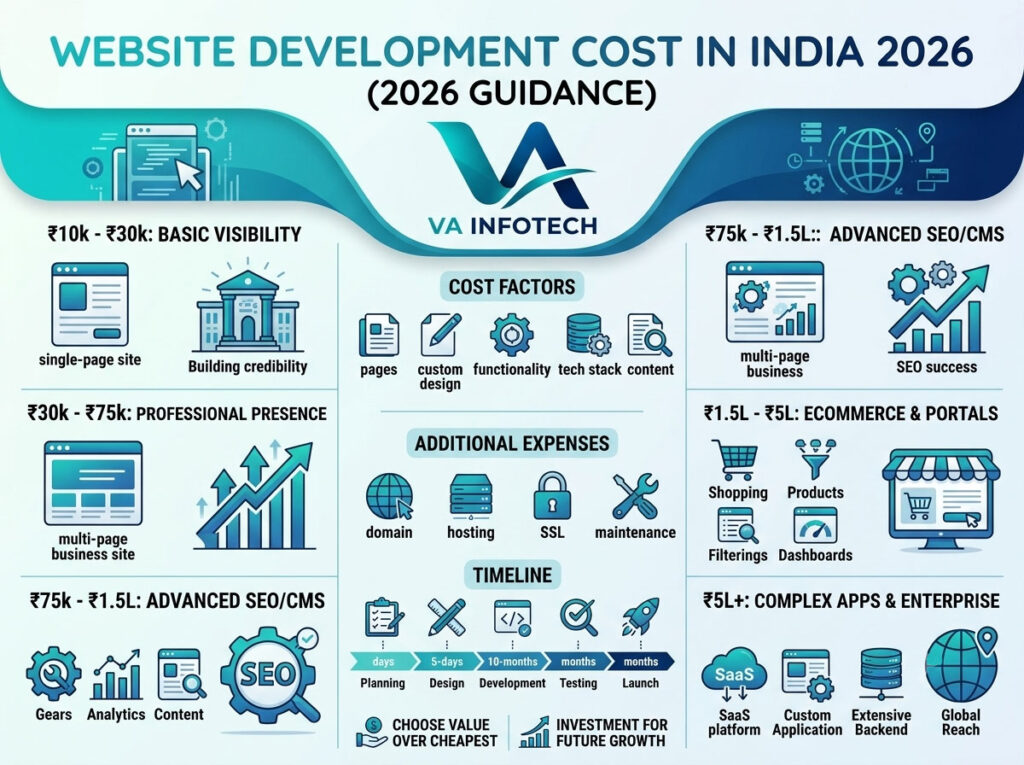
If you are planning to build a new website for your business in 2026, one of the first questions you will probably ask is: How much does website development cost in India? The short answer is: website development in India can cost anywhere from around ₹10,000 to ₹15 lakh or more, depending on the type of website, number of pages, design requirements, technology, integrations, eCommerce functionality, SEO requirements and ongoing maintenance. A simple business website may cost significantly less than a custom eCommerce store, marketplace or web application. Therefore, there is no single fixed website development price that applies to every business. For most small and medium-sized businesses, a professionally designed business website generally falls somewhere around ₹25,000 to ₹1,50,000, while eCommerce websites and custom web applications can cost several lakhs depending on their functionality. In this detailed 2026 guide, VA Infotech explains website development costs in India, what affects pricing, what you should expect at different budget levels, additional expenses to consider, and how to choose the right website development company for your business. Website Development Cost in India in 2026: Quick Overview Here is a practical estimate of website development costs in India in 2026: Website Type Approximate Cost in India Typical Timeline Single-page / Landing Page ₹10,000 – ₹30,000 3–10 days Basic Business Website ₹20,000 – ₹60,000 1–3 weeks Professional Business Website ₹40,000 – ₹1,50,000 2–4 weeks Corporate Website ₹75,000 – ₹2,50,000+ 4–8 weeks ECommerce Website ₹60,000 – ₹3,00,000+ 4–10 weeks Custom Web Application ₹2,00,000 – ₹15,00,000+ 2–6 months Marketplace / Large Portal ₹5,00,000 – ₹25,00,000+ 3–9+ months These figures should be treated as market estimates rather than fixed quotations. Current 2026 pricing guides show similarly wide ranges because a “website” can mean anything from a five-page brochure site to a sophisticated platform with authentication, payments, dashboards and third-party integrations. 1. How Much Does a Basic Website Cost in India? A basic website is usually suitable for a new business, consultant, professional, local service provider or small company that primarily wants an online presence. A basic website generally contains: The approximate cost can range from ₹20,000 to ₹60,000 depending on whether you use a template, semi-custom design or completely custom design. If your objective is simply to establish credibility and allow potential customers to find your business online, this type of website can be a practical starting point. For businesses that want a stronger online presence, VA Infotech provides [Website Design services]Website Design Services focused on responsive layouts, performance, usability, technical SEO and conversion-oriented design. 2. Professional Business Website Cost in India A professional business website goes beyond simply displaying your company information. It may include: A professional business website in India can typically cost ₹40,000 to ₹1,50,000 or more in 2026. The final price depends heavily on the amount of custom work involved. For example, a 10-page WordPress website using a customized design will generally cost less than a completely custom-designed website with advanced animations, integrations and custom functionality. 3. ECommerce Website Development Cost in India If you want to sell products or services online, an eCommerce website requires considerably more functionality than a normal business website. A professional eCommerce website may include: A typical eCommerce website can cost approximately ₹60,000 to ₹3,00,000+ in India in 2026. Large stores with hundreds or thousands of products, advanced inventory systems, ERP/CRM integrations, multiple sellers or customized checkout processes can cost significantly more. VA Infotech offers [ECommerce Website Design and Development]ECommerce Website Design with solutions covering custom storefronts, marketplace development, inventory integrations, payment gateways and SEO-ready product structures. 4. Custom Web Application Development Cost A web application is different from a conventional website. Examples include: Because these projects require backend programming, databases, authentication, APIs, dashboards and extensive testing, costs can start at around ₹2 lakh and go beyond ₹15 lakh. Complex enterprise platforms can require even larger budgets. For these projects, the development cost should be calculated according to functionality rather than the number of pages. 5. What Factors Affect Website Development Cost in India? Why can one company quote ₹30,000 while another quotes ₹1,50,000 for what appears to be the same website? The answer is scope. Several factors directly affect website development pricing. Number of Pages A five-page website requires considerably less design, content formatting and development work than a 30-page corporate website. More pages usually mean more content, layouts, internal linking, SEO work, testing and development time. Custom Design A template-based website is generally more affordable. A custom website requires: If branding and user experience are important to your business, investing in custom design can provide better long-term value. Website Functionality Features such as: can significantly increase development costs. Technology Stack The technology used to develop a website also influences pricing. Depending on the project, businesses may use WordPress, WooCommerce, Shopify, PHP, JavaScript frameworks, custom CMS platforms or headless architectures. VA Infotech currently works with technologies and platforms including WordPress, WooCommerce, Shopify, custom headless CMS solutions, HTML5, CSS3, Bootstrap, JavaScript and cloud infrastructure. Content Creation Website development and website content are not always the same service. You may need: If content is not included in the development quotation, it can become an additional expense. SEO A website should not simply look good. It should also be technically accessible to search engines. Important SEO components include: VA Infotech provides [Search Engine Optimization services]SEO Services and also offers [Large Language Model SEO]LLM SEO Services for businesses targeting modern search and AI answer engines. 6. Website Design vs Website Development: What’s the Difference? Website design focuses primarily on how the website looks and how users interact with it. Website development focuses on the technical implementation that makes the website work. For example: Website design includes: Website development includes: A professional project normally requires both design and development. 7. How Much Does Website Redesign Cost in India? You don’t always need to build a completely new website. If your existing website is outdated, slow, difficult to use or not mobile-friendly, redesigning it may be a better option. Website redesign costs

The Complete SEO Audit Checklist for Business Websites
Web Design

The Complete SEO Audit Checklist for Business Websites

Published by Va Infotech | vainfotech.com/blog Most business owners only think about an SEO audit after traffic has already dropped. By then, you’re not fixing small cracks — you’re digging out of a hole. A proper audit catches the problem while it’s still cheap to fix: a missing meta tag, a slow-loading image, a redirect chain nobody noticed, a page that quietly stopped ranking six months ago. This checklist walks through every layer of a modern SEO audit — technical, on-page, content, off-page, and the newer layer most checklists still ignore: whether your site is structured well enough for AI search tools to find and cite it. Work through it section by section, or use it as a reference the next time something on your site needs a second look. What Is an SEO Audit, and Why Does Your Business Website Need One? An SEO audit is a structured review of your website’s ability to be crawled, indexed, ranked, and clicked on — across both traditional search engines and, increasingly, AI search tools like ChatGPT and Google’s AI Overviews. It’s not a one-time task you complete and forget. Search engines update their algorithms constantly, your competitors publish new content, and your own site accumulates small technical issues over time — broken links, outdated plugins, orphaned pages, thin content that used to be fine and no longer is. For a business website specifically, the stakes are higher than for a personal blog. Every ranking drop is a potential lead lost to a competitor. A slow checkout page on an e-commerce store is a sale walking out the door. An audit exists to catch these issues before they cost you traffic, leads, or revenue — and to give you a prioritized list of what to fix first. Businesses that treat SEO audits as routine maintenance — quarterly or twice a year — consistently outperform those that only audit reactively, after a ranking crash. If your last audit was more than six months ago, or you’ve never run one, this checklist is your starting point. Part 1: Technical SEO Audit Checklist Technical issues are the foundation. If search engines can’t crawl and index your site properly, nothing else in this checklist matters. Crawlability and indexing Site speed and Core Web Vitals HTTPS and security Mobile-friendliness Structured data and schema markup Broken links and redirects Part 2: On-Page SEO Audit Checklist On-page SEO is about making sure each individual page is doing everything it can to earn a ranking and a click. Title tags and meta descriptions Header structure Keyword usage and search intent Content quality Images and alt text URL structure Internal linking Part 3: Content Audit A content audit looks at your site holistically rather than page by page. Part 4: Off-Page SEO Audit Off-page factors are harder to control directly, but they still need regular review. Part 5: The AI Search (GEO) Layer Most SEO checklists stop at traditional search. That’s no longer enough. A growing share of research-stage queries now get answered directly inside ChatGPT, Gemini, Perplexity, and Google’s AI Overviews — often without a single click to any website. Add these checks to your audit: We cover this in far more depth in our guide to what AI SEO is and how to rank in AI search results — worth reading in full if this is new territory for your team. It’s also the core of our dedicated Large Language Model SEO service, built specifically around this gap. Part 6: User Experience and Conversion Audit Rankings only matter if visitors convert once they arrive. Part 7: Analytics and Tracking Audit An audit is only as good as the data behind it. How Often Should You Run an SEO Audit? A full audit, covering every section above, is worth doing at least twice a year for most business websites. A lighter technical check — broken links, page speed, indexing status — is worth running monthly, especially after any site changes, plugin updates, or a website maintenance cycle. If you’ve just gone through a website redesign or migration, run a full audit within the first two weeks to catch redirect and indexing issues before they compound. Common Mistakes We See in Business Website Audits How Va Infotech Can Help Running a genuinely thorough SEO audit takes time, the right tools, and enough experience to know which findings actually matter versus which are noise. At Va Infotech, our Search Engine Optimization team runs full technical, on-page, content, and off-page audits for business websites, paired with our Large Language Model SEO service for businesses that want to show up in AI-generated answers as well as classic search results. If your site also needs structural work — a full website redesign, ongoing website maintenance, or faster web hosting — we handle that alongside the audit itself, so fixes don’t get stuck waiting on a separate vendor. And once your technical and content foundation is solid, our digital marketing, social media marketing, and PPC setup and marketing services help turn that improved visibility into actual leads. You can browse more of our thinking on search and website strategy on the Va Infotech blog, including our recent deep dive on Web Design topics. Frequently Asked Questions How long does a full SEO audit take? For a typical small-to-midsize business website, a thorough audit covering technical, on-page, content, and off-page factors usually takes anywhere from a few days to two weeks, depending on site size and how many issues surface along the way. Can I run an SEO audit myself, or do I need an agency? Basic checks — broken links, page speed, mobile-friendliness — are doable with free tools like Google Search Console and PageSpeed Insights. Deeper technical audits, content strategy review, and backlink analysis usually benefit from professional tools and experience, since misdiagnosing the cause of a ranking issue can send you fixing the wrong thing entirely. What’s the difference between an SEO audit and ongoing SEO work? An audit is a diagnostic snapshot

What Is AI SEO? A Complete Guide to Ranking in AI Search Results
Web Design

What Is AI SEO? A Complete Guide to Ranking in AI Search Results

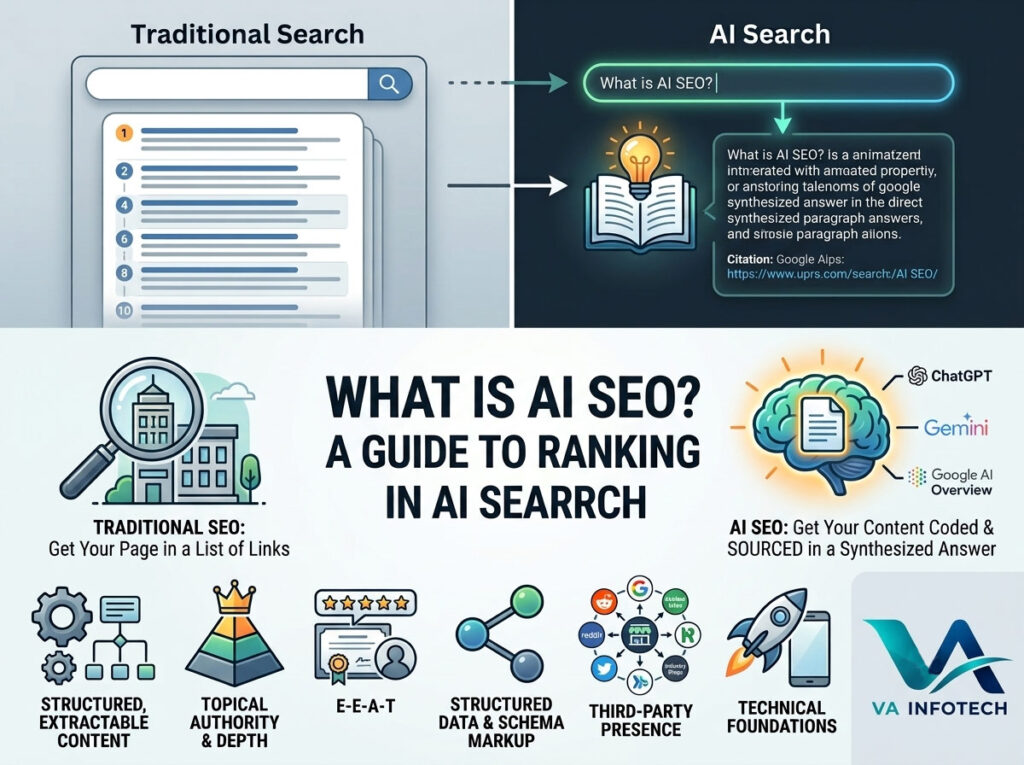
Search has quietly split into two different games. There’s still the familiar one — ten blue links, a search box, a scroll of results. And now there’s a second one running alongside it: a question typed into ChatGPT, Gemini, Perplexity, or Google’s AI Overview, and a single synthesized answer handed back, often with no click required at all. If your business isn’t showing up inside that answer, you’re invisible to a growing share of the people researching your product or service — even if you rank on page one of classic Google. This is what “AI SEO” refers to, and it’s fast becoming as important as traditional SEO for any business that wants to stay discoverable. At VA Infotech, this is a big part of what we help clients navigate through our Large Language Model SEO service, so we wanted to put together a complete, practical guide to what AI SEO actually is, how it differs from traditional SEO, and what you can do today to start showing up in AI-generated answers. What Is AI SEO? AI SEO (also called Generative Engine Optimization, GEO, or LLM SEO) is the practice of optimizing your website and content so that AI systems — large language models like ChatGPT, Gemini, Claude, Perplexity, and Google’s AI Overviews — can find, understand, and cite your business when answering a user’s question. Traditional SEO optimizes for ranking position: getting your page to show up as high as possible in a list of links. AI SEO optimizes for something different: getting your content selected, understood correctly, and referenced as a trustworthy source inside a generated answer. The user may never visit your website directly from that answer, but your brand still gets seen, and in many cases, the AI includes a link or citation back to you — which is often a more qualified, higher-intent visitor than one who clicked through ten search results first. How AI Search Is Different From Traditional Search Understanding the difference matters because the optimization playbook isn’t identical. Traditional search (Google, Bing): AI search (ChatGPT, Gemini, Perplexity, AI Overviews): This shift means AI systems care less about keyword density and backlink count, and much more about whether your content is clear, well-structured, factually accurate, and easy for a language model to extract and trust. Why AI SEO Matters Right Now A growing share of research-stage queries — “best CRM for small business,” “how does website hosting work,” “what should a landing page include” — are increasingly answered directly inside an AI chat interface or an AI Overview panel, without the user ever scrolling through traditional search results. For businesses that depend on organic search for leads, this isn’t a future trend to plan for later — it’s already reshaping how people find services today. The businesses that adapt early get an outsized advantage, for a simple reason: AI models tend to repeatedly cite the same handful of sources they’ve learned to trust for a given topic. Being one of those early trusted sources compounds over time, much the way early backlink-rich sites dominated traditional SEO for years. The Core Pillars of AI SEO 1. Structured, Extractable Content AI models pull information more reliably from content that’s organized clearly — proper headings, short paragraphs, definition-style answers near the top of a section, and bullet points for lists or steps. A wall of unstructured text is much harder for a model to parse and confidently cite than a page with a clear H2 answering the exact question a user might ask. A practical habit: for any important page, write a two-to-three sentence direct answer to the core question right under the heading, before going into detail. This single habit does more for AI visibility than almost anything else. 2. Topical Authority and Depth AI systems favor sources that demonstrate real depth on a topic, not just a single thin page targeting one keyword. Building out a genuinely comprehensive content cluster — covering a topic from multiple angles, with internal links tying related pages together — signals the kind of authority a language model is more likely to trust and cite repeatedly. This is the same principle behind good search engine optimization content clusters, just applied with an AI reader in mind rather than only a human one. 3. E-E-A-T: Experience, Expertise, Authoritativeness, Trustworthiness Google’s long-standing E-E-A-T framework matters even more in an AI-search world, because language models are explicitly trained to weigh source credibility when deciding what to cite. Author bios, clear business information, verifiable credentials, case studies, and original data all help establish the kind of trust signal that both traditional search rankings and AI citation systems reward. 4. Structured Data and Schema Markup Schema markup (FAQ schema, Article schema, Organization schema, Product schema) gives AI crawlers a machine-readable layer of context about your content, making it easier for a model to correctly understand what your page is about and who’s behind it. This is a technical layer most businesses skip, and it’s one of the more overlooked levers in a proper SEO strategy today. 5. Being Present Where AI Models Learn Large language models are trained and continually updated using a huge range of web sources — not just your own website, but also third-party platforms, review sites, forums, and industry directories. A business that only exists on its own website has a smaller footprint in the data these models draw from. Being cited, mentioned, or reviewed across multiple credible third-party sources increases the chance an AI model has encountered — and trusts — your brand when a relevant question comes up. 6. Fast, Crawlable, Mobile-Friendly Technical Foundations None of the above matters if AI crawlers and search bots can’t efficiently access and render your site in the first place. A slow, poorly structured, or technically broken website limits both traditional and AI-driven visibility. This is why AI SEO isn’t a replacement for solid technical fundamentals — it builds directly on top of a well-built, well-maintained website design foundation. AI SEO