Most businesses treat their website like a signboard — put it up once, and forget it exists. But a website isn’t a one-time project. It’s a living system with software that needs updating, links that break, forms that stop working silently, and search rankings that shift under your feet if nobody’s watching.
The businesses that keep their websites running fast, secure, and search-friendly aren’t the ones with the biggest budgets — they’re the ones with a routine. A simple monthly website maintenance checklist, followed consistently, prevents almost every major website disaster: hacked sites, lost leads from broken forms, sudden traffic drops, and the slow SEO decay that happens when nobody notices a site has quietly gone stale.
This guide walks through exactly what to check every month, why it matters, and how to build it into a repeatable process — whether you handle it in-house or through a website maintenance partner.
Why Monthly Website Maintenance Matters
A website isn’t static. Search engines change their algorithms, browsers update, hosting environments patch vulnerabilities, and your CMS or plugins release new versions almost weekly. If none of that gets tracked, small issues stack up until they become expensive problems — a security breach, a Google penalty, or a site that simply stops converting visitors into customers.
Monthly maintenance matters because it catches problems while they’re still small:
- Security risks get patched before they’re exploited, not after a breach.
- Broken links and errors get fixed before they hurt user trust or SEO.
- Speed issues get resolved before visitors bounce and rankings slip.
- Content gaps get noticed before competitors outrank you with fresher information.
Think of it the same way you’d think about servicing a vehicle. Skipping a few months rarely causes an immediate breakdown — but the risk compounds quietly until something fails at the worst possible time.
The Monthly Website Maintenance Checklist
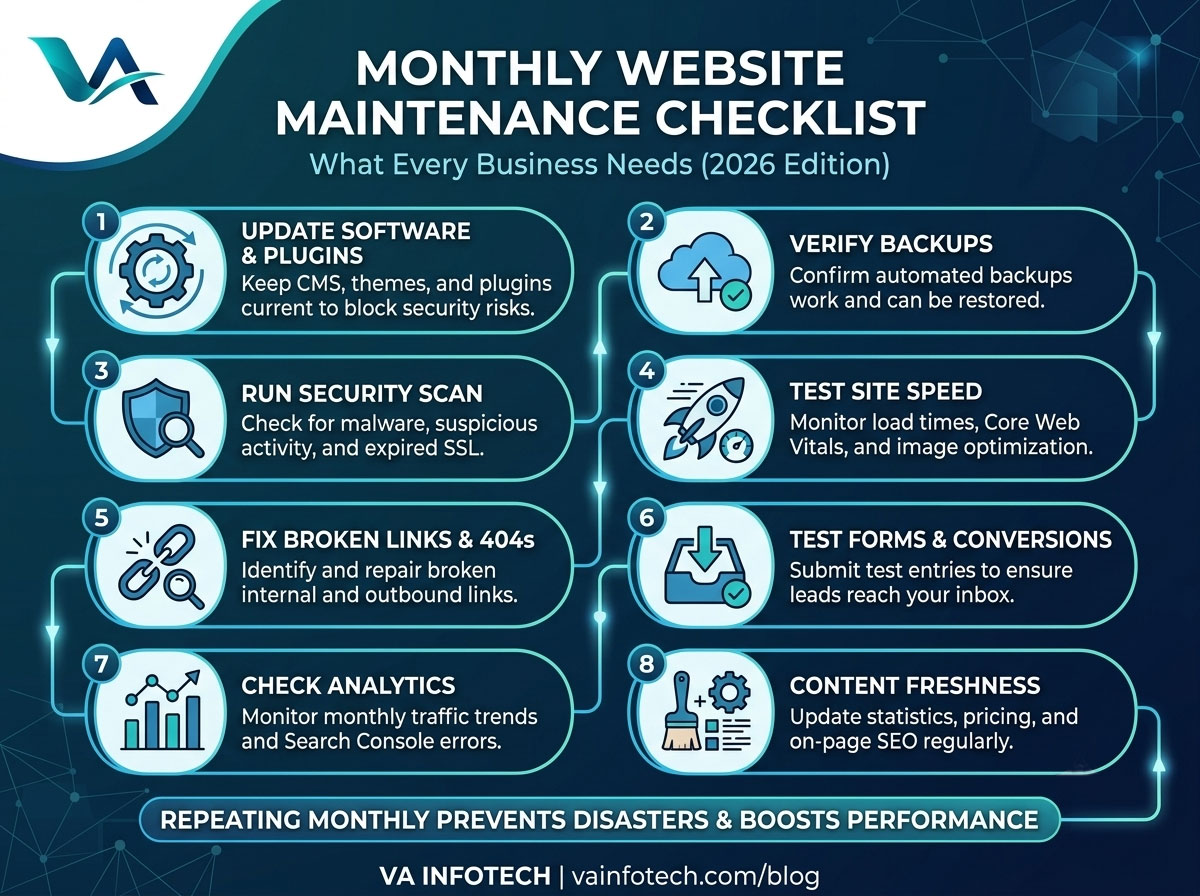
Here’s the full checklist, broken into the categories that matter most for a business website.
1. Check for Software, CMS, and Plugin Updates
If your website runs on WordPress or a similar CMS, outdated plugins and themes are one of the most common entry points for hackers. Every month, check:
- Core CMS version is up to date
- All plugins and themes are updated to their latest stable versions
- Any deprecated or unused plugins have been removed entirely (not just deactivated)
- Custom code or integrations still work correctly after updates
Never update everything blindly on a live site — test updates on a staging environment first if your business depends heavily on uptime. A single incompatible plugin update can break checkout pages, contact forms, or entire layouts.
2. Verify Backups Are Running and Restorable
A backup that hasn’t been tested is not a real backup. Every month, confirm:
- Automated backups are actually running on schedule
- Backups include both files and the database, not just one or the other
- At least one backup copy is stored off-site or on a separate server
- You’ve done a test restore at some point, not just assumed it works
This single habit is what separates a five-minute recovery from a five-day nightmare if your site ever gets hacked, corrupted, or accidentally broken during an update.
3. Run a Security Scan
Security isn’t a “set it and forget it” feature, even with a firewall in place. Monthly, you should:
- Run a malware and vulnerability scan
- Check for unfamiliar admin users or suspicious login attempts
- Confirm your SSL certificate is valid and not close to expiry
- Review file permissions for anything that’s been changed unexpectedly
If you’re not sure where to start, a professional Website Maintenance service typically bundles security monitoring with updates and backups, so nothing falls through the cracks.
4. Test Site Speed and Core Web Vitals
Page speed directly affects both user experience and search rankings. Once a month, run your homepage and a few key landing pages through a speed-testing tool and check:
- Largest Contentful Paint (LCP), Cumulative Layout Shift (CLS), and Interaction to Next Paint (INP)
- Image sizes — are new images being uploaded uncompressed?
- Whether new plugins or scripts have slowed things down since last month
- Mobile speed specifically, not just desktop
A site that was fast six months ago can quietly slow down as more content, images, and third-party scripts get added. Catching this monthly prevents a slow, silent decline in both rankings and conversions.
5. Check for Broken Links and 404 Errors
Broken internal and external links frustrate visitors and waste the “link equity” search engines use to understand your site structure. Monthly, scan for:
- Broken internal links (especially after any page deletions or URL changes)
- Broken outbound links to external resources
- 404 error pages showing up in your analytics or Search Console
- Redirects that are chained (A to B to C) instead of direct
Fixing these consistently is a small task each month, but it protects both user experience and the SEO value passed between your pages.
6. Review Forms and Conversion Points
This is one of the most overlooked checks — and one of the most costly to skip. A contact form or checkout process can silently break after a plugin update, a hosting change, or a spam filter misconfiguration, and you might not find out until you notice leads have dried up. Every month:
- Submit a test entry through every form on the site
- Confirm form notifications are actually reaching your inbox (check spam folders too)
- Test the checkout flow end-to-end if you run an eCommerce store
- Check click-to-call and WhatsApp buttons on mobile
If you run an online store, this check is even more critical — pair it with a broader review from your ECommerce Website Design checklist to make sure payment gateways, cart, and shipping calculations are all functioning correctly.
7. Check Analytics and Search Console
Your analytics dashboard tells you what’s actually happening on your site — but only if you look at it regularly. Monthly, review:
- Traffic trends month-over-month — any sudden drops or spikes?
- Top landing pages and whether they match your business priorities
- Search Console for crawl errors, manual actions, or indexing issues
- Bounce rate and time-on-page for key pages
If you notice unusual patterns — a steady decline in organic traffic, for instance — that’s a signal to dig deeper into technical SEO or content freshness before it becomes a bigger problem. A full Search Engine Optimization review can help diagnose what’s changed.
8. Review On-Page SEO and Content Freshness
Search engines favour websites that stay current. Once a month:
- Check that top-performing pages still have accurate information (pricing, services, contact details)
- Update any statistics, dates, or outdated references
- Review meta titles and descriptions for pages that aren’t getting clicks despite ranking
- Add internal links from new content back to relevant service or product pages
If your site hasn’t had a full technical review recently, it’s worth working through our detailed guide: The Complete SEO Audit Checklist for Business Websites. It covers the deeper, quarterly-level checks that complement this monthly routine.
9. Test Mobile Responsiveness
With most traffic now coming from mobile devices, a layout issue on smaller screens can quietly cost you leads every single day it goes unnoticed. Monthly, check:
- Navigation menus open and close correctly on mobile
- Text and buttons aren’t overlapping or cut off
- Forms are easy to fill out on a touchscreen
- Pop-ups or banners aren’t blocking content on smaller screens
10. Check Uptime and Hosting Performance
Your hosting environment is the foundation everything else sits on. Monthly, confirm:
- Uptime monitoring shows no unexpected downtime
- Server response times are consistent, not creeping upward
- Hosting storage and bandwidth usage are within your plan’s limits
- SSL and domain renewal dates are noted well in advance
If your site has outgrown its current hosting plan or you’re seeing recurring slowdowns, it may be time to review your Web Hosting setup rather than just patching symptoms every month.
11. Review AI and LLM Search Visibility
Search behaviour is changing — more users are getting answers directly from AI tools like ChatGPT, Gemini, and Google’s AI Overviews rather than clicking through ten blue links. Once a month, it’s worth checking whether your key pages are structured in a way that AI tools can understand and cite. If this is new territory for your business, our guide on Large Language Model SEO and What Is AI SEO? A Complete Guide to Ranking in AI Search Results explains what’s changed and how to adapt.
Signs Your Website Needs More Than Routine Maintenance
Sometimes monthly checks reveal something bigger than a quick fix — a site that’s slow no matter how much you optimise, a design that looks dated next to competitors, or a CMS that can’t support the features your business now needs. If that sounds familiar, it may be time for a deeper look rather than another round of patches. Our post on How to Know When Your Business Website Needs a Redesign walks through the exact signals to watch for.
And if you’re budgeting for that next step, it helps to know what a rebuild actually costs before you start: How Much Does Website Development Cost in India in 2026? breaks down realistic pricing so you can plan with confidence.
Building This Into a Repeatable Process
A checklist only works if someone actually runs through it every month. A few practical ways to make that happen:
- Put it on a calendar. Pick the same date each month — the first Monday, for instance — and treat it as a recurring task, not an “if we have time” item.
- Keep a simple log. A shared spreadsheet noting what was checked, what was found, and what was fixed creates accountability and a useful history if something goes wrong later.
- Assign clear ownership. Whether it’s an internal team member or an outsourced partner, someone specific should be responsible — shared responsibility often means nobody actually does it.
- Separate monthly tasks from quarterly and annual ones. Not everything needs monthly attention — a full SEO audit or a complete redesign review can happen quarterly or yearly, while security, backups, and speed checks deserve a monthly cadence.
Final Thoughts
Website maintenance isn’t glamorous, and it’s easy to postpone when there’s no visible fire to put out. But the businesses that treat it as a routine — not a reaction — are the ones that avoid the expensive surprises: the hacked site, the vanished leads, the sudden ranking drop nobody can explain three months later.
Run through this checklist every month, and most of those problems simply won’t happen. If you’d rather hand the whole process to a team that does this daily across dozens of business websites, VA Infotech’s Website Maintenance service covers updates, backups, security monitoring, speed checks, and SEO health — so your website stays reliable while you focus on running your business.
Explore more resources on our blog, or browse our Web Design category for related guides on keeping your business website fast, secure, and search-ready.
Want help applying this to your website?
Tell us about your business and goals. We will review your site and suggest clear next steps, free of charge.