
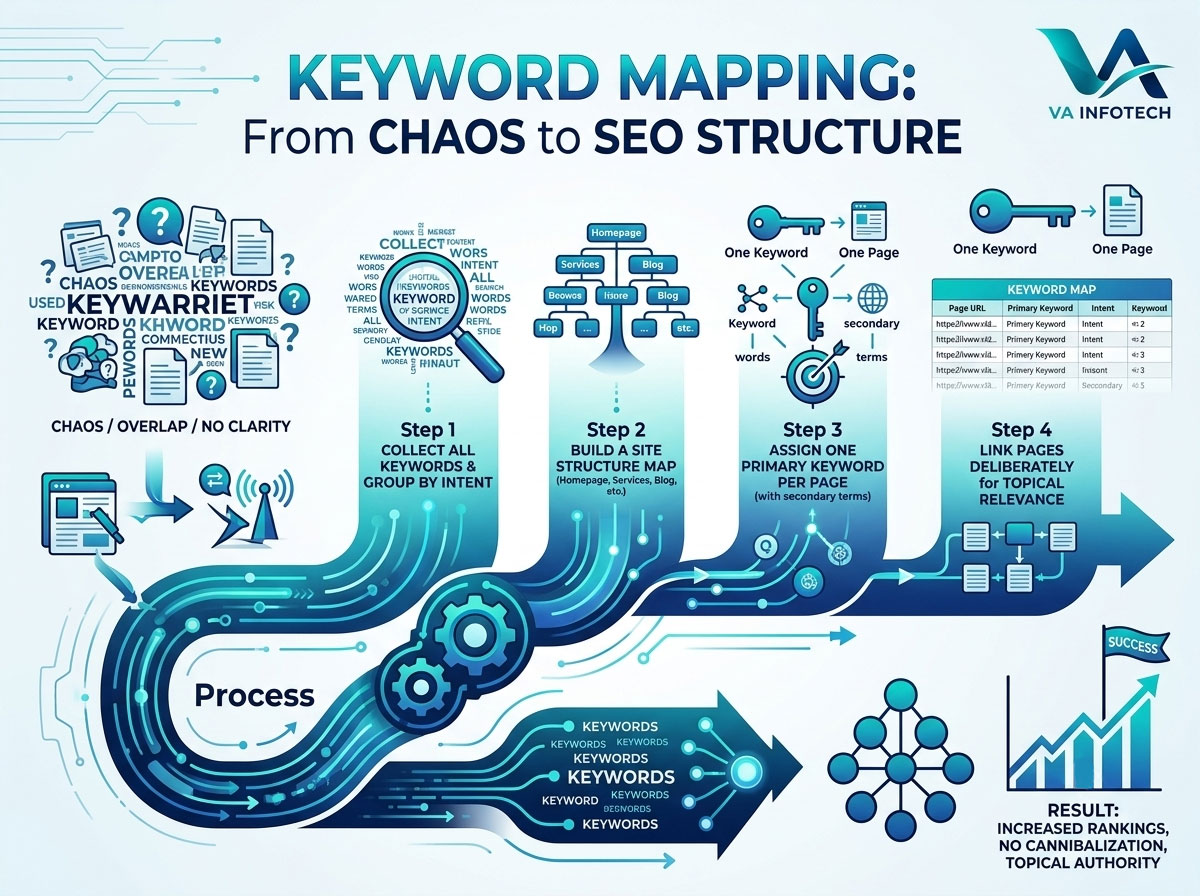
Most websites don’t have a keyword problem — they have a keyword organization problem. There are enough keywords being targeted somewhere on the site, but nobody can say with confidence which page is supposed to rank for which term. Two service pages quietly compete for the same search. A blog post outranks the page that should actually be converting. A brand-new page launches without anyone checking whether it overlaps with something already live.
This is what keyword mapping fixes. It’s the process of assigning one clear, primary keyword — plus a small set of supporting terms — to every indexed page on your site, so that every page has a defined job and Google never has to guess which one to rank.
Done properly, keyword mapping turns a scattered content strategy into a structured one. Done poorly (or skipped entirely), it’s one of the most common reasons otherwise well-built websites plateau in rankings despite having plenty of content.
What Keyword Mapping Actually Means
Keyword mapping is not the same thing as keyword research. Research is about discovering what people search for. Mapping is about deciding — deliberately, page by page — which of those discovered keywords belongs where.
A completed keyword map is usually a spreadsheet with, at minimum:
- Page URL (existing or planned)
- Page type (homepage, service page, category page, blog post, location page)
- Primary keyword — the one term this page is built to rank for
- Secondary/supporting keywords — closely related terms the page should also capture
- Search intent (informational, commercial, transactional, navigational)
- Current ranking position (once live, for tracking)
That’s it. It sounds simple, and structurally it is — but building an accurate one requires real judgment about intent, overlap, and site architecture, which is where most businesses go wrong.
Why Skipping This Step Costs You Rankings
When pages aren’t mapped, three problems show up repeatedly:
Keyword cannibalization. Two or more pages target the same or very similar keyword, so Google has to choose one to rank — and it often picks the “wrong” one, or splits authority between both so neither ranks well. This is one of the most common technical issues we find during a technical SEO audit, and it’s almost always invisible until someone actually maps the site’s keywords against its URLs.
Content gaps. Without a map, it’s easy to publish ten blog posts on adjacent topics while never actually covering the specific terms your audience is searching for — and equally easy to miss that a core service has no dedicated page targeting its primary keyword at all.
Weak topical relevance. Search engines increasingly evaluate whether a site demonstrates real depth on a subject, not just whether a single page mentions a keyword. A deliberate keyword map is what turns a handful of disconnected pages into a coherent topic cluster that reads as authoritative — to traditional search rankings and, increasingly, to how AI-generated answers decide what to cite as well.
Step 1: Start With a Complete Keyword List
Before you can assign keywords to pages, you need a full inventory of the terms worth targeting. Pull this from a combination of sources:
- Search Console data — what you already rank for, even at low positions, is often the fastest-growing opportunity list you have
- Keyword research tools (Ahrefs, SEMrush, Google Keyword Planner) — for volume, difficulty, and related terms
- Competitor pages — what terms are ranking competitors targeting that you aren’t
- Customer language — actual questions and phrases prospects use in sales calls, support tickets, and reviews, which often surface long-tail terms tools miss entirely
If your site hasn’t had a full content and technical review recently, this is a natural extension of a broader SEO audit — running the audit first gives you an accurate picture of what’s currently ranking before you start reassigning targets.
Don’t filter too aggressively at this stage. It’s easier to prioritize a large list down than to realize later that you excluded a keyword cluster nobody thought to research.
Step 2: Group Keywords by Intent, Not Just Topic
This is the step most keyword mapping efforts skip, and it’s the one that matters most.
Two keywords can be topically related but represent completely different intents — and therefore belong on completely different pages:
- “What is website redesign” → informational intent → belongs on a blog post
- “Website redesign services” → commercial/transactional intent → belongs on a service page
- “Website redesign cost” → commercial investigation intent → could be a dedicated page or a strong section on the service page
- “How to redesign a website without losing SEO” → informational, but bottom-of-funnel → blog content that should link directly into the website redesign service page
Grouping by intent first, then by topic, prevents one of the most common mapping mistakes: assigning a high-value commercial keyword to a blog post that was never designed to convert, or stuffing a service page with informational content that dilutes its commercial focus.
Step 3: Match Keyword Clusters to the Right Page Type
Once your keywords are grouped by intent and topic, match each cluster to the type of page built to serve that intent:
- Homepage — one or two broad, brand-level or category-level terms at most. Don’t overload it.
- Service pages — commercial and transactional keywords specific to that offering (e.g., “search engine optimization services,” “ecommerce SEO agency”)
- Category/collection pages — broader commercial terms that sit above individual products or sub-services
- Blog posts — informational, question-based, and long-tail keywords that support the commercial pages by driving traffic and internal links toward them
- Location or industry pages — commercial terms modified by geography or vertical, when relevant
If a keyword doesn’t clearly belong to an existing page type, that’s usually a sign you need a new page — not that you should force the term onto something already built for a different purpose.
Step 4: Assign One Primary Keyword Per Page
Every page gets exactly one primary keyword. Not two, not three — one. This is the term the page’s title tag, H1, URL (where practical), and core content are built around.
Alongside it, list 3–8 secondary keywords: close variants, related long-tail phrases, and questions the primary keyword’s searchers also ask. These get worked naturally into subheadings and body content — they support the primary term rather than compete with it.
Resist the temptation to make every page target five “important” keywords at once. A page trying to rank for everything usually ranks for nothing, because its content signals are too diffuse for search engines to confidently match to any single query.
Step 5: Actively Check for and Resolve Overlap
Once your first draft of the map is complete, sort it by primary keyword and scan for duplicates or near-duplicates across pages. Where you find overlap, you generally have three options:
- Consolidate — merge the weaker page’s content into the stronger one and 301 redirect the old URL
- Differentiate — sharpen each page’s intent so they’re clearly serving different searches (e.g., one commercial, one informational)
- Deprioritize — keep both live but assign the secondary page a different, more specific long-tail variant instead
This overlap check matters just as much — arguably more — when you’re restructuring an existing site. If you’re planning a redesign or migration, your keyword map should be built and finalized before you touch the site architecture, so it can directly inform your URL structure and redirect plan rather than being reverse-engineered after launch.
Step 6: Translate the Map Into On-Page Optimization
With every page assigned a primary keyword, the map becomes your on-page SEO brief. For each page, make sure:
- The title tag includes the primary keyword, ideally near the front
- The H1 reflects the primary keyword naturally, not as an exact-match stuffing exercise
- The meta description reinforces the primary keyword and intent, even though it isn’t a direct ranking factor — it drives click-through
- Subheadings (H2/H3) work in secondary keywords and related questions
- Internal links pointing to that page use the primary keyword (or a close variant) as anchor text where it reads naturally
- The URL slug, where you can still influence it, reflects the primary keyword concisely
This is also where a keyword map pays for itself operationally — content writers, designers, and developers all work from the same source of truth instead of guessing at what a page is “about.”
Step 7: Use the Map to Drive Internal Linking
A keyword map isn’t just an assignment sheet — it’s an internal linking blueprint. Once you know which blog posts support which service pages, you can build deliberate contextual links between them: informational content that ranks for top-of-funnel searches should link directly into the commercial pages it supports, using the target keyword as anchor text.
This is exactly the kind of structure that reinforces topical authority across a digital marketing content strategy — search engines read consistent internal linking patterns as a signal of which pages matter most on a given topic, which is part of why a scattered, unmapped site structure tends to underperform even when the individual pages are well-written.
Step 8: Maintain and Revisit the Map
Keyword mapping isn’t a one-time project. Revisit the map:
- Whenever you plan new content, to confirm the target keyword isn’t already assigned elsewhere
- Quarterly, to check actual ranking data against intended targets and catch cannibalization that’s developed organically
- Before any redesign, migration, or major content overhaul
- When search behavior shifts — new question formats, voice search phrasing, or terms surfaced by AI search tools are increasingly part of how people search, and your map should evolve to reflect that alongside classic keyword research. This is one of the areas we cover under LLM SEO, since the terms worth mapping for AI-driven discovery don’t always match traditional keyword volume data exactly.
Common Mistakes to Avoid
- Assigning the same primary keyword to more than one page
- Mapping keywords by topic alone, ignoring search intent
- Targeting keywords with no existing or planned page that fits — leaving them “orphaned” with nowhere to convert traffic
- Overloading a single page with too many primary-level keywords
- Treating the map as a one-time document instead of a living reference
- Building the content first and figuring out the keyword afterward, rather than mapping first
Final Thoughts
Keyword mapping is the connective tissue between keyword research and actual rankings. Research tells you what people are searching for; mapping tells your website how to answer, page by page, without pages competing against each other for the same result.
At Va Infotech, keyword mapping is a core part of how we approach every SEO engagement — before a single page is optimized, we build a complete map of primary and secondary keywords against your existing and planned site structure, so every page has a clear job and nothing cannibalizes anything else. We handle this alongside website design and content strategy, so the map isn’t just a spreadsheet — it directly shapes the pages themselves.
Talk to Va Infotech about building a keyword map that gives every page on your site a clear, uncontested target.
Frequently Asked Questions
1. How many keywords should one page target?
One primary keyword, plus roughly 3–8 closely related secondary keywords. Trying to rank a single page for many unrelated primary terms usually weakens its relevance for all of them.
2. What’s the difference between keyword mapping and keyword research?
Research identifies what people search for. Mapping assigns those discovered keywords to specific pages, so every page has a defined, non-overlapping target.
3. How do I know if I have keyword cannibalization?
Search Console’s Performance report will often show two of your own URLs ranking for the same query, alternating positions over time — that’s a strong signal. Sorting your keyword map by primary keyword will also surface duplicates directly.
4. Should blog posts and service pages ever target the same keyword?
Generally no — assign the commercial version of a keyword to the service page and a related informational or long-tail variant to the blog post, then link the two together.
5. When should I redo my keyword map?
Before any site redesign or migration, whenever you’re planning new content, and at least quarterly to check real ranking data against your intended targets.