
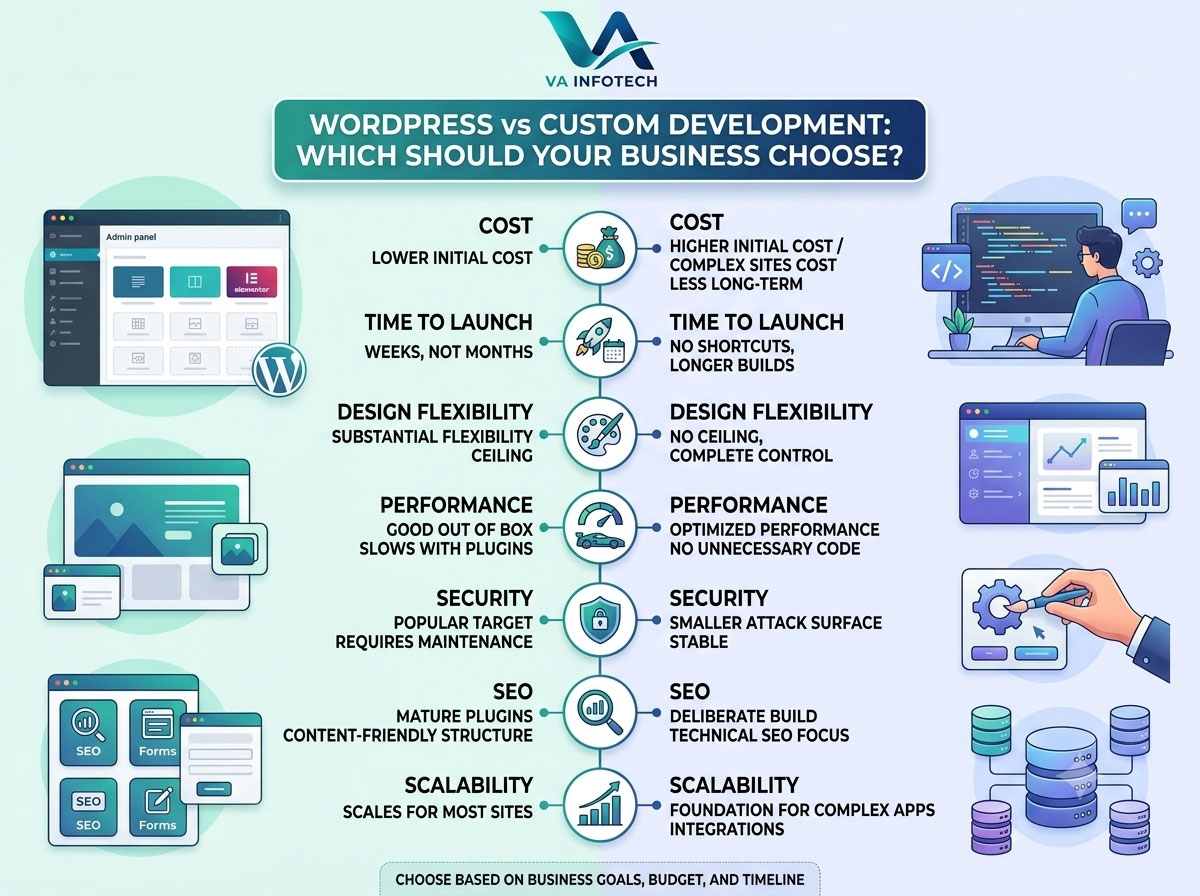
One of the first real decisions every business owner faces when building a website isn’t about colors or fonts — it’s about the platform underneath everything. Should you build on WordPress, or invest in a fully custom-developed website?
It’s a question we get asked in nearly every discovery call at Va Infotech, and the honest answer is: it depends on what your business actually needs, not on which option sounds more impressive. WordPress powers a huge share of the web for good reason, but custom development exists because WordPress genuinely isn’t the right fit for every business either.
This guide breaks down exactly how the two compare — cost, speed to launch, flexibility, performance, security, SEO, and long-term scalability — so you can make the decision based on your business goals rather than guesswork.
What Is WordPress Website Development?
WordPress is a content management system (CMS) that powers roughly 40% of all websites globally. It lets you build a site using pre-built themes and plugins, with a visual editor (often paired with page builders like Elementor) that doesn’t require writing code for most day-to-day changes.
For businesses that need a professional website without engineering a system from scratch — a services website, a blog, a small catalog, a portfolio — WordPress offers a proven, well-documented foundation. Most website design projects for small and mid-sized businesses start here because it balances speed, cost, and flexibility better than almost any other option at that scale.
What Is Custom Website Development?
Custom development means building a website (or web application) from the ground up, using a framework and codebase tailored specifically to your business logic — rather than adapting a general-purpose CMS to fit your needs.
This approach makes sense when your requirements go beyond what a CMS and its plugin ecosystem can reasonably support: complex user permission systems, proprietary booking or pricing engines, deep integrations with internal software, or performance demands that a plugin-heavy WordPress stack can’t reliably meet at scale.
Head-to-Head Comparison
1. Cost
WordPress is significantly cheaper to build initially. Themes, plugins, and a large pool of experienced developers keep both development time and hourly rates lower. For most small businesses, this is the deciding factor — and reasonably so.
Custom development costs more upfront because every feature is built rather than configured. However, it can cost less over time for complex sites, since you’re not layering paid plugins on top of paid plugins to force a CMS to do something it wasn’t designed for.
If budget is your primary constraint right now, it helps to understand realistic pricing before committing either way — we broke down real numbers in How Much Does Website Development Cost in India in 2026?.
2. Time to Launch
WordPress wins here decisively for most standard business websites. With existing themes and a mature plugin ecosystem, a professional WordPress site can go live in weeks, not months.
Custom builds take longer because there’s no shortcut — every component, from the admin panel to the front-end interface, is designed and built specifically for your use case. If speed to market matters more than exact customization, WordPress is almost always the practical choice.
3. Design Flexibility
This is where the comparison gets more nuanced. WordPress, especially with a page builder, offers substantial design flexibility for most businesses — enough to build a genuinely distinctive, on-brand site.
But there’s a ceiling. If your brand requires highly specific interactions, animations, or layouts that push beyond what themes and builders are designed to handle, you’ll eventually be fighting the platform instead of building on it. Custom development has no such ceiling — if you can imagine it, it can be built, without being constrained by a theme’s underlying structure.
4. Performance
Out of the box, a lean, well-configured WordPress site performs well. The problem is that WordPress sites tend to accumulate plugins over time — one for SEO, one for forms, one for popups, one for security — and each one adds overhead. A WordPress site that started fast can slow down significantly within a year or two if it isn’t maintained carefully.
Custom-built sites generally have a performance advantage because there’s no unnecessary code running in the background — only what the business actually needs. For businesses where page speed directly affects conversions (e-commerce, lead generation at scale), this difference is worth taking seriously.
5. Security
WordPress’s popularity is also its biggest security liability — it’s the most targeted CMS in the world simply because of its market share, and outdated plugins or themes are the most common entry point for attacks.
This isn’t a reason to avoid WordPress; it’s a reason to maintain it properly. Regular updates, a security plugin, and a solid backup strategy close most of the gap. Custom sites have a smaller attack surface by default since there’s no plugin ecosystem to exploit, but they still require the same ongoing diligence. Either way, don’t treat security as a set-it-and-forget-it item — our guide on Website Backup Strategy: How to Protect Your Business Website covers what a proper safety net actually looks like.
6. SEO
Both platforms can rank well — SEO success depends far more on execution than on the underlying platform. WordPress has a practical advantage here: mature SEO plugins, a huge base of documentation, and a content-friendly structure that makes it easy to build out blog content, which is one of the strongest long-term SEO levers a business has.
Custom sites can be just as SEO-friendly, but every technical SEO element — structured data, sitemap generation, metadata management — has to be deliberately built rather than configured through a plugin. If SEO is core to your growth strategy, make sure whichever platform you choose is paired with a real Search Engine Optimization plan, not just a technically capable site. It’s also worth running through The Complete SEO Audit Checklist for Business Websites once your site is live, regardless of which platform you build on.
7. Scalability
For most small-to-mid-sized businesses, WordPress scales just fine — plenty of large, high-traffic sites run on it successfully. But scalability isn’t just about traffic; it’s about how complex your business logic becomes over time.
If you expect your website to evolve into something closer to a web application — custom dashboards, complex user roles, integrations with internal tools — custom development gives you a foundation that grows with those needs instead of working against them later.
8. Ongoing Maintenance
WordPress requires consistent maintenance: core updates, plugin updates, theme compatibility checks, and security monitoring. Skipping this is how sites become slow, vulnerable, or broken over time. Ongoing website maintenance isn’t optional for WordPress — it’s part of the cost of the platform’s flexibility.
Custom sites also need maintenance, but typically less frequently, since there’s no third-party plugin ecosystem introducing compatibility issues. The trade-off is that you’re more dependent on the original development team (or detailed documentation) for future changes, since there’s no standardized system another developer can jump into as easily as they could with WordPress.
Which Should You Choose? A Practical Framework
Choose WordPress if:
- You need to launch within weeks, not months
- Your budget is a primary constraint
- Your site is primarily content-driven (services, blog, portfolio, small catalog)
- You want your internal team to make day-to-day content updates without a developer
- You’re building or rebuilding a website redesign and want to modernize without starting from zero
Choose custom development if:
- Your business logic goes beyond what plugins can reasonably support
- Performance at scale is a hard requirement, not a nice-to-have
- You’re building something closer to a web application than a content website
- You need deep, proprietary integrations with internal systems
- Long-term differentiation and complete design control matter more than speed to launch
A middle path exists too. Many businesses use WordPress as a headless CMS paired with a custom front end, or build core business logic as custom modules integrated into a WordPress backbone. This hybrid approach captures much of WordPress’s content-management convenience while solving for the specific limitations a fully off-the-shelf build would hit.
What About eCommerce?
If the website in question is (or will become) an online store, the calculation shifts slightly. WooCommerce on WordPress handles the vast majority of small-to-mid-sized eCommerce needs well and integrates with the same content and SEO tooling. But stores with complex inventory logic, custom checkout flows, or high transaction volume often benefit from a more tailored build. If you’re weighing this specifically, our eCommerce Website Design team can walk through what your product catalog and growth plans actually require — and if organic visibility is a priority from day one, pair that decision with our eCommerce SEO Checklist for New Online Stores.
Common Mistakes Businesses Make in This Decision
- Choosing custom development for prestige, not necessity. A custom build isn’t inherently “better” — it’s a trade-off, and an expensive one if your actual needs don’t require it.
- Choosing WordPress and then neglecting maintenance. The platform’s flexibility only pays off if it’s kept updated and secure.
- Not planning for growth. A site that fits today’s needs perfectly but can’t accommodate next year’s plans often needs a costly rebuild sooner than expected.
- Ignoring hosting quality. Both platforms depend heavily on solid web hosting — a slow host will undercut even the best-built site.
- Skipping a proper needs assessment before development starts. The right platform decision comes from mapping business requirements first, not picking a platform and fitting the business around it.
Final Thoughts
There’s no universally “better” option between WordPress and custom development — only a better fit for your specific business, budget, timeline, and growth plans. WordPress remains the practical choice for the majority of businesses that need a professional, content-friendly, cost-effective website launched quickly. Custom development earns its higher cost and longer timeline when your requirements genuinely exceed what a CMS can support.
The businesses that make the wrong call usually aren’t wrong about WordPress or custom development in the abstract — they’re wrong about what their own business actually needs.
At Va Infotech, we start every project with that assessment before recommending a platform. If you’re weighing this decision for your own business, take a look at our portfolio to see both approaches in action, or get in touch for a free consultation — we’ll help you figure out which path actually fits before you spend a rupee on development.