
Launching an online store is exciting. You’ve picked your products, designed your storefront, and set up payments. Then you notice that nobody is visiting.
That’s normal. A new store has no authority, no backlinks, and no history with Google. Paid ads can bring early traffic, but organic search is what lowers your customer acquisition cost over time. The stores that grow steadily usually did their SEO groundwork before launch, or in the first weeks after it.
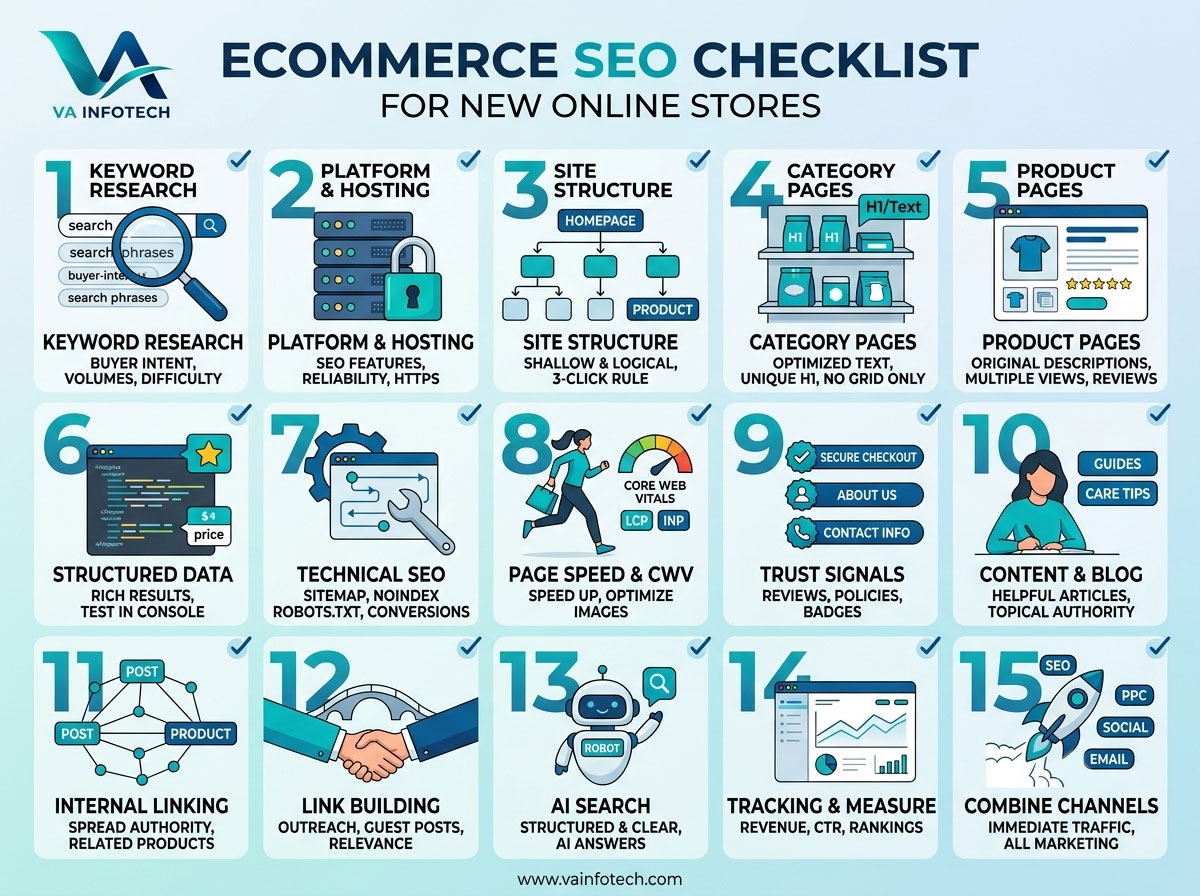
At Va Infotech, a website design and digital marketing company in Ahmedabad, we help new stores get the basics right from the start. This ecommerce SEO checklist covers what to set up, in what order, and why each item matters.
Why Ecommerce SEO Is Different From Regular SEO
A service business might have ten to twenty pages. An online store can have thousands of URLs across categories, products, filters, and variants. That creates challenges a normal website doesn’t face:
- Duplicate content, because similar products, variants, and filtered pages can look almost identical to search engines
- Thin content, because product pages often carry only a title, a photo, and a price
- Crawl waste, because filters and sorting options can generate thousands of low-value URLs
- Constant change, because products go out of stock, prices change, and new items arrive
Getting the foundation right means search engines can crawl your store efficiently and understand what you sell. Customers can then find you at the moment they’re ready to buy.
1. Start With Keyword Research Built for Buyers
Every SEO decision starts with keywords, and ecommerce keywords are about buying intent. Aim for terms that signal a shopper is close to purchasing, not just browsing.
What to do:
- List your main product categories and your top 10 to 20 products.
- Find the phrases customers use, such as “buy,” “price,” “best,” “online,” or a product plus a size, material, or use case.
- Use Google autocomplete, “People also ask,” Google Keyword Planner, and tools like Ahrefs, Semrush, or Ubersuggest to gather volume and difficulty data.
- Check the search results page. If Google shows product listings and category pages, you know what format to build.
- Prioritize long-tail keywords (for example, “handmade cotton kurti for women online”) over broad terms (for example, “kurti”). A new store can’t compete for head terms yet.
We cover this process step by step in our guide on how to find high-value keywords for your business. It’s worth reading before you assign keywords to pages.
Quick rule: Each category and product page should target one primary keyword and a few close variations. Don’t target the same keyword on two pages, because they’ll compete against each other.
2. Choose the Right Ecommerce Platform and Hosting
Your platform and hosting decide how much SEO control you have and how fast your store loads. Before you build:
- Check the platform’s SEO features. You should be able to edit title tags, meta descriptions, URLs, image alt text, canonical tags, and structured data without hacks.
- Pick reliable hosting. Slow servers hurt both rankings and conversion rates. Secure, fast web hosting is part of your SEO foundation, not an afterthought.
- Use HTTPS everywhere. SSL is standard for ecommerce, and customers won’t enter card details on an insecure page.
If you haven’t built the store yet, working with an ecommerce website design team that understands SEO can save you expensive rebuilds later.
3. Plan a Clean Site Structure
A logical structure helps both shoppers and search engines. The ideal ecommerce structure is shallow and simple:
Homepage > Category > Subcategory > Product
Checklist:
- Keep every product within three clicks of the homepage.
- Group products into clear categories that match how people search.
- Use descriptive, keyword-friendly URLs, such as
/womens-running-shoes/instead of/category?id=482. - Keep URLs short and lowercase, and separate words with hyphens.
- Avoid changing URLs after launch. If you must, set up 301 redirects.
- Add breadcrumb navigation so users and Google can see where a page sits in your hierarchy.
Your main navigation should feature your most important categories. These pages usually carry the most ranking potential, because they target broader, higher-volume searches than individual products.
4. Optimize Category Pages First
Category pages are the most overlooked SEO opportunity in ecommerce. Many stores pour effort into product pages and leave category pages as a grid of thumbnails with no text.
What a strong category page includes:
- A unique H1 with the primary keyword (for example, “Women’s Running Shoes”)
- A short introduction of 80 to 150 words above or below the products that explains what shoppers will find
- Useful supporting content such as buying tips, size guidance, or FAQs, placed below the product grid so it doesn’t push products down
- Internal links to relevant subcategories and popular products
- A custom title tag and meta description written to earn clicks
Don’t stuff keywords. Write for a shopper who’s trying to decide, and the keywords will fit naturally.
5. Write Product Pages That Rank and Convert
Product pages are where sales happen, and for a new store they’re often the hardest to rank because so many stores sell the same items.
Never use manufacturer descriptions. Hundreds of other stores use the same text, and Google sees it as duplicate content. Write your own.
Product page checklist:
- Title tag: include the product name and a key attribute, ideally under 60 characters
- Meta description: 140 to 155 characters that mention the benefit and invite the click
- H1: one per page, matching the product name
- Description: at least 150 to 300 words of original copy covering features, benefits, materials, sizing, and use cases
- High-quality images: multiple angles, compressed for speed, with descriptive filenames and alt text
- Clear pricing, availability, and shipping information
- Customer reviews: they add fresh content, build trust, and can earn star ratings in search results
- FAQs: answer real questions about sizing, delivery, returns, or compatibility
- Related products: link to complementary items to help both users and crawlers
Think about what a shopper would ask a salesperson standing next to them, and answer it on the page.
6. Add Structured Data (Schema Markup)
Structured data helps search engines understand your products and can make your listings eligible for rich results. These can include price, availability, and review ratings shown directly in search.
Schema types to consider:
- Product schema (name, image, description, SKU, brand)
- Offer schema (price, currency, availability)
- Review and AggregateRating schema (only when you have genuine reviews)
- BreadcrumbList schema
- Organization schema for your brand details
- FAQ content marked up where it genuinely applies
After adding schema, test it with Google’s Rich Results Test and monitor errors in Google Search Console. Never mark up information that doesn’t appear on the page, because that violates Google’s guidelines.
7. Fix Technical SEO Before You Scale
Technical problems quietly cap your rankings, no matter how good your content is. Run through these before you invest heavily in content or ads.
Technical checklist:
- Submit an XML sitemap to Google Search Console and Bing Webmaster Tools.
- Check your robots.txt. Make sure you haven’t accidentally blocked important pages, and block low-value ones such as cart, checkout, and account pages.
- Use canonical tags on product variants and filtered URLs so Google knows which version to index.
- Handle faceted navigation carefully. Filters for size, color, and price can generate huge numbers of near-duplicate URLs. Decide which are worth indexing and control the rest.
- Fix broken links and redirect chains.
- Handle out-of-stock products properly. For temporary stock-outs, keep the page live and say when it returns. For discontinued products, redirect to the closest alternative or category.
- Avoid orphan pages, which have no internal links pointing to them.
- Make sure the store is mobile-friendly. Most shoppers browse and buy on phones.
If you want a full walkthrough, see our guide on how to perform a technical SEO audit step by step.
8. Improve Page Speed and Core Web Vitals
Speed affects rankings, but more importantly it affects revenue. Shoppers leave slow stores, and mobile visitors are the least patient.
Google measures user experience through Core Web Vitals: loading performance (LCP), responsiveness (INP), and visual stability (CLS).
How to speed up your store:
- Compress and resize images, and use modern formats such as WebP.
- Enable lazy loading for images below the fold.
- Minimize heavy apps, plugins, and third-party scripts.
- Use browser caching and a content delivery network (CDN).
- Choose quality hosting and keep your platform up to date.
- Reserve space for images and banners so the layout doesn’t jump while loading.
Test key pages with PageSpeed Insights and Search Console’s Core Web Vitals report. Ongoing website maintenance keeps speed, security, and plugins in good shape as your catalog grows.
9. Build Trust Signals Into Your Store
Google evaluates whether a site is trustworthy, and shoppers do the same before entering payment details. New stores need to work harder because nobody knows them yet.
Include:
- A detailed About Us page that explains who you are
- Clear contact information, including address, phone, and email
- Transparent shipping, return, and refund policies
- Privacy policy and terms and conditions pages
- Secure checkout with recognized payment options
- Genuine customer reviews and testimonials
- Trust badges only where they’re real and verifiable
If you have a physical location or serve a specific city, also set up your Google Business Profile. Our guide on how to optimize your Google Business Profile for more customers shows how to do it well.
10. Create Content That Supports Your Products
Product and category pages target buyers. A blog or resource section captures shoppers earlier in their journey and builds topical authority.
Content ideas for new stores:
- Buying guides (“How to choose the right laptop bag”)
- Comparison posts (“Cotton vs linen bedsheets”)
- How-to and care guides (“How to clean leather shoes”)
- Gift guides and seasonal roundups
- FAQ and problem-solving articles based on customer questions
Each post should link naturally to the relevant category and product pages. That passes authority to the pages that make money and gives readers a next step.
Aim for helpful, original, experience-based writing. Google’s systems reward content that demonstrates real expertise, not thin articles written only to catch keywords.
11. Use Internal Linking Strategically
Internal links spread authority around your store and help Google discover your pages. New stores often underuse them.
Best practices:
- Link from the homepage to your top categories and best sellers.
- Link from blog posts to relevant categories and products.
- Use descriptive anchor text such as “women’s running shoes” instead of “click here.”
- Add “related products” and “customers also viewed” sections.
- Make sure every important page has at least a few internal links pointing to it.
12. Start Link Building and Brand Mentions Early
Backlinks remain one of the strongest ranking signals, and a brand-new store has none. Focus on quality, relevant links rather than shortcuts.
Realistic options for new stores:
- List your business in trusted local and industry directories.
- Reach out to bloggers and reviewers who fit your niche.
- Offer expert quotes or data to journalists and industry sites.
- Create useful resources such as size guides, calculators, or original research that others want to cite.
- Partner with suppliers, manufacturers, and complementary brands who can link to you.
- Share content on social channels. Social links don’t directly boost rankings, but visibility often leads to natural mentions. Our social media marketing services can help with this.
Avoid buying links or joining link schemes. They can lead to penalties that are hard to recover from.
13. Prepare for AI Search and Answer Engines
Shoppers increasingly research products through AI assistants and AI-generated answers, not just traditional search results. Stores that are clearly structured, well-documented, and trusted are more likely to be surfaced and cited.
Practical steps:
- Write clear, factual product information and FAQs.
- Keep your brand details consistent across your site and profiles.
- Use structured data so machines can read your product information.
- Publish helpful, authoritative content that answers real questions.
Learn more in our guides on how to optimize your website for ChatGPT search and how to get your business mentioned in AI search results. Our Large Language Model SEO service is designed for exactly this shift.
14. Set Up Tracking and Measure What Matters
You can’t improve what you don’t measure. Set up your tracking before launch so you have data from day one.
Set up:
- Google Search Console for indexing status, queries, and errors
- Google Analytics with ecommerce tracking to see revenue, conversion rate, and top landing pages
- Bing Webmaster Tools for additional search coverage
- Conversion goals for purchases, add-to-cart actions, and checkout starts
KPIs to review monthly:
- Organic traffic and organic revenue
- Keyword rankings for target terms
- Click-through rate from search results
- Conversion rate and average order value
- Pages indexed vs. pages submitted
- Core Web Vitals status
Review keyword performance each quarter and update or improve pages that sit on page two.
15. Combine SEO With Paid and Marketing Channels
SEO takes time. For most new stores, results build over months, not days. In the meantime, pair SEO with channels that produce faster traffic.
- PPC campaigns deliver immediate visibility and reveal which keywords convert. Use that data to inform your SEO priorities. See our PPC setup and marketing service.
- Email marketing brings visitors back.
- Social media builds awareness and drives traffic.
- A wider digital marketing plan ties all of these together.
New Store SEO Launch Checklist (Quick Reference)
Before launch
- Keyword research completed and mapped to pages
- Clean URL and category structure planned
- Fast, secure hosting with HTTPS
- Unique titles and meta descriptions written
- Original product descriptions and optimized images
- Schema markup added and tested
- XML sitemap and robots.txt configured
- Mobile and speed testing passed
- Trust pages published (About, Contact, Policies)
- Analytics and Search Console installed
After launch
- Submit sitemap and check indexing
- Publish buying guides and supporting content
- Add internal links between content, categories, and products
- Begin outreach and link building
- Collect customer reviews
- Monitor rankings, traffic, and technical errors monthly
Common Ecommerce SEO Mistakes to Avoid
- Copying manufacturer descriptions
- Targeting the same keyword on multiple pages
- Ignoring category pages
- Letting filters create thousands of duplicate URLs
- Deleting out-of-stock pages without redirects
- Using huge, uncompressed images
- Skipping mobile testing
- Expecting instant results
- Neglecting ongoing updates and monitoring
Do You Need to Redesign Before You Optimize?
Sometimes SEO problems come from the site itself: a confusing layout, slow templates, or a structure that can’t support growth. In that case, fixing the foundation first makes everything else work better. A website redesign or a fresh website design can create the base your SEO needs. Before relaunching, use our website redesign checklist to avoid losing rankings.
Final Thoughts
Ecommerce SEO isn’t a single task you finish and forget. It’s a system: build a clean structure, write pages for real buyers, keep the site fast and trustworthy, and keep improving with data. New stores that follow this checklist give themselves a real advantage over competitors who treat SEO as an afterthought.
Ready to Grow Your Online Store With SEO?
Va Infotech helps online stores get found, trusted, and chosen. From ecommerce website design and search engine optimization to Large Language Model SEO and digital marketing, our team builds stores that rank and sell.
Talk to our team and let’s build an SEO plan for your store, or visit https://www.vainfotech.com to explore our services.