
If you have ever hired a designer or read about improving your website, you have probably seen the terms UX and UI used as if they meant the same thing. They don’t. Mixing them up is one of the most common reasons business websites look good but fail to bring in leads.
Understanding website UX vs UI helps you brief designers properly, spot problems on your own site, and make better decisions about where to invest. In this guide, Va Infotech explains what each term means, how they differ, how they work together, and why both affect your search rankings and your revenue.
What Is UX (User Experience)?
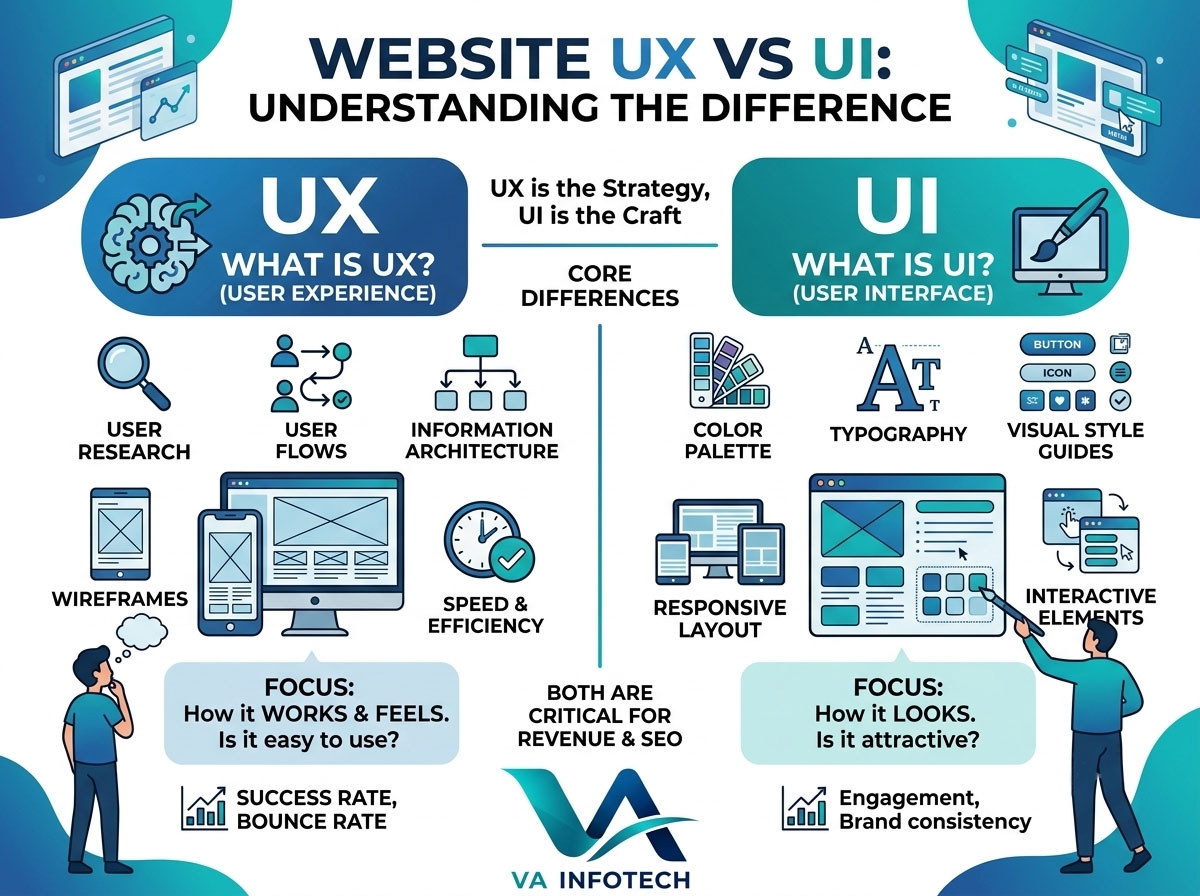
UX stands for user experience. It covers everything a person goes through when they use your website: how easily they find what they need, how logical the navigation feels, how fast pages load, and whether they can complete a task such as booking a call, buying a product, or filling in a form without frustration.
UX is about how the website works and feels to use. It is driven by research and strategy rather than colors and fonts. A UX designer asks questions like:
- Who is visiting this site, and what do they want?
- What is the easiest path from landing on the page to taking action?
- Where do visitors get confused or leave?
- Does the structure make sense on a phone as well as a desktop?
Core parts of UX design include user research, information architecture, site maps, wireframes, usability testing, and conversion path planning.
What Is UI (User Interface)?
UI stands for user interface. It is the visual layer of your website: the layout, colors, typography, buttons, icons, images, spacing, form fields, and animations. UI is what people see and touch.
UI is about how the website looks and how its elements respond. A UI designer asks questions like:
- Does the design reflect the brand and build trust?
- Are buttons clearly recognizable as buttons?
- Is the text readable on every screen size?
- Are colors, fonts, and icons consistent across every page?
Core parts of UI design include visual design, style guides, color palettes, typography, responsive layouts, and interactive elements such as hover states and menus.
UX vs UI: The Key Differences
The simplest way to remember it: UX is the journey, UI is the vehicle. UX decides where the visitor is going and how smooth the trip is. UI is the look and feel of everything they touch along the way.
| UX (User Experience) | UI (User Interface) | |
|---|---|---|
| Focus | How the site works and feels | How the site looks |
| Main question | Is it easy and useful? | Is it clear and attractive? |
| Based on | Research, behavior, testing | Branding, visual design, interaction |
| Deliverables | User flows, wireframes, site maps | Mockups, style guides, design systems |
| Measured by | Task success, bounce rate, conversions | Consistency, clarity, engagement |
| Happens | Early and continuously | After structure is planned, refined throughout |
Here is another way to picture it. A restaurant can have beautiful decor, but if the menu is confusing, the service is slow, and the tables are hard to reach, people will not come back. The decor is UI. The overall dining experience is UX. You need both.
Simple Examples of UX vs UI on a Website
Examples make the difference easier to spot.
Contact form
- UX: Asking only for name, email, and message so visitors finish the form, and showing a clear confirmation after submitting.
- UI: The field styling, button color, label placement, and error message design.
Navigation menu
- UX: Grouping pages logically, limiting top-level items, and placing key pages like Services and Contact where people expect them.
- UI: The menu typography, dropdown styling, and mobile hamburger icon.
Online store checkout
- UX: Reducing the number of steps, offering guest checkout, and showing shipping costs early.
- UI: The layout of the cart summary, the payment buttons, and the trust badges.
Landing page
- UX: Putting the value proposition and main call to action above the fold and removing distractions.
- UI: The hero image, headline font, and button design.
Why UX and UI Must Work Together
A site can fail in three ways:
- Good UI, poor UX. It looks stunning, but visitors cannot find pricing, the menu is confusing, or the checkout takes seven steps. Traffic arrives and leaves.
- Good UX, poor UI. The structure is logical, but the design looks outdated, cluttered, or untrustworthy, so visitors do not feel confident enough to act.
- Poor both. Nothing works and nothing looks credible.
The winning combination is a well-planned experience wrapped in a clean, consistent, on-brand interface. That is what turns visitors into inquiries and customers. This is also why our website design process at Va Infotech starts with structure and user goals before any visual design begins.
How UX and UI Affect SEO
Design and search engine optimization are more connected than most business owners think. Google’s goal is to send people to pages that satisfy them, and it looks at signals related to page experience. Here is where UX and UI show up in SEO.
Page speed and Core Web Vitals. Heavy images, bloated scripts, and layout shifts hurt both usability and rankings. Fast, stable pages are a UX benefit and an SEO benefit.
Mobile usability. Most searches happen on phones. A responsive interface with readable text and tap-friendly buttons is essential for both users and Google’s mobile-first indexing.
Engagement and satisfaction. When a page is clear and easy to use, visitors stay longer, explore more pages, and are more likely to convert. Confusing layouts push people back to the search results.
Site structure and internal linking. Good information architecture, a core UX task, helps search engines crawl and understand your content. It also helps visitors move naturally from one page to the next.
Readable content. Clear headings, short paragraphs, and strong visual hierarchy make content easier to scan, which supports both users and search engines.
Accessibility. Sufficient color contrast, descriptive alt text, and keyboard-friendly navigation make your site usable for more people and reinforce quality signals.
Design cannot replace SEO, and SEO cannot rescue a poor experience. They work best together. If you want to check how your site is doing technically, our complete SEO audit checklist is a good place to start, and our search engine optimization service can turn the findings into a plan.
Common UX and UI Mistakes on Business Websites
UX mistakes
- Too many menu items and unclear labels
- Hiding contact details or the main call to action
- Long, complicated forms
- Slow loading pages
- No clear path from information to inquiry
- Ignoring mobile visitors
UI mistakes
- Inconsistent fonts, colors, and button styles across pages
- Low contrast text that is hard to read
- Tiny buttons and links on mobile
- Cluttered layouts with no whitespace
- Stock imagery that feels generic or untrustworthy
- Animations that distract or slow the page down
A Simple UX and UI Process for Your Website
Whether you build a new site or improve an existing one, this sequence works well:
- Define goals. Decide what the site must achieve: leads, sales, bookings, or brand credibility.
- Understand your audience. Identify who visits, what they need, and what stops them.
- Map the structure. Plan pages, navigation, and user flows.
- Create wireframes. Sketch the layout of key pages without visual styling.
- Design the interface. Apply your brand colors, typography, imagery, and components.
- Build responsively. Develop the site so it works on every device and loads quickly.
- Test and refine. Check usability, speed, and accessibility, then improve based on real behavior.
- Maintain and improve. Keep monitoring, updating, and securing the site. Our website maintenance service helps keep everything running smoothly and protected, and a solid website backup strategy protects the work you have invested in.
A Quick UX and UI Checklist for Your Site
Use this list to review your own website:
- Can a new visitor understand what you do within five seconds?
- Is your main call to action visible on every key page?
- Can people reach any important page in three clicks or fewer?
- Does the site load quickly on mobile data?
- Are fonts readable and buttons easy to tap on a phone?
- Are colors, buttons, and headings consistent across all pages?
- Is there enough contrast between text and background?
- Are forms short and error messages helpful?
- Do you show trust signals such as testimonials, portfolio work, and contact details?
- Does the design still feel current and on brand?
If you answered no to several of these, the problem is probably not your traffic. It is your experience.
When to Invest in a Redesign
Sometimes small fixes are not enough. Consider a rebuild if your bounce rate is high despite steady traffic, your site looks dated next to competitors, mobile visitors struggle, conversions are low, or your platform limits what you can change. Our website redesign service focuses on improving both the experience and the interface so the new site performs better, not just looks newer.
If you sell online, UX matters even more, because every extra step or confusing screen can cost you an order. Our ecommerce website design work centers on smooth product discovery, simple checkout, and fast performance. If you are unsure whether a template or a tailored build fits your needs, read our guide on custom website development vs website builders.
Getting More From a Well-Designed Website
A great UX and UI foundation makes every marketing channel work harder. Visitors from search, ads, and social media land on pages that are easier to use, so more of them convert. That is why design belongs in your wider growth plan alongside digital marketing, PPC marketing, and social media marketing. If you are planning a budget, our post on how much a small business should spend on digital marketing can help you decide. And as search evolves, it is worth understanding Google AI Overviews SEO too, since clear structure and helpful content support visibility there as well.
Frequently Asked Questions
What is the main difference between UX and UI?
UX focuses on how a website works and how easy it is to use. UI focuses on how it looks, including layout, colors, typography, and buttons.
Which is more important for a business website, UX or UI?
Both matter. UX determines whether visitors can accomplish their goals, and UI determines whether the site feels credible and pleasant. A site needs both to convert well.
Does UX affect SEO?
Yes. Page speed, mobile usability, clear navigation, and engaging content all influence how users behave and how search engines evaluate your pages.
Can one person do both UX and UI?
On smaller projects, one designer can cover both. Larger or more complex websites usually benefit from specialists working together.
How do I know if my website has a UX problem?
Warning signs include high bounce rates, low conversion rates, short visits, and visitors who abandon forms or carts. Recordings and heatmaps can show where people struggle.
How much does UX and UI design cost?
It depends on the size and complexity of the site. Contact a web design company like Va Infotech for a quote based on your goals and pages.
Final Thoughts
UX is how your website works. UI is how it looks. One without the other leaves results on the table. When strategy, structure, design, and performance are planned together, visitors find what they need, trust what they see, and take action, and search engines notice too.
At Va Infotech, we design and build websites where user experience and interface work as one, then support them with SEO, hosting, and ongoing maintenance. Ready to improve your website? Contact Va Infotech today or explore more guides on the Va Infotech blog.