Talk To An Expert

+91 9924241667

Web Design

How to Find High-Value Keywords for Your Business
Web Design

How to Find High-Value Keywords for Your Business

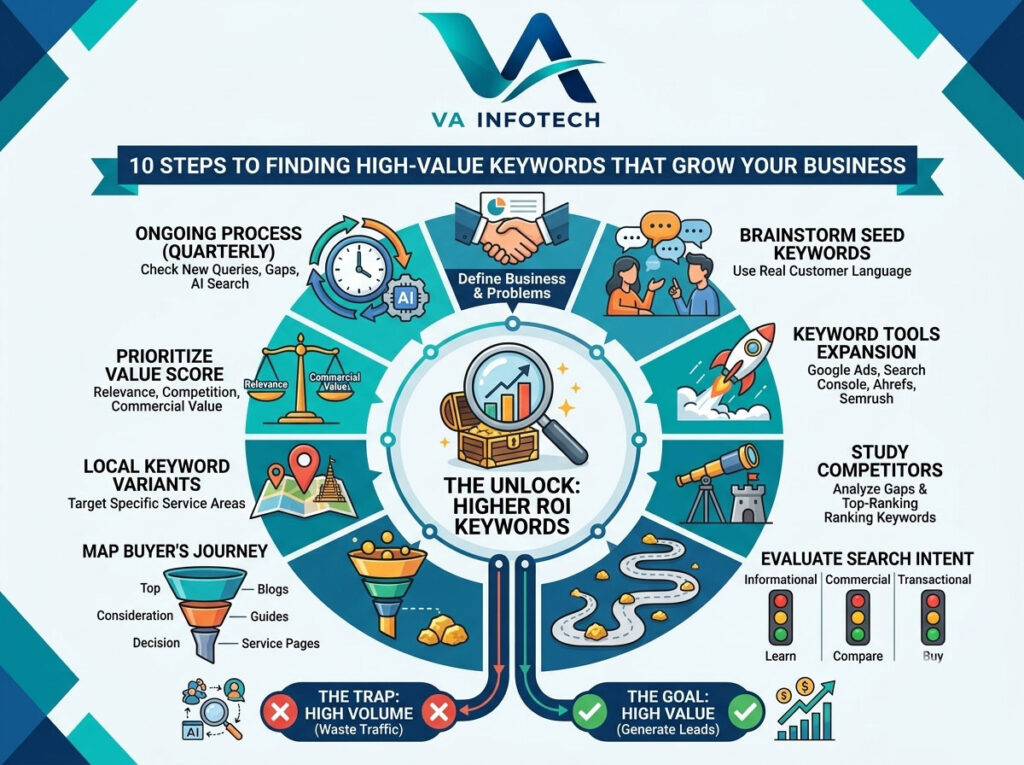
Most businesses start their SEO journey the same way: they open a keyword tool, type in a broad term, sort by search volume, and pick whatever has the biggest number next to it. It feels productive. It rarely works. High search volume doesn’t mean high value. A keyword with 50,000 monthly searches can bring you zero customers if the people searching it aren’t looking to buy what you sell. Meanwhile, a keyword with 90 searches a month can generate a steady stream of qualified leads if it’s the exact phrase your ideal customer types right before they’re ready to act. At Va Infotech, keyword research is the first thing we do before writing a single line of content for a client, and it’s usually the difference between a blog that generates leads and a blog that just generates traffic. This guide walks through the process we actually use — not the theoretical version, the practical one — so you can find keywords that move your business forward, not just your analytics dashboard. Why “High-Value” Is Different From “High-Volume” Before diving into tools and tactics, it’s worth being precise about what makes a keyword valuable. A high-value keyword typically has three characteristics working together: Search volume matters, but it’s the least important of the three. A keyword search strategy built purely around volume tends to produce content that ranks for terms nobody with a wallet is searching. A strategy built around intent and achievability produces content that converts. Step 1: Start With Your Business, Not a Keyword Tool The biggest mistake businesses make is opening a keyword research tool before they’ve thought clearly about their own business. Before you touch any software, answer three questions: This exercise produces what’s called a seed list: a rough set of topics and phrases that describe your business in your customers’ language, not your internal jargon. Everything else in this guide builds on that seed list. Step 2: Brainstorm Seed Keywords From Real Customer Language Once you know your seed topics, the next step is expanding them using language your actual customers use — not the language your team uses internally. A few reliable sources: By the end of this step, you should have a messy list of 50–100 phrases. Don’t filter yet — volume and difficulty come later. Step 3: Use Keyword Research Tools to Expand and Quantify With your seed list built from real language, it’s time to bring in tools to expand it and attach data. A few worth knowing: Run every phrase from your seed list through one of these tools and pull the following data points for each: monthly search volume, keyword difficulty, and — where available — cost-per-click (CPC), which is a strong proxy for commercial intent even if you never run paid ads. A high CPC tells you advertisers are willing to pay for that click, which usually means it converts. Step 4: Study What Your Competitors Rank For (and Where the Gaps Are) One of the fastest ways to find high-value keywords is to reverse-engineer what’s already working for competitors — not to copy their content, but to find the gaps between what they rank for and what you rank for. Using a competitor keyword gap tool (most paid platforms have one built in), pull the top-ranking keywords for two or three direct competitors and compare them against your own site. You’re looking for two specific patterns: This step alone frequently surfaces the most commercially valuable keywords in an entire research project, because it filters for terms that are already generating clicks and conversions for someone in your space. Step 5: Evaluate Keywords Against Search Intent, Not Just Metrics At this point you’ll have a long list of keywords with volume, difficulty, and CPC data attached. Before ranking or prioritizing anything, run each keyword through an intent check: what does Google’s current results page for this term actually look like? Search each keyword and note whether the top results are: If your business page is transactional but the keyword’s search results are dominated by informational blog content, you’re very unlikely to rank there no matter how well-optimized your page is — Google has already decided what kind of content answers that query. Matching content format to intent is often more important than the keyword’s raw metrics. Step 6: Don’t Overlook Long-Tail Keywords Short, high-volume “head” keywords are almost always the most competitive and the most expensive to rank for. Long-tail keywords — longer, more specific phrases with lower individual search volume — are usually where the real return on investment lives, for three reasons: This is exactly the strategy behind a well-built blog: rather than chasing one impossible head term, you build topical authority through many long-tail, intent-matched articles that collectively outperform a single broad page. Step 7: Map Keywords to the Buyer’s Journey Not every keyword should point to the same type of page. Once you’ve built and filtered your keyword list, group each term by where the searcher likely sits in their decision-making process: A common mistake is sending every keyword to the homepage or a generic contact page. Matching keyword intent to page type — blog post for awareness terms, service page for decision terms — significantly improves both rankings and conversion rates, because the page format matches what the searcher actually expects to find. Step 8: Don’t Skip Local Keyword Variants If your business serves a specific city, region, or service area, local keyword variants deserve their own pass in the research process. Terms like “website redesign agency in Ahmedabad” or “SEO services near me” often have lower search volume than their generic counterparts but convert at a dramatically higher rate, because the searcher has already filtered for geography — they’re not comparing you against agencies on the other side of the world. Pair local keyword targeting with a properly optimized Google Business Profile and location-specific landing pages for the strongest results. This is a step we cover in more depth in
How to Get Your Business Mentioned in AI Search Results
Web Design

How to Get Your Business Mentioned in AI Search Results

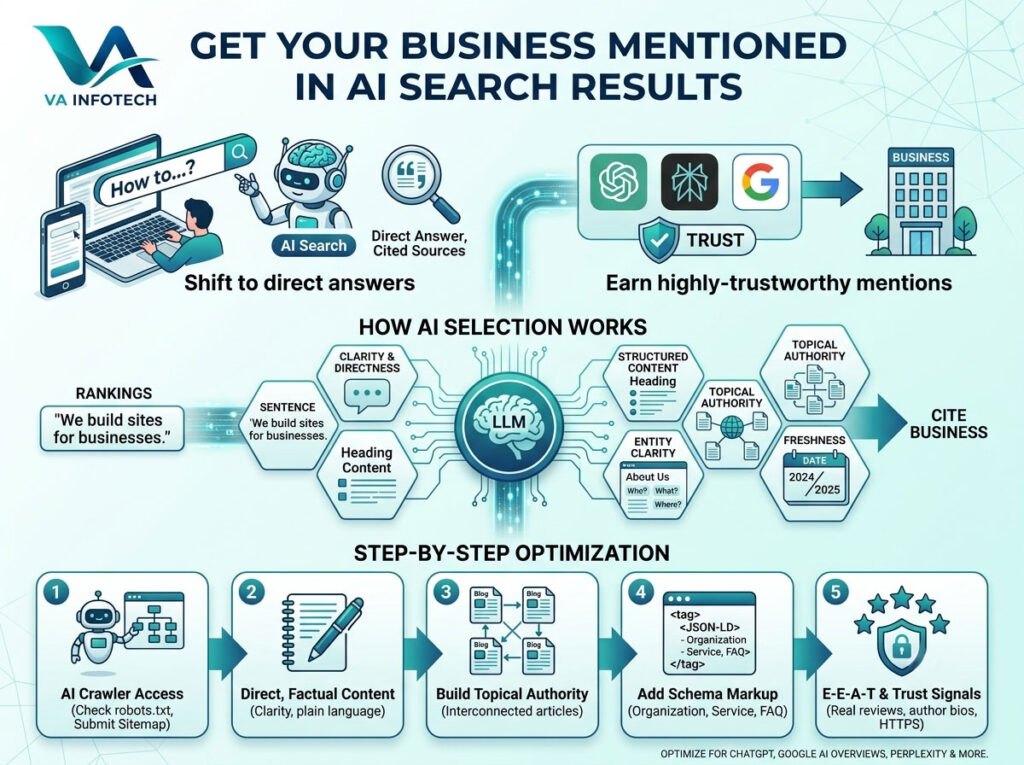
Search is changing shape. A growing share of your potential customers aren’t typing keywords into Google anymore — they’re asking ChatGPT, Perplexity, or Google’s AI Overviews a full question and expecting a direct answer, often with a handful of sources cited alongside it. If your business isn’t one of those sources, you’re invisible at the exact moment someone is deciding who to buy from. This isn’t a future problem. It’s already reshaping how people discover local services, compare software, and vet vendors. The businesses showing up inside AI-generated answers today are the ones building visibility now — before it becomes the default way people search. This guide walks through exactly how AI search results work, what large language models look for before citing a source, and the concrete steps you can take to get your business mentioned by name. What Are AI Search Results, and Why Do They Matter? AI search results are the answers generated by tools like ChatGPT, Google AI Overviews, Perplexity, and Microsoft Copilot when someone asks a question. Instead of returning ten blue links, these tools synthesize an answer from multiple sources and often cite — or simply mention — the businesses and websites that informed that answer. The shift matters for three reasons: If you’ve already invested in a properly built, technically sound website, you’re closer to AI visibility than you might think. If your site was thrown together years ago and never revisited, this is a good moment for a website redesign before you tackle AI optimization on top of it. How AI Search Actually Chooses What to Cite Unlike traditional search engines, large language models aren’t ranking pages by keyword density or backlink count alone. They’re evaluating a different mix of signals: 1. Clarity and directness. AI models extract information more easily from plain, declarative sentences than from vague or overly promotional copy. A sentence like “Va Infotech builds custom WordPress and Shopify websites for businesses in Ahmedabad” is far easier for an AI system to lift and cite than three paragraphs of marketing language saying the same thing indirectly. 2. Structured, well-organized content. Clear headings, short paragraphs, bullet points, and logically nested sections make it easier for AI crawlers to parse what your page is actually about — and to extract a clean, citable snippet. 3. Topical authority. A single article rarely earns a citation on its own. AI models favor sites that demonstrate consistent, in-depth expertise across a topic cluster — multiple interconnected pages that all reinforce the same subject matter. 4. Entity clarity. AI systems think in terms of entities — your business, your services, your location, the industries you serve — not isolated keywords. The more clearly and consistently your site explains who you are, what you do, and who you serve, the easier it is for a model to confidently associate your business with a query. 5. Freshness. AI tools weight recently updated, accurate content more heavily than stale pages. A blog post from 2019 that’s never been revisited is a weaker citation candidate than one updated this year. 6. Trust signals. Author bios, transparent business information, secure hosting (HTTPS), genuine customer reviews, and citations from other credible sites all feed into whether an AI system treats your content as trustworthy enough to reference. Step-by-Step: How to Optimize Your Business for AI Search 1. Make Sure AI Crawlers Can Actually Access Your Site Before anything else, confirm that AI systems can technically reach and read your content: This is foundational technical SEO work, and if you’ve never had it checked, it’s worth running a proper technical SEO audit before layering AI-specific optimization on top. 2. Write in Clear, Citable Language Go through your key pages — homepage, service pages, and top blog posts — and rewrite vague, adjective-heavy sentences into direct, factual statements. Front-load the answer at the top of each section instead of building up to it. If someone asks “what does this business do,” the answer should be obvious within the first two or three sentences of the relevant page, not buried three paragraphs down. 3. Build Topical Authority With Connected Content One well-optimized page is rarely enough. AI models favor businesses that cover a subject from multiple angles across several interlinked pages. If AI visibility and search are relevant to your business, that might mean publishing content across: At Va Infotech, this is essentially what our dedicated Large Language Model SEO service is built around — helping businesses build exactly this kind of interconnected, AI-readable content structure rather than a single isolated blog post. 4. Add Structured Data (Schema Markup) Schema markup explicitly tells search engines and AI systems what your content means — this is a business, this is a service, this is a review, this is an FAQ — rather than leaving them to infer it. At minimum, implement: This is a small technical change with an outsized impact on how confidently AI systems can identify and cite your business. 5. Strengthen Trust Signals (E-E-A-T) AI systems, much like modern Google algorithms, weigh Experience, Expertise, Authoritativeness, and Trustworthiness heavily. Concretely, that means: If you’re not sure where your site currently stands on trust and credibility signals, our SEO audit checklist covers exactly what to look for. 6. Write Content Around Real Questions, Not Just Keywords AI search queries are conversational. People ask full questions — “which website development company should I hire in India,” not “web development company India.” Structure your content to directly answer natural-language questions: 7. Don’t Neglect Local Signals If your business serves a specific city or region, AI tools increasingly pull from the same local signals that power “near me” search results — consistent business listings, Google Business Profile accuracy, and local citations. Our local SEO checklist for Indian businesses walks through exactly how to get these fundamentals right. 8. Keep Content Fresh Set a recurring schedule — quarterly is reasonable for most businesses — to revisit and update your highest-value pages: refresh statistics, correct outdated information, and

How Often Should a Business Website Be Updated?
Web Design

How Often Should a Business Website Be Updated?

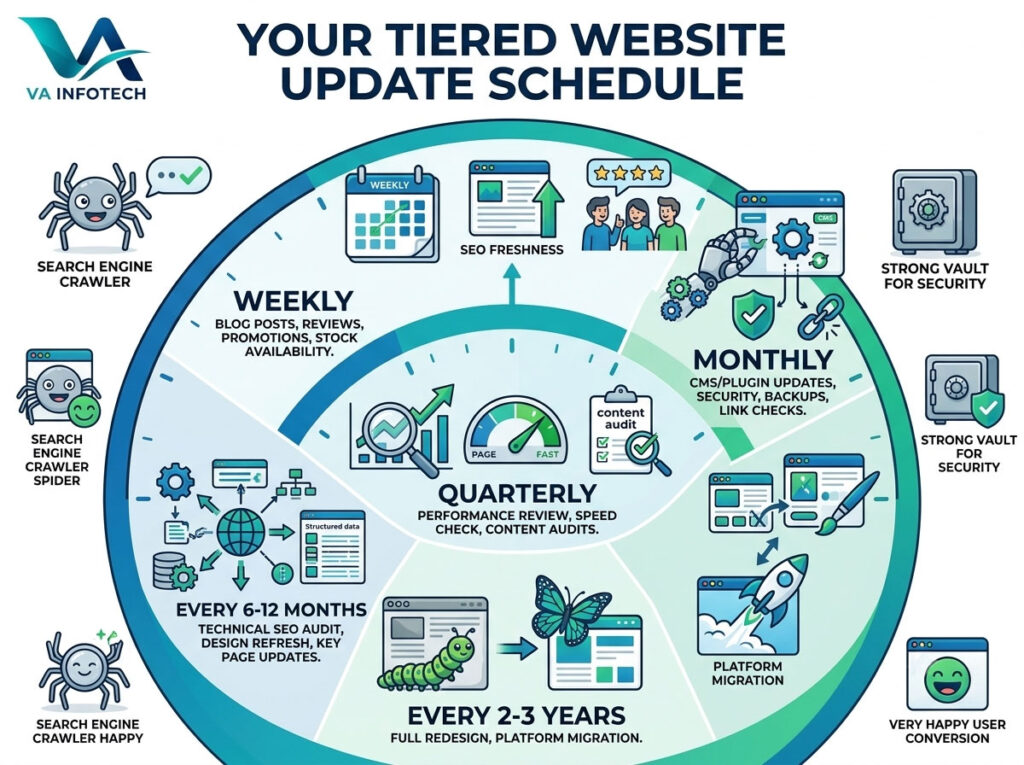
Most business owners only think about their website twice: the day it launches, and the day something breaks. In between, the site quietly sits there — same homepage banner, same team photo, same “2023” copyright in the footer — while the business behind it has changed completely. That gap is more expensive than it looks. An outdated website doesn’t just look neglected to visitors; it tells search engines the same thing. Google favors websites that show real signs of activity, relevance, and maintenance. A site that hasn’t been touched in two years is competing against sites that are updated weekly, and it’s losing ground even if nobody notices immediately. So how often should a business website actually be updated? There isn’t a single number that fits every business, but there is a practical framework: some things need attention every week, some every month, some every quarter, and a few only every few years. This guide breaks all of it down. Why Website Update Frequency Matters More Than You Think A website isn’t a brochure you print once. It’s closer to a storefront — and storefronts that never change their window display, restock their shelves, or fix a broken sign eventually stop attracting foot traffic. There are three main reasons update frequency matters: 1. Search engines reward freshness. Google’s crawlers revisit active websites more often than stale ones. Frequent, meaningful updates (not just changing a comma) signal that your site is maintained and relevant, which can support both crawl frequency and rankings. 2. Security risks increase over time. Outdated CMS versions, plugins, and themes are one of the most common ways business websites get hacked. Every month a site goes without updates is another month those vulnerabilities sit exposed. 3. User expectations shift fast. Visitors judge credibility in seconds. Outdated design trends, broken layouts on newer phone models, or pricing and contact information that’s no longer accurate all quietly damage trust — and conversions. If you want a deeper look at the technical side of this, our guide on how to perform a technical SEO audit step by step covers how search engines evaluate a site’s health beyond just content freshness. The Short Answer: A Tiered Update Schedule Instead of asking “how often should I update my website,” it’s more useful to ask “which parts of my website need which update frequency.” Here’s the framework we recommend to clients: Frequency What to Update Weekly Blog content, social proof, promotions, stock/availability Monthly Plugin/CMS updates, broken link checks, analytics review Quarterly SEO performance review, page speed check, content audits Every 6–12 months Technical SEO audit, design refresh of key pages, imagery Every 2–3 years Full website redesign or platform migration Let’s break each of these down in detail. Weekly Updates: Keep the Site Feeling Alive Weekly updates are usually the lowest-effort, highest-frequency category, and they matter more than most businesses assume. What belongs here: Publishing consistently — even one solid blog post a week — gives search engines a reason to crawl your site more often and gives return visitors a reason to come back. It also compounds over time: a business with 150 published articles has far more ways to rank for long-tail search queries than a business with 12. If content strategy is where you’re stuck, this is also where SEO and content work overlap directly with our Search Engine Optimization services, which focus on exactly this kind of ongoing content cadence. Monthly Updates: Protect What You’ve Built Monthly maintenance is where most businesses fall behind — not because it’s difficult, but because nothing visibly breaks until it suddenly does. What belongs here: Skipping these for a few months rarely causes an immediate problem. Skipping them for a year is how businesses end up with a hacked site, a broken checkout nobody noticed for weeks, or a contact form that’s been silently failing since March. This category is essentially what Website Maintenance as a service exists to solve — ongoing security updates, backups, monitoring, and troubleshooting so nothing quietly rots in the background. Quarterly Updates: Step Back and Measure Every three months, it’s worth pulling out of day-to-day content and maintenance to look at performance with fresh eyes. What belongs here: Quarterly is also a good cadence to revisit keyword targeting. Search intent shifts, competitors publish new content, and pages that ranked well a year ago can quietly slide if nothing is refreshed. A short content refresh — updating statistics, adding a missing section, tightening a title tag — can often recover rankings faster than writing something new from scratch. Every 6–12 Months: The Deeper Technical Pass This is where a lighter check-in isn’t enough anymore, and a full technical review earns its place. What belongs here: We put together a full walkthrough of this process in our guide on how to perform a technical SEO audit step by step, and a broader version in the complete SEO audit checklist for business websites if you want to check more than just the technical layer. If your business has also expanded into new products, services, or markets since launch, this is usually the point where a partial redesign — new service pages, updated navigation, refreshed messaging — makes more sense than trying to patch the existing structure indefinitely. Every 2–3 Years: The Full Redesign Conversation Even with consistent weekly, monthly, and quarterly upkeep, every website eventually reaches a point where incremental updates aren’t enough. Design trends shift, technology stacks age, page speed expectations rise, and businesses simply outgrow the site they launched with. Signs it’s time for a full redesign rather than another round of updates: We cover this in more depth in how to know when your business website needs a redesign, including the specific signals worth tracking before committing to a full rebuild. If you do decide a redesign is the right move, the biggest risk isn’t the new design itself — it’s losing existing SEO value during the transition. Our Website Redesign service is built specifically around protecting

Google Ads vs Meta Ads: Where Should Your Business Advertise?
Web Design

Google Ads vs Meta Ads: Where Should Your Business Advertise?

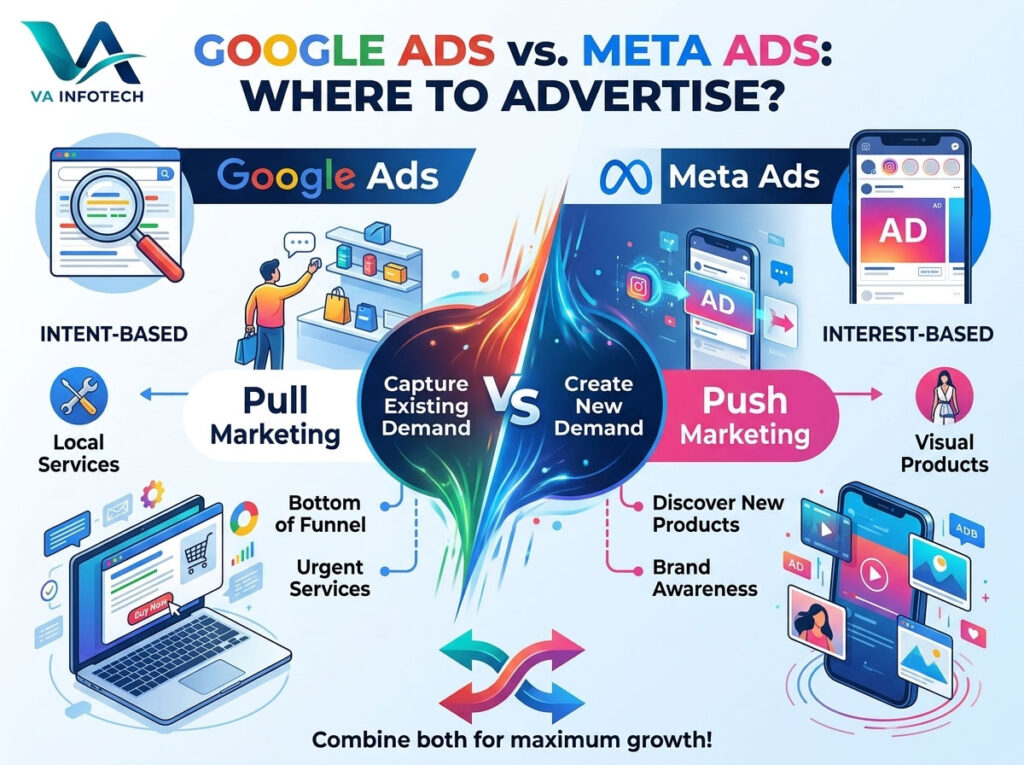
Every business with a marketing budget eventually asks the same question: Google Ads or Meta Ads? It sounds like a simple either/or decision, but the two platforms work in almost opposite ways — one captures people who are already looking for what you sell, the other puts your business in front of people who weren’t looking at all. Choosing wrong doesn’t just waste budget; it can quietly starve a campaign that would have worked fine on the other platform. This guide breaks down exactly how each platform works, what they cost in 2026, where each one wins, and how to decide — including when running both at once is actually the smarter move. The Core Difference: Intent vs. Discovery Before comparing costs and features, it’s worth understanding the fundamental difference in how these two platforms find customers for you. Google Ads is intent-based advertising. Someone types “emergency plumber near me” or “best CRM software for small teams” into Google, and your ad appears because you bid on that exact phrase. The person is already in problem-solving mode — they want a solution now, and you’re offering to be it. This is often called “pull” marketing: the customer pulls the ad toward them through their own search behavior. Meta Ads is interest-based advertising. Someone is scrolling Instagram or Facebook, not thinking about your product at all, and your ad interrupts their feed based on their demographics, interests, past behavior, or similarity to your existing customers. This is “push” marketing: you push the offer toward someone who wasn’t necessarily searching for it. Neither approach is better in the abstract — they solve different problems. Google Ads is built to capture demand that already exists. Meta Ads is built to create demand and awareness where none existed yet. Google Ads vs Meta Ads: Cost Comparison for 2026 Cost is usually the first question business owners ask, and it’s also the most misleading number if you look at it in isolation. Metric Google Ads (Search) Meta Ads (Facebook/Instagram) Average CPC Roughly $2–5, higher in competitive industries Roughly $0.70–1.20 Average CTR 3–7% depending on industry 1–2% across placements Average conversion rate 4–8% 1–3% Average cost per lead/acquisition $40–90, varies heavily by industry $25–45, varies heavily by industry Minimum realistic monthly budget ₹25,000–75,000 for most SMBs ₹15,000–50,000 for most SMBs At a glance, Meta looks like the cheaper platform — and per click, it usually is. But cost-per-click isn’t the number that pays your bills; cost-per-customer is. Because Google traffic arrives with existing purchase intent, it tends to convert at a noticeably higher rate, which often closes the cost gap by the time you look at actual cost-per-lead or cost-per-sale. Meta, meanwhile, wins on cost-per-impression and cost-per-follower, making it far more efficient for pure reach and brand-building goals. The honest takeaway: don’t compare CPC alone. Compare cost-per-outcome — the metric tied to what you actually want (a sale, a lead, a booked call) — and that number depends heavily on your industry, offer, and how well the campaign is built, not just which platform you pick. Where Google Ads Wins 1. High-intent, bottom-of-funnel searches. If someone is actively typing “buy,” “price,” “near me,” or a specific product name into Google, they’re close to a decision. Google Ads puts you directly in front of that moment. 2. Local service businesses. Plumbers, dentists, lawyers, real estate agents, and repair services thrive on Google Ads because customers search for these services only when they urgently need them — and Google Local Service Ads and Search campaigns capture that moment precisely. 3. B2B and long-consideration purchases. Software, industrial equipment, and professional services with longer sales cycles tend to perform better on Google, where buyers are actively researching solutions, rather than Meta, where they’d need to be interrupted mid-scroll to even think about the category. 4. Measurable, direct-response campaigns. Google’s auction and reporting are built around measurable actions — calls, form fills, purchases — making it easier to calculate a clean return on ad spend for performance-driven businesses. Where Meta Ads Wins 1. Brand awareness and new-audience discovery. If your target customer doesn’t know they need your product yet, Google Ads can’t help — nobody is searching for a problem they don’t know they have. Meta’s interest and behavior targeting can put your brand in front of exactly the right audience before they ever search for it. 2. Visually driven products. Fashion, home decor, food, fitness, beauty, and lifestyle brands benefit enormously from Meta’s image, video, carousel, and Reels ad formats — formats Google’s primarily text-based Search ads simply don’t offer. 3. Retargeting website visitors. Someone browsed your site and left without buying. Meta Ads is exceptionally strong at bringing that visitor back with a tailored ad in their feed, often at a fraction of the cost of a fresh Google click. 4. Lower budget entry point. Because CPCs and CPMs are generally lower, Meta lets smaller businesses test creative, audiences, and offers without needing as large a budget commitment as a competitive Google Search auction. 5. Community and engagement building. Comments, shares, and social proof compound on Meta in a way they simply don’t on a Google Search ad — useful for businesses that want ongoing brand presence, not just a one-time click. A Quick Decision Framework If you only have budget for one platform right now, ask these questions: Why Most Growing Businesses Eventually Use Both In practice, the strongest-performing accounts we manage rarely pick one platform and ignore the other — they use each for what it does best. A typical effective structure looks like this: This combination consistently outperforms either platform running alone, because it matches the ad to where the customer actually is in their decision journey — instead of assuming every customer is either already searching or needs to be introduced to your brand from zero. Common Mistakes Businesses Make Choosing Between Them Frequently Asked Questions Is Google Ads or Meta Ads better for a small business? It depends on what you sell and

How to Build an Ecommerce Website That Converts
Web Design

How to Build an Ecommerce Website That Converts

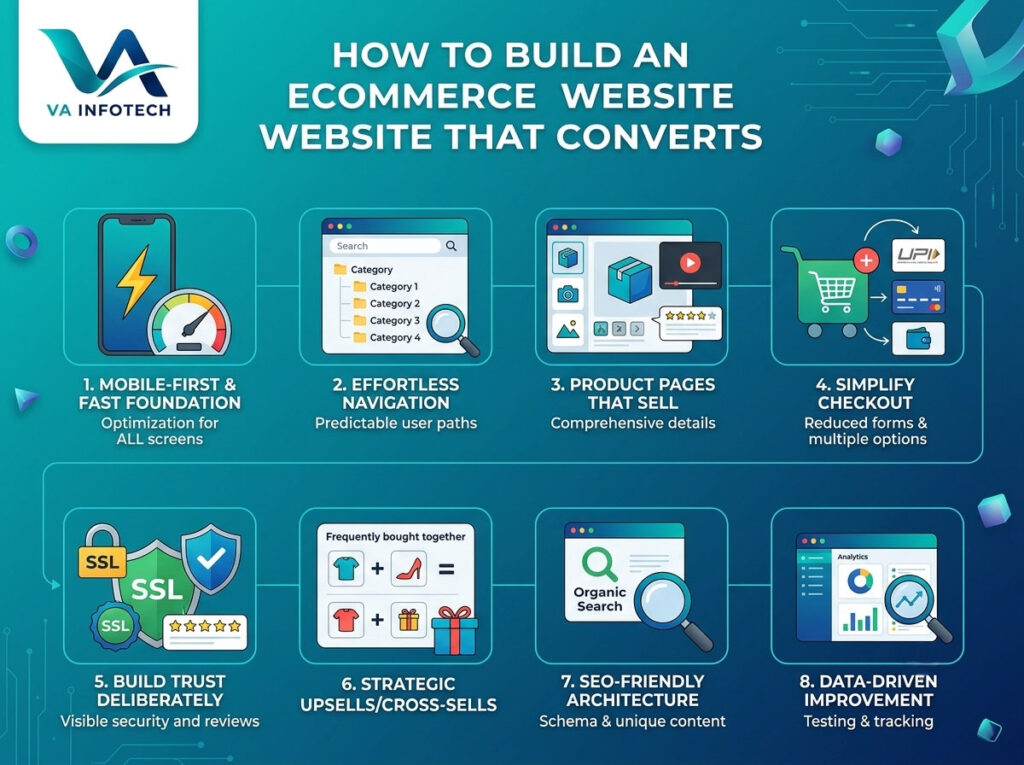
Anyone can launch an online store today. Platforms like Shopify, WooCommerce, and Magento have made it possible to have a live storefront within a weekend. But having a store and having a store that converts are two completely different things. Most ecommerce websites lose the majority of their visitors before checkout — not because the product is wrong, but because the website itself gets in the way. Slow load times, confusing navigation, a checkout that asks for too much, or simply nothing that builds enough trust to hand over a credit card number. Traffic isn’t the bottleneck for most stores. Conversion is. This guide walks through exactly what separates a store that quietly bleeds visitors from one that consistently turns them into customers — covering design, technical performance, checkout, trust signals, content, and the SEO foundation that gets people there in the first place. Why Most Ecommerce Websites Don’t Convert Before getting into what works, it’s worth understanding why so many stores underperform. A few patterns show up again and again: A converting ecommerce website fixes all of this systematically — not as an afterthought, but as the foundation of how the site is built. 1. Start With a Fast, Mobile-First Foundation More than half of ecommerce traffic today comes from mobile devices, and that share keeps growing. If your store isn’t built mobile-first, you’re optimising for a shrinking slice of your actual audience. What this means in practice: Speed isn’t just a UX nicety — it’s also a ranking factor. A slow site quietly loses both the sale and the SEO value that could have brought the next hundred visitors for free. If your current store hasn’t been evaluated for this recently, it’s worth pairing a speed audit with a broader look at Website Design fundamentals, since the two are deeply connected. 2. Make Navigation Effortless The best ecommerce navigation is the kind a visitor never has to think about. A few principles that consistently work: Good navigation isn’t about being clever. It’s about being predictable enough that the visitor’s brain doesn’t have to work to find what it wants. 3. Design Product Pages That Sell Your product page is doing the job a salesperson would do in a physical store — except it has to do it without a human in the room. That means it needs to answer every reasonable question a buyer might have, proactively. A high-converting product page typically includes: If your store sells across multiple categories, this is also where thin, templated product descriptions quietly hurt you — both with customers and with search engines, which increasingly reward genuinely useful, unique product content over generic copy-paste listings. 4. Simplify Checkout — This Is Where Most Sales Are Lost Checkout abandonment is one of the most consistent, well-documented problems in ecommerce, and it’s almost always fixable. A few changes make an outsized difference: A store that fixes checkout friction alone, without touching anything else, often sees a meaningful lift in completed orders. It’s usually the single highest-leverage place to focus first. 5. Build Trust Deliberately, Not Accidentally Online shoppers are cautious by default, especially with a store they haven’t bought from before. Trust isn’t something that happens automatically — it has to be designed into the site. Effective trust signals include: None of these individually make or break a sale, but together they answer the unspoken question every new visitor is asking: “Is this a real business I can safely buy from?” 6. Use Strategic Upsells and Cross-Sells — Without Being Pushy Once the fundamentals are solid, well-placed upsells and cross-sells can meaningfully increase average order value without hurting conversion, as long as they’re relevant and not aggressive: The line between helpful and annoying here is relevance. A recommendation that makes sense increases trust; a random, unrelated upsell does the opposite. 7. Build Your Ecommerce SEO Foundation Into the Site, Not On Top of It A beautifully converting store is only valuable if people actually find it. Ecommerce SEO has its own particular challenges — thousands of product pages, category structures, and duplicate content risks that a typical blog doesn’t face — so it needs to be built into the site architecture from the start, not bolted on afterward. Key foundations to get right: If your store’s foundation was built purely for launch speed rather than long-term search visibility, it’s worth running it through a proper Search Engine Optimization audit — this is exactly the kind of gap that quietly limits organic growth for months without an obvious cause. Our Complete SEO Audit Checklist for Business Websites is a useful starting point if you want to check this yourself first. It’s also increasingly worth preparing for AI-driven shopping discovery — tools like AI Overviews and conversational assistants are starting to influence product research the way traditional search results once did exclusively. Our guide on Large Language Model SEO covers what that shift means in more detail. 8. Test, Measure, and Keep Improving A converting ecommerce website isn’t a one-time build — it’s an ongoing process. The stores that keep improving conversion rates over time are the ones actively watching their data and testing changes, rather than assuming the site is “done” after launch. Worth tracking consistently: Small, incremental changes — a clearer call-to-action, one fewer checkout field, a better product photo — compound over time into a meaningfully higher conversion rate. Common Mistakes That Quietly Kill Ecommerce Conversions Most of these aren’t expensive to fix. They’re simply easy to overlook when the focus is on getting the store live rather than on what happens after a visitor actually arrives. How This Fits Into Your Broader Ecommerce Strategy A high-converting website is the foundation, but it works best alongside a few other things: Final Thoughts Building an ecommerce website that converts isn’t about chasing trends or adding every feature available. It’s about systematically removing friction at every stage — from the first page load, to product discovery, to checkout — while giving visitors genuine reasons

Website Redesign Checklist: What to Fix Before Launch
Web Design

Website Redesign Checklist: What to Fix Before Launch

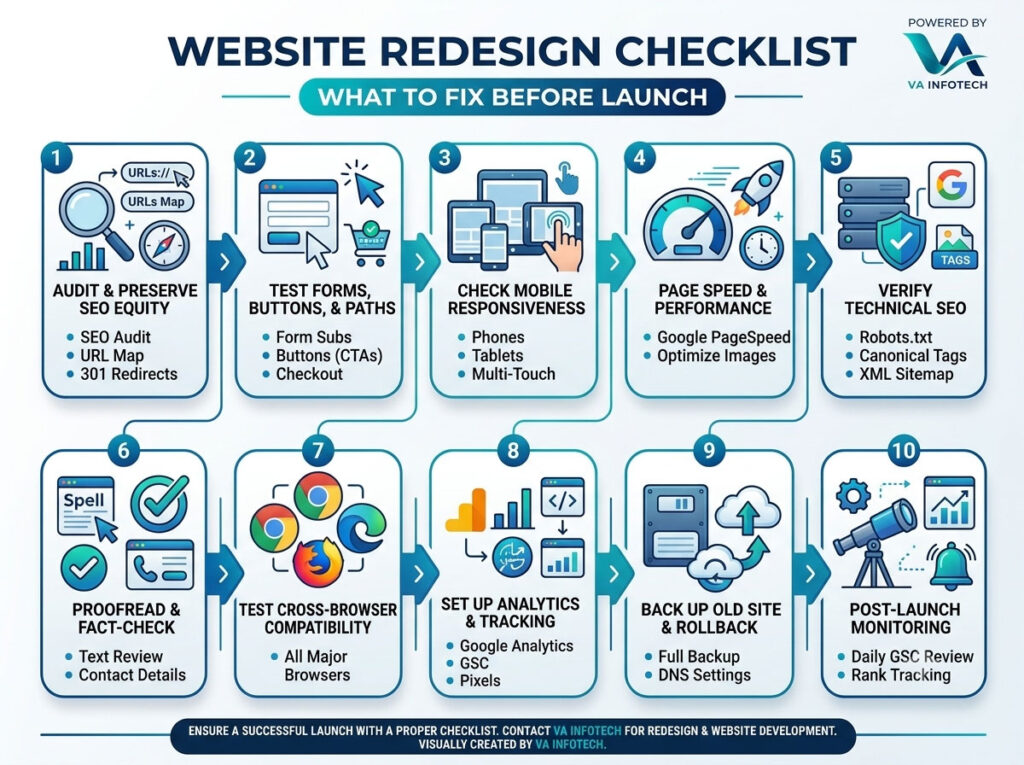
Launching a redesigned website feels like crossing a finish line — but hitting “publish” too early is one of the most common (and costly) mistakes businesses make. A rushed launch can wipe out months of SEO rankings, break critical user flows, and quietly cost you leads for weeks before anyone notices. At VA Infotech, we’ve guided hundreds of businesses through website redesign projects, and almost every disaster we’ve fixed traces back to skipping a pre-launch checklist. This guide walks through everything you need to verify — technically, visually, and strategically — before your new website goes live. Whether you’re redesigning a small business site or a complex eCommerce platform, this checklist will help you launch with confidence instead of crossed fingers. Why a Pre-Launch Checklist Matters A website redesign touches nearly every part of your digital presence: your URL structure, your content, your design system, your SEO equity, and your backend infrastructure. Change any of these carelessly and you risk: None of these problems are theoretical — they happen to real businesses that treat “redesign” as a purely visual upgrade instead of a full technical and strategic migration. A proper checklist turns launch day from a gamble into a controlled, predictable process. 1. Audit and Preserve Your SEO Equity This is the single biggest risk in any redesign, and it deserves top priority. Map every old URL to its new equivalent. Before you touch anything, crawl your existing site and create a complete inventory of live URLs, along with their traffic and backlink data. Every page that’s being renamed, merged, or removed needs a corresponding entry in your redirect map. Set up 301 redirects, not 302s. A 301 redirect tells search engines the move is permanent and passes on nearly all the page’s ranking value. A 302 signals a temporary move and search engines won’t transfer authority the same way. Skipping redirects entirely is the fastest way to turn years of ranking progress into a pile of 404 errors. Preserve your meta titles, descriptions, and header structure wherever the underlying content hasn’t fundamentally changed. If you’re rewriting content anyway, make sure new titles and descriptions still target the keywords that were driving traffic. Keep your XML sitemap accurate and resubmit it in Google Search Console the moment you launch. An outdated sitemap pointing to old URLs will confuse crawlers at exactly the moment you need them to re-index your site quickly. If your redesign involves any significant restructuring, it’s worth having a dedicated Search Engine Optimization review before launch rather than after — fixing a ranking drop is far harder than preventing one. 2. Test Every Form, Button, and Conversion Path Your redesign might look sharper, but if a visitor can’t submit a contact form or complete checkout, none of the visual polish matters. For businesses running an online store, this step is especially critical — a broken checkout during a redesign launch translates directly into lost revenue. Our eCommerce Website Design team treats end-to-end transaction testing as a non-negotiable launch gate, not an afterthought. 3. Check Mobile Responsiveness Across Real Devices Desktop previews lie. A layout that looks perfect on a 27-inch monitor can break entirely on a mid-range Android phone or an older iPad. With mobile traffic making up the majority of visits for most industries, a mobile-first review isn’t optional polish — it’s the primary experience most of your visitors will actually have. 4. Run a Full Page Speed and Performance Check A beautiful redesign that loads slowly will lose visitors before they ever see it. Page speed also directly affects search rankings, so this step serves both user experience and SEO. 5. Verify Technical SEO Fundamentals Beyond redirects, a handful of technical details are easy to overlook but hugely consequential: It’s worth remembering that technical SEO increasingly extends beyond traditional search engines. AI-driven answer engines and chat-based search tools are becoming a real source of discovery traffic, so structuring your content clearly for both crawlers and language models pays off. Our guide on how to optimize your website for ChatGPT search covers this shift in more depth, and our Large Language Model SEO service is built specifically around it. 6. Proofread and Fact-Check Every Page Design teams focus on layout; content often gets a final pass far too late. Before launch: 7. Test Cross-Browser Compatibility Not everyone browses in the same environment you designed and tested in. Check your redesigned site in: Pay particular attention to custom fonts, animations, and any JavaScript-heavy interactive elements — these are the most common places where cross-browser rendering breaks down. 8. Set Up Analytics and Tracking Before Day One It’s remarkably common for a new site to launch with tracking code missing or misconfigured — meaning the first days or weeks of post-launch data simply don’t exist. If paid traffic is part of your growth strategy, this step is especially urgent — a gap in conversion tracking during a live PPC Setup and Marketing campaign can silently waste ad spend for days before anyone notices the numbers look off. 9. Back Up the Old Site and Prepare a Rollback Plan Even with thorough testing, launches occasionally go wrong. Before you flip the switch: 10. Plan for Post-Launch Monitoring Launch day isn’t the finish line — it’s the start of a monitoring period. For at least the first two weeks: Ongoing technical health doesn’t stop after the first two weeks, either. Many businesses fold routine monitoring into an ongoing Website Maintenance plan so that performance, security, and uptime stay consistent long after the initial launch excitement fades. Bringing It All Together A successful website redesign isn’t just about a fresh coat of visual paint — it’s a coordinated technical migration that touches SEO, user experience, performance, and infrastructure all at once. Treating pre-launch testing as a formal checklist, rather than a quick once-over, is what separates redesigns that grow a business from redesigns that quietly undo years of progress. If you’re planning a redesign and want a team that treats

How to Choose a Website Development Company in India
Web Design

How to Choose a Website Development Company in India

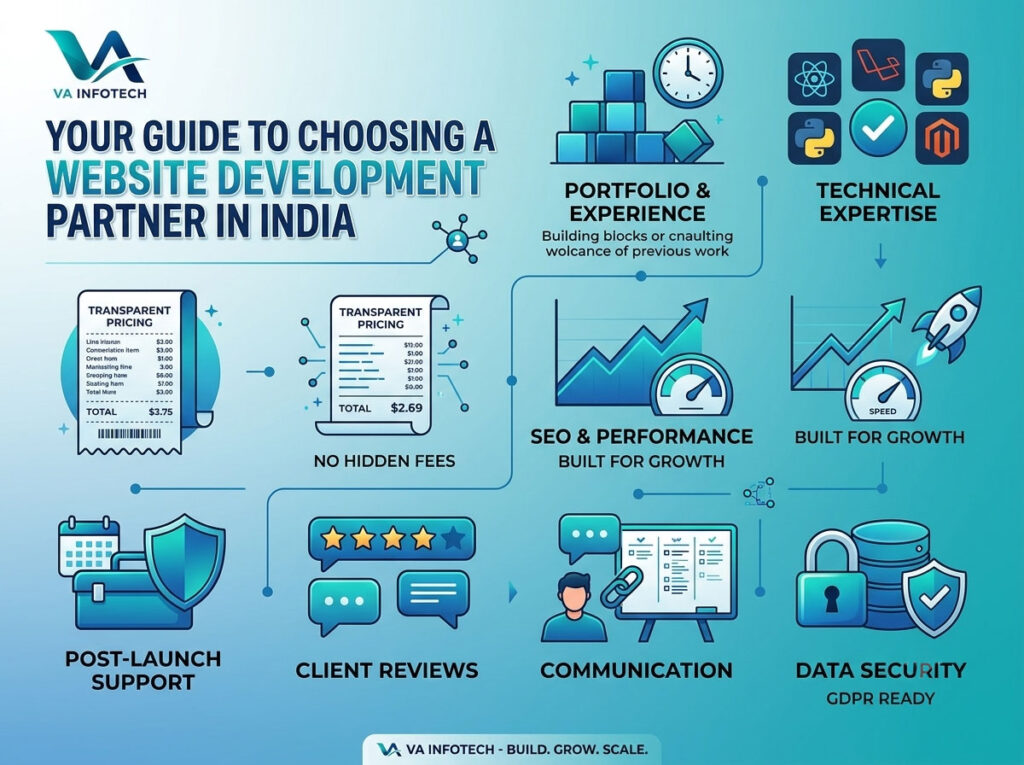
Your website is often the first impression your business makes on a potential customer. Whether you’re a startup founder, an established SME, or an enterprise looking to scale digitally, the company you hire to build that website can make or break your online presence. With thousands of web development agencies across India offering everything from basic static sites to complex, AI-powered platforms, choosing the right partner can feel overwhelming. At Va Infotech, we’ve worked with businesses across industries — from local retailers to global enterprises — and we’ve seen firsthand what separates a website that drives real business results from one that just sits online looking pretty. In this guide, we’ll walk you through exactly how to choose a website development company in India, the red flags to avoid, and the questions you should be asking before you sign any contract. Why India Is a Top Destination for Website Development India has become one of the world’s leading hubs for web and software development, and for good reason: That said, not every web development company in India delivers the same level of quality, transparency, or long-term support. This is exactly why due diligence matters before you commit to a development partner. Signs You Need a Professional Website Development Company Before diving into the selection criteria, it helps to recognize when DIY website builders or freelancers are no longer enough: If any of this sounds familiar, it’s time to look for a dedicated website development company rather than a one-person freelance setup or a generic template builder. Key Factors to Consider When Choosing a Website Development Company in India 1. Portfolio and Industry Experience The single best indicator of a company’s capability is its past work. Look for: A company that has built websites for businesses like yours will understand your industry’s specific challenges — whether that’s inventory management for an e-commerce store or appointment scheduling for a clinic. 2. Technical Expertise and Technology Stack Not all websites are built the same way. Ask potential partners about the technologies they specialize in: A capable website development company in India should be able to recommend the right technology for your specific business goals — not just push whatever they’re most comfortable building. 3. Transparent Pricing and Clear Contracts One of the most common complaints businesses have about outsourced development is hidden costs. Before signing any agreement, make sure you get: Reliable agencies, including our team at Va Infotech, provide upfront pricing with no hidden charges, so you know exactly what you’re paying for at every stage. 4. SEO and Performance Optimization Knowledge A beautiful website that doesn’t rank on Google or load quickly is a wasted investment. Your development partner should build with SEO and performance in mind from day one: Ask any prospective company how they approach technical SEO during development — not just what they’ll charge you for a separate SEO package afterward. 5. Post-Launch Support and Maintenance A website isn’t a one-time project — it needs ongoing updates, security patches, backups, and occasional feature additions. Before you hire a company, ask: A trustworthy development partner sees the relationship as long-term, not just a one-off transaction. 6. Client Reviews and Testimonials Don’t just rely on what a company says about itself — check independent sources: Consistent, detailed, and verifiable reviews are a much stronger signal of reliability than polished testimonials on the agency’s own website alone. 7. Communication and Project Management Process Poor communication is one of the top reasons web development projects fail or run over budget. Look for a company that: If a company is slow or vague in the pre-sales stage, that’s often a red flag for what to expect once the contract is signed. 8. Data Security and Compliance Especially if your website will handle payments, customer data, or sensitive information, ensure the company follows proper security protocols: Red Flags to Watch Out For While evaluating companies, be cautious if you notice: Questions to Ask Before Hiring a Website Development Company Here’s a quick checklist you can use during your evaluation calls: A confident, experienced agency will have clear, specific answers to every one of these questions. Why Businesses Choose Va Infotech as Their Website Development Partner At Va Infotech, we combine technical expertise with a business-first approach to web development. Here’s what sets us apart: We understand that your website is a long-term business asset — not just a design project — and we build accordingly. Explore Our Services and Related Resources If you’re ready to take the next step, explore more about what we offer: (Note: Please update the internal links above to match your actual live page URLs and blog slugs on vainfotech.com before publishing — I’ve used a logical, SEO-friendly URL structure based on your domain, but you’ll want to confirm these against your real site map and swap in links to your actual service/category pages and existing blog posts.) Frequently Asked Questions 1. How much does it cost to hire a website development company in India? Costs vary widely based on complexity — a basic business website can start around ₹15,000–₹40,000, while custom e-commerce or web application projects can range from ₹75,000 to several lakhs, depending on features and integrations. 2. How long does it take to build a website? A simple business website typically takes 2–4 weeks, while complex e-commerce platforms or custom web applications can take 8–16 weeks or more, depending on scope. 3. Should I choose a freelancer or an agency? Freelancers can be cost-effective for very simple projects, but agencies like Va Infotech offer team-based accountability, ongoing support, and broader technical expertise — which matters more as your website’s complexity grows. 4. Will my website be mobile-friendly? Any reputable website development company should build with a mobile-first, responsive approach by default, since the majority of web traffic today comes from mobile devices. 5. Do I need to provide content, or will the company write it for me? Most agencies can assist with content writing and copywriting

How to Perform a Technical SEO Audit Step by Step
Web Design

How to Perform a Technical SEO Audit Step by Step

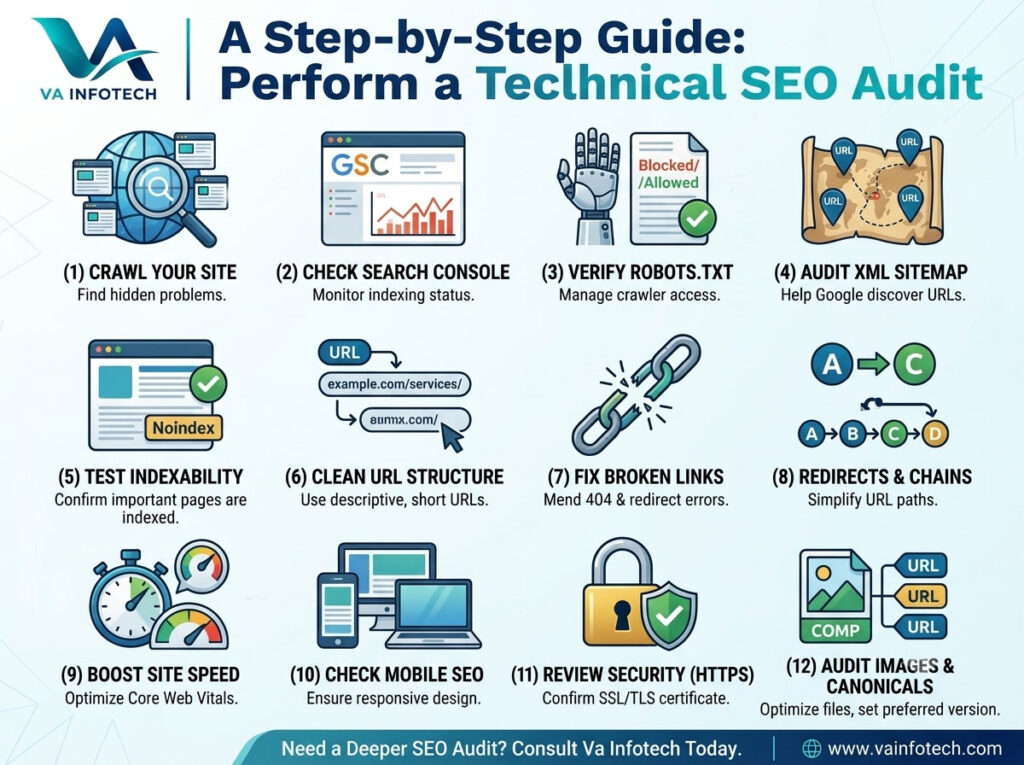
A website can look modern, load reasonably well, and still struggle to rank on Google because of technical SEO problems hiding underneath the surface. Broken links, incorrect redirects, poor website architecture, duplicate URLs, slow pages, indexing problems, missing structured data, and mobile usability issues can all affect how search engines discover, understand, and index your website. That is why a technical SEO audit should be an important part of every SEO strategy. In this guide, Va Infotech explains how to perform a technical SEO audit step by step, even if you are not an SEO expert. You will learn what to check, which problems matter most, and how to create a practical technical SEO checklist for your website. If you want to understand the bigger picture first, you can also read our Complete SEO Audit Checklist for Business Websites. What Is a Technical SEO Audit? A technical SEO audit is a detailed examination of the technical elements of a website that can affect search engine crawling, indexing, rankings, performance, and user experience. Unlike a content audit, which focuses mainly on keywords and content quality, a technical SEO audit looks at the foundation of your website. A technical audit normally checks: The goal is simple: make it easier for search engines to crawl, understand, and index your website while providing a better experience for visitors. Why Is a Technical SEO Audit Important? Search engines need to access and understand your website before individual pages can compete effectively in search results. Imagine creating an excellent blog post but accidentally blocking Google from crawling it. Your content may be valuable, but the technical setup prevents it from reaching its full SEO potential. A technical SEO audit helps identify these hidden problems. For example, your audit may discover: Fixing these issues creates a stronger technical foundation for your SEO strategy. Step 1: Crawl Your Website The first step in a technical SEO audit is crawling the website. A crawler simulates how search engine bots discover pages and links throughout your website. Popular SEO crawling tools include Screaming Frog, Semrush, Ahrefs and similar platforms. During the crawl, look for: For a small website, you can manually inspect important pages. For a larger website, a crawling tool can save significant time. The important point is not simply to collect errors. You need to determine which errors actually affect important pages and organic search performance. Step 2: Check Google Search Console Google Search Console should be one of the most important tools in your technical SEO audit. Open your verified property and review: The indexing report is particularly useful. Look for pages that Google has discovered but has not indexed. Not every excluded page is a problem. Some pages should intentionally remain outside Google’s index. For example, you may not want search engines indexing: The goal is to determine whether important commercial and informational pages are indexed correctly. Step 3: Check Your Robots.txt File Your robots.txt file provides instructions to search engine crawlers about which areas of a website they may or may not crawl. Usually, the file can be found at: yourdomain.com/robots.txt Check whether important directories or pages are accidentally blocked. For example, blocking an important folder containing product, service, or blog pages could prevent search engines from properly crawling those resources. However, remember that robots.txt should not be treated as a universal method for removing pages from Google’s index. During an audit, compare your robots.txt rules with the pages you actually want Google to crawl and index. Step 4: Check Your XML Sitemap An XML sitemap helps search engines discover important URLs on your website. Your sitemap should generally contain: Avoid filling your sitemap with: After checking the sitemap, make sure it has been submitted through Google Search Console. A common technical SEO mistake is allowing an old sitemap to remain active after a website redesign or URL restructuring. If your website has recently been redesigned, the sitemap deserves extra attention. Step 5: Check Website Indexability Crawling and indexing are not exactly the same thing. A page can exist on your website but still not be eligible for indexing. Check important pages for: Your most valuable pages should generally be accessible, indexable, internally linked, and associated with the correct canonical URL. Create a list of your most important pages and verify each one individually. For a business website, this could include: Step 6: Analyze Your URL Structure A clean URL structure makes websites easier for users and search engines to understand. For example: example.com/seo-services/ is generally easier to understand than: example.com/page?id=48392 Keep URLs: Avoid unnecessarily complicated URL structures. If you change an existing URL, remember to properly redirect the old URL to the new one. Do not change URLs simply to insert keywords if the existing URL already performs well. SEO improvements should be based on a genuine benefit rather than changing URLs for the sake of changing them. Step 7: Find and Fix Broken Links Broken links create poor user experiences and can make website maintenance more difficult. During your technical SEO audit, look for: Internal broken links should receive particular attention because they can prevent users and crawlers from reaching useful pages. If a page has permanently moved, use an appropriate 301 redirect where necessary. If a page has been intentionally removed and there is no useful replacement, you should not automatically redirect everything to the homepage. The solution should match the user’s intent and the original page. Step 8: Check Redirects Redirects are an essential part of technical SEO, especially after a website redesign or migration. Check for: Redirect chains Example: A → B → C → D Ideally, the old URL should redirect directly to the final relevant URL. Redirect loops Example: A → B → A This can prevent the page from loading correctly. Incorrect redirects An old service page should generally redirect to the most relevant new service page rather than an unrelated homepage. VA Infotech’s Website Redesign service specifically focuses on URL mapping and protecting existing SEO

How to Optimize Your Website for ChatGPT Search
Web Design

How to Optimize Your Website for ChatGPT Search

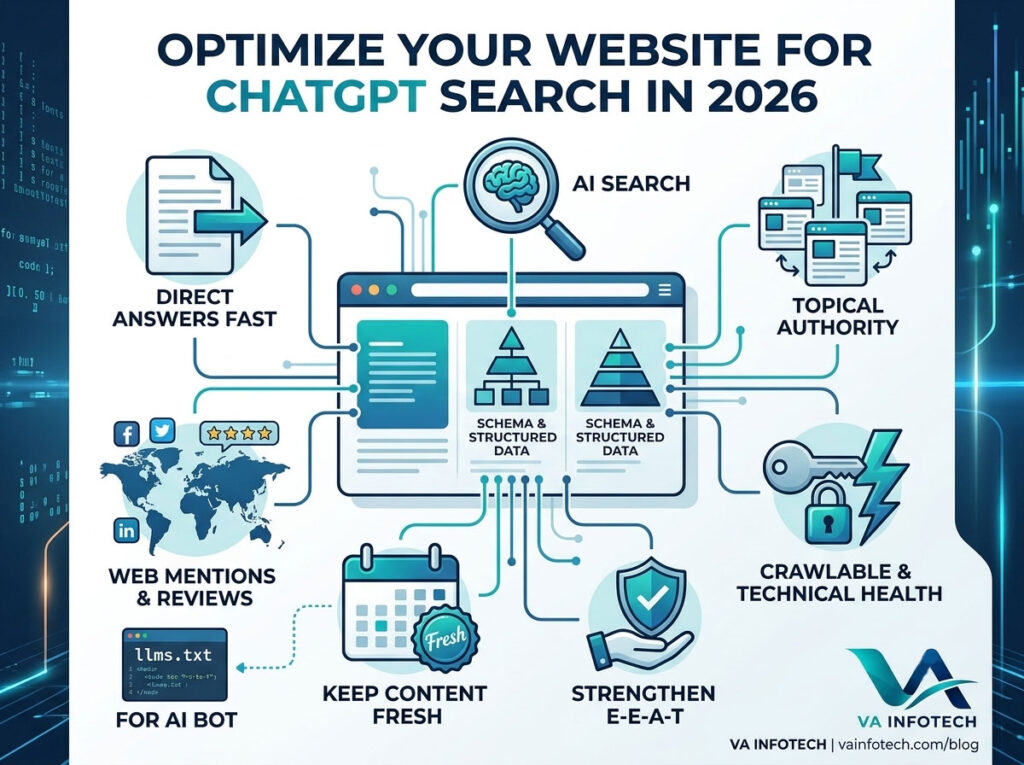
For twenty years, ranking well meant one thing: show up on page one of Google. That’s no longer the whole picture. A growing share of people now ask ChatGPT directly instead of typing a query into a search bar — “what’s the best website design company in Ahmedabad,” “compare these two ecommerce platforms,” “recommend a reliable web hosting provider in India.” ChatGPT answers with a direct recommendation, sometimes with sources, sometimes without ever sending the user to a website at all. That shift changes what “ranking” even means. Traditional SEO optimises for a search engine’s crawler and a ten-blue-links results page. Optimising for ChatGPT Search means optimising to be the source an AI model trusts enough to reference — or confident enough to recommend by name, sourced or not. This guide walks through exactly how that works, and what to change on your website to improve your odds of being the business ChatGPT mentions. How ChatGPT Search Actually Works Before optimising for anything, it helps to understand what’s actually happening behind the answer. ChatGPT Search (and similar AI search tools like Google’s AI Overviews, Perplexity, and Gemini) work differently from traditional search in a few key ways: In short: ChatGPT Search isn’t a replacement for SEO. It’s an additional, increasingly important layer built on the same foundation, with different rules for what gets surfaced. The Complete Checklist to Optimize for ChatGPT Search 1. Write Content That Directly Answers Questions AI models are trained to extract clear, direct answers — not to interpret vague or scattered content. For every important page: This is a genuine shift from older SEO writing habits, where a long, keyword-rich introduction was considered good practice. AI search tools reward the opposite — get to the point fast, then support it with depth. 2. Use Structured Data and Schema Markup Schema markup helps AI systems understand your content with certainty instead of inferring meaning from unstructured text. At minimum, implement: Structured data doesn’t guarantee a citation, but it removes ambiguity — and AI systems consistently favour sources they can parse with confidence over ones they have to guess about. 3. Build Topical Authority, Not Just Individual Pages ChatGPT and similar tools tend to trust — and cite — sources that demonstrate depth on a topic, not just a single well-written page. This means: If you’ve already written about AI-related search topics, this is exactly the strategy behind our companion guide, What Is AI SEO? A Complete Guide to Ranking in AI Search Results — read alongside this post, the two work together to build topical depth rather than competing for the same query. 4. Get Mentioned Consistently Across the Web Unlike traditional SEO, where your own website’s authority matters most, AI search models are heavily influenced by how consistently your business is described across independent sources — review platforms, industry directories, news mentions, forums, and social profiles. To strengthen this: A business that’s described consistently and positively across ten independent sources is far more likely to be recommended by an AI model than one whose only mention of its own expertise exists on its own homepage. 5. Keep Content Fresh and Dated AI search tools generally favour recent, actively maintained content — especially for anything time-sensitive like pricing, technology comparisons, or industry trends. Make sure: If your maintenance routine doesn’t currently include a content freshness review, this is worth building into your regular technical upkeep — our Website Maintenance service includes ongoing content and technical health checks alongside standard updates and security monitoring. 6. Make Your Site Fully Crawlable This sounds basic, but it’s the foundation everything else depends on — if AI crawlers can’t access your content, none of the above matters. Check that: A full technical audit is the fastest way to catch these issues before they quietly limit your visibility. Our Complete SEO Audit Checklist for Business Websites walks through the exact technical checks worth running. 7. Consider an llms.txt File A newer, still-emerging practice is adding an llms.txt file to your website’s root directory — similar in concept to robots.txt, but designed to give AI language models a clean, structured summary of what your site offers and where to find key information. While adoption and support are still evolving across different AI platforms, setting this up now positions your site ahead of competitors who haven’t considered it yet. It typically includes: It’s a small technical addition, but as AI search continues to mature, being early to structured, AI-readable formats tends to pay off before it becomes standard practice. 8. Optimise for Comparison and Recommendation Queries A large share of ChatGPT search queries are comparative or recommendation-based — “best,” “compare,” “which is better,” “top options for.” To capture this intent: Pages that answer “how much does X cost” or “X vs Y” tend to be cited disproportionately often in AI search results, because they contain the exact structured comparison information these tools are built to extract and summarise. 9. Strengthen E-E-A-T Signals (Experience, Expertise, Authority, Trust) AI models, much like modern Google algorithms, weigh trust signals heavily when deciding which sources to rely on. Strengthen these by: If your website hasn’t been reviewed for these trust signals recently, it’s worth a broader look — sometimes the fix isn’t content at all, but the site’s overall credibility and structure. Our guide on How to Know When Your Business Website Needs a Redesign covers the signs worth watching for. Common Mistakes Businesses Make with AI Search Optimisation Why This Matters Even If Most of Your Traffic Still Comes from Google It’s tempting to deprioritise AI search optimisation if your analytics still show the overwhelming majority of traffic coming from traditional Google search. But two things are worth keeping in mind: first, Google’s own AI Overviews are already built on the same underlying principles covered in this checklist, so this work improves your traditional rankings too. Second, the shift toward AI-assisted search is accelerating, not slowing down — businesses that build this foundation now will have

Local SEO Checklist for Businesses in India
Web Design

Local SEO Checklist for Businesses in India

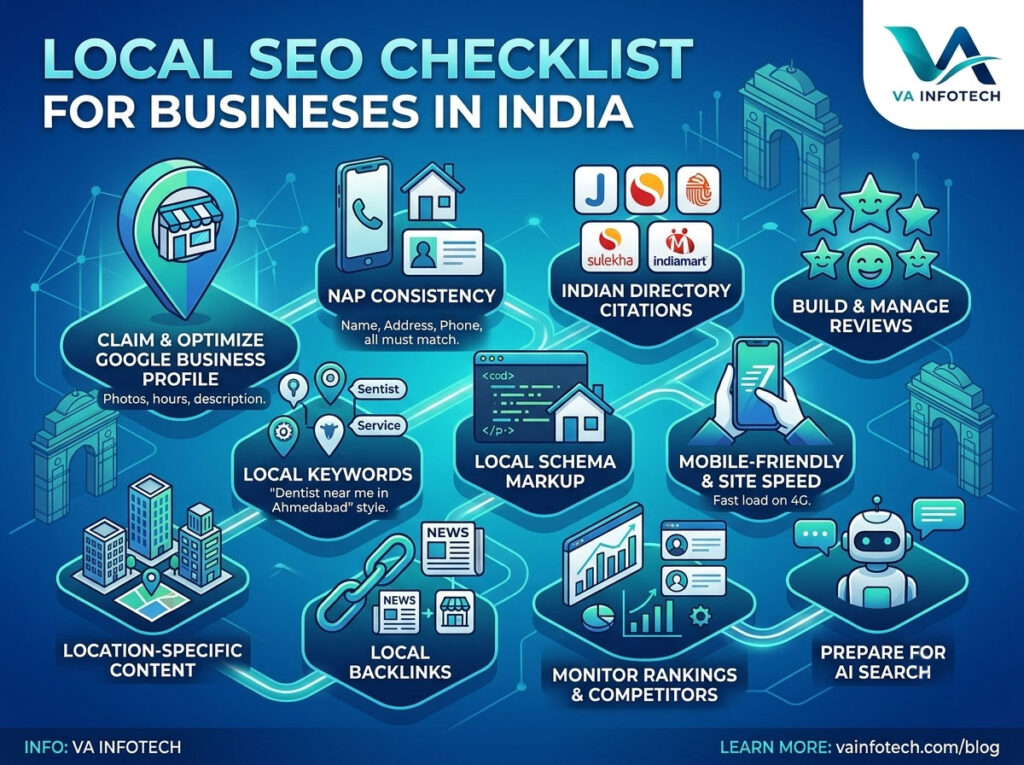
If you run a business that depends on customers finding you within a specific city or neighbourhood — a clinic in Ahmedabad, a boutique in Mumbai, a service provider in Bangalore — ranking on national search terms doesn’t help you nearly as much as showing up when someone nearby searches “near me.” That’s what local SEO does, and in India’s increasingly mobile-first, “near me” search culture, it’s often the single highest-return marketing activity a local business can invest in. The problem is that most local SEO advice online is written for the US or UK market, where things like address formatting, review platforms, and local directories work differently. This checklist is built specifically around what actually moves the needle for Indian businesses in 2026 — from Google Business Profile optimisation to citation consistency to the technical basics that quietly sabotage local rankings if left unchecked. Why Local SEO Matters More Than Ever in India Searches with local intent — “best,” “near me,” “in [city]” — have grown steadily as more of India’s population searches primarily on mobile devices. Someone searching “dentist near me” or “best mehndi artist in Ahmedabad” isn’t browsing casually — they’re ready to book, call, or visit. That’s exactly why local search results convert at a far higher rate than generic national searches. For small and mid-sized businesses competing against larger, better-funded brands, local SEO is also one of the few areas where a well-optimised local presence can genuinely outrank a national competitor for searches that matter most — because Google prioritises proximity and relevance for these queries, not just domain authority. The Complete Local SEO Checklist 1. Claim and Fully Optimise Your Google Business Profile Your Google Business Profile (formerly Google My Business) is the single most important local SEO asset you own. Yet most businesses set it up once and never touch it again. Check that: An incomplete or outdated profile is one of the fastest ways to lose local visibility, even if everything else on your website is solid. 2. Keep NAP Consistency Across the Web NAP stands for Name, Address, and Phone number — and consistency across every platform where your business is listed is one of the strongest trust signals Google uses for local rankings. Check that your NAP is identical (down to formatting) across: Even small inconsistencies — “Rd” versus “Road,” or an old phone number that was never updated — can quietly confuse search engines about which listing is authoritative. 3. Get Listed on Relevant Indian Business Directories Beyond Google, several India-specific directories carry real local SEO weight: Each listing acts as a “citation” — a signal to Google that your business is a real, established entity at a specific location. Don’t just create these listings once; check them periodically for outdated information. 4. Build and Manage Customer Reviews Reviews are one of the strongest local ranking factors, and Indian consumers rely on them heavily before choosing a local business. Monthly, you should: A steady stream of genuine, recent reviews signals to Google that your business is active and trusted — which directly affects your position in the local map pack. 5. Optimise for Local Keywords Generic SEO keywords rarely match how people actually search locally. Instead of just “website design company,” people search “website design company in Ahmedabad” or “affordable website designer near Navrangpura.” Make sure your website includes: If you’re not sure which local terms actually drive traffic in your industry, this is exactly the kind of gap a proper Search Engine Optimization audit uncovers — comparing what you currently rank for against what your local competitors are capturing. 6. Add Local Business Schema Markup Schema markup helps search engines understand your business details with certainty rather than guessing from page content. At minimum, your website should include LocalBusiness schema with: This is a technical, one-time setup that continues paying off — it’s also increasingly important as AI-powered search tools rely on structured data to understand and cite businesses accurately. 7. Ensure Mobile-Friendliness and Site Speed The overwhelming majority of local searches in India happen on mobile devices, often on average network speeds outside major metro areas. If your site is slow or difficult to navigate on mobile, you lose potential customers before they even see your offering. Check that: If your site hasn’t been checked for mobile performance recently, it’s worth reviewing alongside a broader Website Design evaluation — local SEO gains are wasted if the site itself drives visitors away once they land. 8. Create Location-Specific Content If you serve multiple cities, neighbourhoods, or regions, generic “one page fits all” content underperforms compared to dedicated, genuinely useful location pages. Each location page should include: Thin, duplicated location pages can actually hurt rankings rather than help — Google’s algorithms are quick to identify templated, low-value content. 9. Build Local Backlinks Backlinks from other local, relevant websites signal to Google that your business is genuinely part of the local community. Look for opportunities like: These backlinks are usually harder to earn than generic directory submissions, but they carry proportionally more weight because of their relevance and authenticity. 10. Monitor Local Rankings and Competitor Activity Local SEO isn’t a “set and forget” project — rankings shift as competitors improve their own profiles and content. Monthly or quarterly, check: If your rankings have started slipping without an obvious cause, a full technical review often surfaces the issue — our Complete SEO Audit Checklist for Business Websites covers the deeper diagnostic steps beyond this local-specific checklist. 11. Prepare for AI-Powered Local Search Search is evolving beyond the traditional ten blue links. Tools like Google’s AI Overviews and conversational AI assistants are increasingly used for local discovery — “find me a good [service] near [area]” is now often answered directly by AI rather than a list of links. To stay visible in this shift, your business information needs to be structured, consistent, and easy for AI systems to interpret and cite confidently. Our guides on Large Language Model SEO and What

Scroll to Top