Ask most store owners which pages bring in the most organic traffic and they’ll say product pages. In reality, category pages are usually the stronger performers. They capture broad, high-volume searches like “women’s running shoes,” “office chairs” or “organic skincare,” which is where shoppers begin their buying journey.
Yet category pages are often the most neglected pages on an online store. They get a thin list of products, a generic title and no real content. This guide shows you how to fix that.
At Va Infotech, we design and optimize ecommerce websites, and category pages are one of the first places we look for quick SEO gains. Here is everything you need to know.
What Is a Category Page?
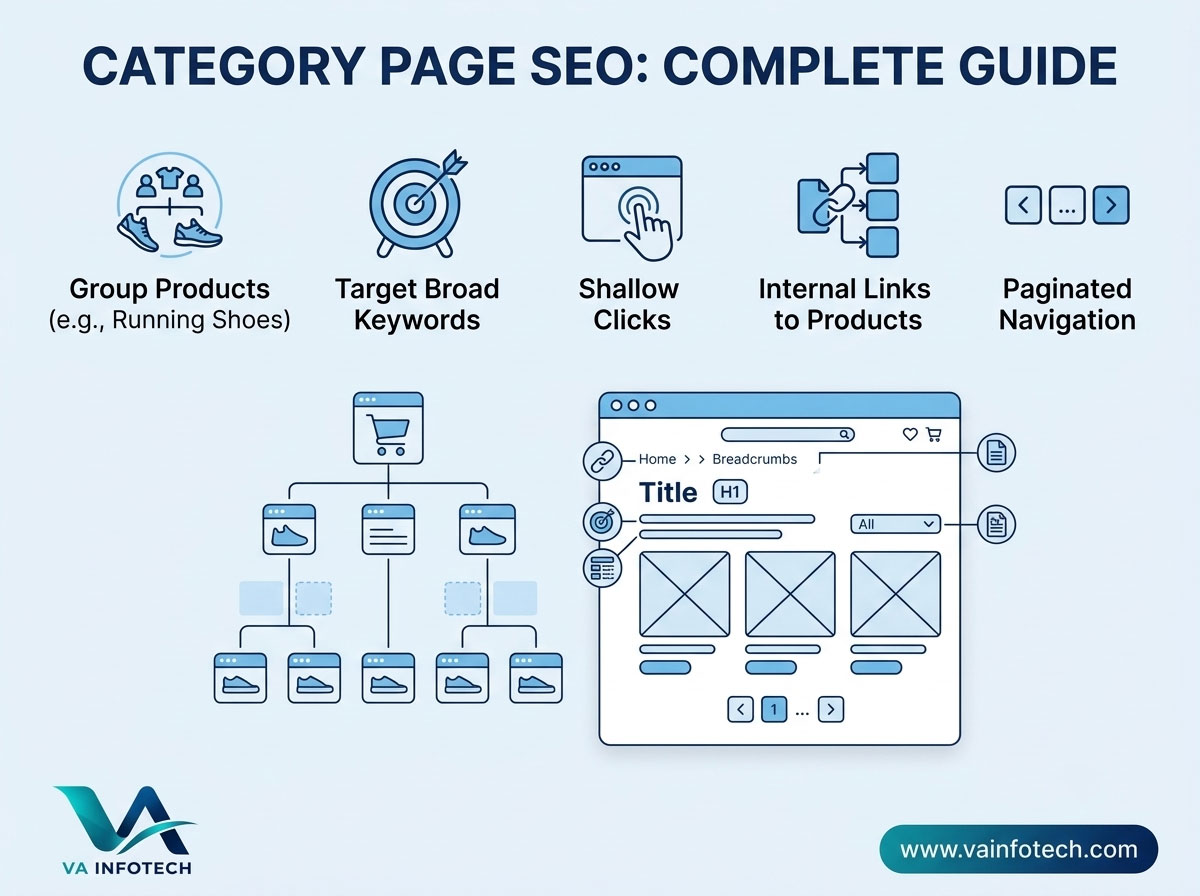
A category page groups related products under one heading, such as “Men’s Jackets” or “Gaming Laptops.” It sits between your homepage and your individual product pages in the site hierarchy, and it often has subcategories beneath it.
A typical structure looks like this:
- Homepage
- Category: Footwear
- Subcategory: Running Shoes
- Product: Brand X Trail Runner
- Subcategory: Running Shoes
- Category: Footwear
Category pages serve two jobs at once. They help visitors browse, and they give search engines a page to rank for broader commercial keywords.
Why Category Page SEO Matters for Ecommerce
1. They target high-volume, high-intent keywords
Product pages usually target specific, lower-volume phrases (a model name or a niche variation). Category pages target broader terms with far more monthly searches. A shopper searching “wooden dining tables” is ready to compare options, and that is exactly the type of visitor you want.
2. They distribute authority to products
Category pages typically earn more internal and external links than individual products. Through internal linking, that authority flows down to your product pages and helps them rank.
3. They support the whole site structure
Search engines use your category hierarchy to understand what your store sells and how topics relate. A clear structure helps every page perform better.
4. They convert well
Because shoppers arrive with a clear need, a well-organized category page can guide them straight to the right product. Better SEO and better conversion often come from the same improvements.
If you’re launching a new store, start with our ecommerce SEO checklist for new online stores so the fundamentals are in place before you optimize individual categories.
Step 1: Choose the Right Category Structure
Good SEO starts with how you organize your products.
Keep it simple and logical. Group products the way customers think about them, not the way your inventory system does. Use plain names such as “Women’s Sandals” rather than internal terms or brand slang.
Aim for shallow depth. Ideally, every product should be reachable within three clicks of the homepage. Deep hierarchies bury pages and dilute authority.
Avoid overlap. If two categories target nearly the same search term, they compete against each other. This is called keyword cannibalization, and it weakens both pages.
Plan before you build. A site architecture planned early is far cheaper than one rebuilt later. Our Ecommerce Website Design team plans category structure around both user behavior and search demand from the start.
Step 2: Research Keywords for Each Category
Every category page should target one primary keyword and a handful of closely related terms.
How to find them:
- List your product groups.
- Check search volume and competition for several phrasings of each (for example “sofas,” “couches” and “sofa sets”).
- Study the search results for each term. Are the top results category pages, product pages or blog posts? That tells you what Google expects to rank.
- Choose the phrasing that matches both demand and your inventory.
For a deeper walkthrough, read our guide on how to find high-value keywords for your business.
Match search intent
Category keywords are usually commercial investigation or transactional. People want to see and compare products, not read a long essay. If the top results are all product grids, your page should be a clean, browsable product listing. Our article on search intent explains how to read these signals.
Assign one keyword per page
Once you’ve chosen keywords, map them so no two pages compete. Our keyword mapping guide shows exactly how to do this.
Step 3: Optimize On-Page Elements
Title tag
Include your primary keyword near the start, keep it under about 60 characters, and make it appealing to click.
- Weak:
Shoes | My Store - Better:
Women's Running Shoes: Lightweight & Cushioned | Brand
Meta description
It doesn’t affect rankings directly, but it influences clicks. Write about 150 to 160 characters mentioning the category, a key benefit (free shipping, wide range, easy returns) and a gentle call to action.
H1 heading
Use one clear H1 that matches the category name and primary keyword, for example “Women’s Running Shoes.”
URL
Keep it short, readable and consistent:
- Good:
/womens-running-shoes/ - Poor:
/category?id=482&sort=new
Product listing quality
Each product tile should have a clear image, name, price and rating. Use descriptive image file names and alt text. Make sure product images load quickly, because they make up most of a category page’s weight.
Step 4: Write Useful Category Page Content
Many stores leave category pages with no text at all. Others stuff 1,000 words of keyword-heavy copy above the products and push the items out of sight. Neither works well.
What good content looks like
A short introduction (50 to 150 words) near the top. Say what the category contains and who it’s for, and use the primary keyword naturally. Keep it short enough that products stay visible without scrolling far.
A longer section below the products (200 to 500 words). This is where you can add depth:
- A buying guide (“How to choose the right running shoe”)
- Key differences between product types
- Materials, sizes or compatibility notes
- Care or usage tips
- Links to related categories and helpful articles
An FAQ section. Answer real customer questions concisely. FAQs capture long-tail searches and may help you appear in rich results. They also make your page more useful to AI search tools, as we explain in our post on ChatGPT SEO vs Google SEO.
Content rules to follow
- Write for shoppers first and search engines second.
- Never copy manufacturer descriptions or reuse the same text across categories.
- Don’t repeat the keyword unnaturally.
- Keep the information accurate and current.
Step 5: Build Strong Internal Linking
Internal links tell Google which pages matter and help visitors move through your store.
Link down to subcategories and your best-selling or most strategic products.
Link across to closely related categories. A “Running Shoes” page might link to “Running Socks” and “Fitness Trackers.”
Link up with breadcrumbs, such as Home > Footwear > Running Shoes. Breadcrumbs improve navigation and can appear in search results when marked up with schema.
Link to content. Connect categories to buying guides and blog posts, and link back from those posts to the category. This is one of the most effective ways to pass authority to commercial pages.
Use descriptive anchor text. “Trail running shoes” tells Google far more than “click here.”
Don’t hide important categories behind scripts or search boxes. If a crawler can’t follow a plain link to a page, the page may never rank. For product-level optimization, pair this with our Product Page SEO guide.
Step 6: Handle Filters, Sorting and Pagination
This is where ecommerce SEO gets technical, and where many stores lose rankings without noticing.
Faceted navigation and filters
Filters (size, color, price, brand) can generate thousands of URL variations, such as ?color=red&size=9&sort=price. Left unchecked, they create:
- Duplicate or near-duplicate content
- Wasted crawl budget
- Diluted ranking signals
What to do:
- Decide which filter combinations have real search demand. “Red running shoes” might deserve its own indexable page. “Running shoes sorted by price descending” does not.
- Use canonical tags to point low-value variations to the main category URL.
- Use
noindexor robots.txt rules carefully for filter pages with no search value. Test before deploying, since a wrong rule can block important pages.
Sorting parameters
Sorting options should almost never be indexed. Canonicalize them to the default view.
Pagination
Large categories split products across several pages. Best practices:
- Give each paginated page a unique, crawlable URL (
/running-shoes/page/2/). - Include normal links between pages, not only “load more” buttons that require JavaScript to work.
- Let each paginated page canonicalize to itself rather than to page one, unless you’ve set up a full “view all” alternative.
- Keep the main category text on page one only, so you don’t repeat it on every page.
If your store uses infinite scroll, make sure there’s also a crawlable paginated fallback.
Step 7: Add Structured Data
Schema markup helps search engines understand your page and can unlock rich results.
Useful types for category pages:
- BreadcrumbList: displays the navigation path in search results.
- CollectionPage / ItemList: describes the group of products on the page.
- FAQPage: if the page includes a genuine FAQ section.
- Organization: describes your business site-wide.
Always validate your markup with Google’s Rich Results Test and make sure it reflects what’s actually visible on the page.
Step 8: Improve Speed and User Experience
A slow, cluttered category page loses both rankings and sales.
Speed essentials:
- Compress and lazy-load images
- Use modern image formats such as WebP
- Minimize heavy scripts and unused plugins
- Use quality hosting and caching
Speed tends to degrade as stores grow, so read why website speed gets slower over time and how to fix it. Reliable Web Hosting also makes a measurable difference on image-heavy store pages.
UX essentials:
- Mobile-first layouts with easy-to-tap filters
- Clear prices, availability and ratings in each tile
- Sensible default sorting
- A visible search bar and simple navigation
- Fast, uncluttered “add to cart” or “view product” actions
Understanding the difference between the two design disciplines helps here, so see our explanation of website UX vs UI. If your store’s design is outdated or hard to navigate, a Website Redesign can improve both user experience and search performance.
Step 9: Handle Out-of-Stock and Discontinued Products
Products come and go, but your category pages should stay stable.
- Temporarily out of stock: keep the product listed, mark it clearly, and offer a back-in-stock alert.
- Permanently discontinued: redirect the product to the closest alternative or its parent category with a 301 redirect, instead of leaving a dead end.
- Empty categories: don’t leave them live and blank. Merge, redirect or fill them.
Broken pages and empty listings frustrate users and waste crawl budget.
Step 10: Earn Links and Authority
Category pages rank better with external signals too.
- Create useful guides and comparison content that naturally link to the category
- Share category pages in your social media and email marketing
- Earn mentions from industry blogs, review sites and suppliers
- Keep your business details consistent across online directories
If you also serve customers in a specific region, combine this with the tactics in our guide to getting more local leads from Google Search and our complete Google Business Profile guide.
Common Category Page SEO Mistakes
- No content at all. A bare grid gives Google little to understand.
- Overstuffed content. Huge walls of text above the products hurt UX.
- Duplicate descriptions copied across categories or from suppliers.
- Cannibalization. Multiple categories chasing the same keyword.
- Indexable filter and sort URLs creating thousands of thin pages.
- Weak internal linking that leaves important categories buried.
- Ignoring page speed, especially on mobile.
- Missing breadcrumbs and schema.
- Deleting categories without redirects.
- Never auditing the store. Problems accumulate silently, so run regular checks using our complete SEO audit checklist.
Category Page SEO Checklist
Use this list for every category on your store:
- [ ] One primary keyword chosen and mapped to this page only
- [ ] Title tag, meta description and H1 optimized
- [ ] Clean, short, readable URL
- [ ] Short intro text above the products
- [ ] Helpful 200 to 500 word section below the products
- [ ] FAQ section answering real questions
- [ ] Internal links to subcategories, related categories and key products
- [ ] Breadcrumb navigation with schema
- [ ] Canonical tags set; filters and sorting handled correctly
- [ ] Pagination crawlable and self-canonicalized
- [ ] Images compressed, with descriptive alt text
- [ ] Page loads fast on mobile
- [ ] Out-of-stock and discontinued products handled properly
- [ ] Included in your XML sitemap
- [ ] Reviewed in your regular SEO audit
How Category Pages Fit Into Your Wider Strategy
Category page SEO works best alongside everything else you do online:
- Search Engine Optimization builds the technical and content foundation across your store.
- Large Language Model SEO helps your categories and brand get mentioned in AI-generated answers. See also our guide to Google AI Overviews SEO.
- PPC Setup and Marketing can send immediate traffic to your top categories while organic rankings grow.
- Digital Marketing brings it together, and our guide to calculating digital marketing ROI helps you measure what’s working.
- Website Maintenance and a solid website backup strategy keep your store fast, secure and available.
If you’re still choosing a platform, our comparison of WordPress vs custom website development can help you decide which fits your store.
Frequently Asked Questions
What is category page SEO?
Category page SEO is the process of optimizing the pages that group your products so they rank for broad, high-intent search terms and guide shoppers to the right items.
How long should category page content be?
There’s no fixed length. As a guide, a short 50 to 150 word introduction above the products and 200 to 500 words of helpful content below is a good balance for most stores. Focus on usefulness, not word count.
Should I put text above or below the products?
Both can work. Keep the top section brief so shoppers see products quickly, and put the longer buying guide or FAQ below the product grid.
Are category pages more important than product pages for SEO?
They serve different purposes. Category pages usually capture broader, higher-volume searches, while product pages capture specific, ready-to-buy searches. A strong store optimizes both.
How many products should be on one category page?
Enough to be useful without slowing the page, often 20 to 60 depending on your design and audience. Use crawlable pagination for the rest.
Should I index filter pages?
Only when a filtered combination has real search demand and offers unique value, such as “red running shoes.” Otherwise, canonicalize or block low-value variations.
How do I fix keyword cannibalization between categories?
Map one primary keyword to each page, merge categories that overlap heavily, and differentiate the content and internal links of the remaining pages.
How long does category page SEO take to work?
It varies by competition and site authority, but most stores see meaningful movement within three to six months of consistent improvements.
Final Thoughts
Category pages are the backbone of an ecommerce website. They capture broad demand, spread authority across your catalog and guide shoppers toward a purchase. Done properly, they can become the biggest source of organic traffic and revenue in your store.
Start with a clear structure, target one keyword per page, add useful content, strengthen your internal links and handle filters and pagination carefully. Then keep improving with regular audits.
At Va Infotech, we help ecommerce businesses across Ahmedabad and India build fast, search-friendly online stores, from Website Design and eCommerce Website Design to ongoing SEO and marketing. You can see examples of our work in our Portfolio, learn more about us, or browse more guides on our Blog.
Want your category pages to rank higher and sell more? Visit vainfotech.com or contact Va Infotech for a free consultation.
Want help applying this to your website?
Tell us about your business and goals. We will review your site and suggest clear next steps, free of charge.