
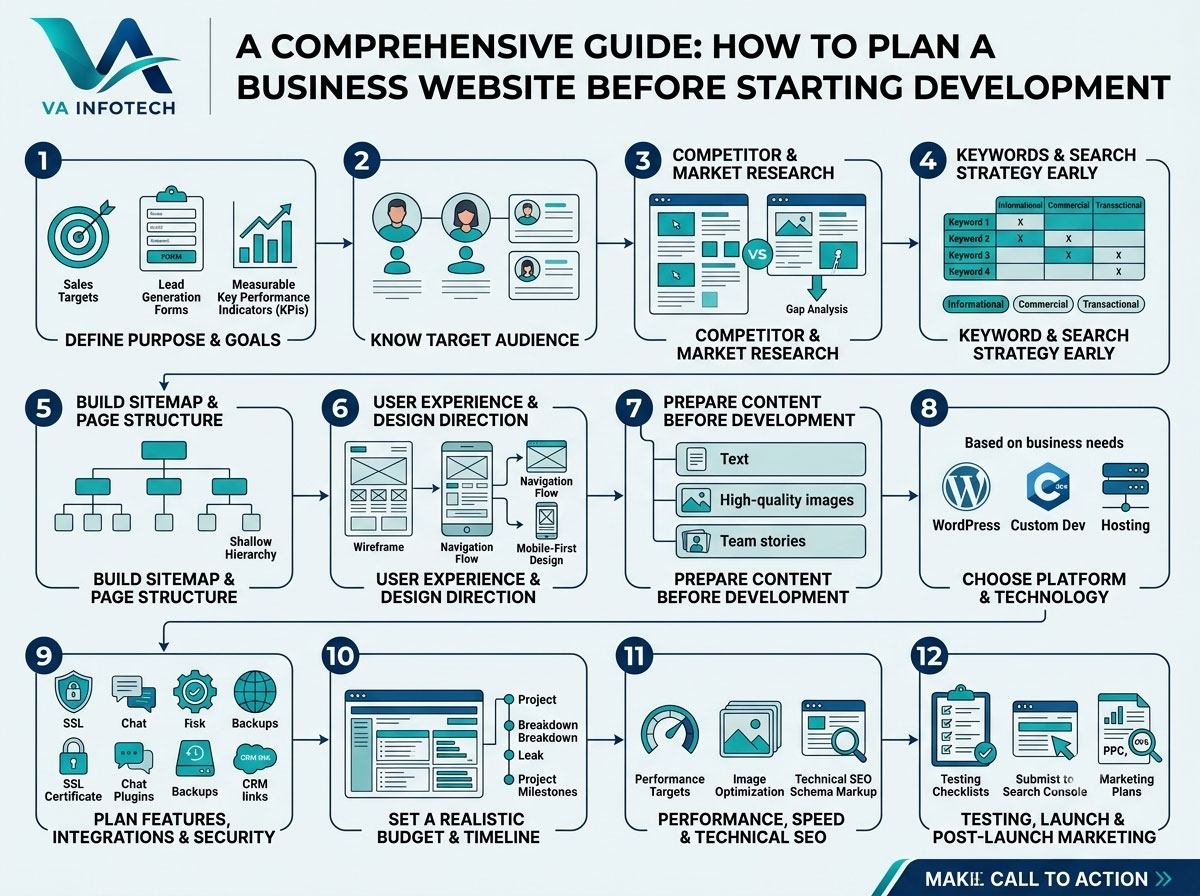
Most website problems do not start during development. They start before it. A site that launches late, goes over budget or fails to bring in enquiries usually had no clear plan behind it. The design looked fine, the code worked, but nobody decided who the website was for, what it needed to achieve or how it would be found.
This guide explains how to plan a business website before starting development. It covers the decisions to make, the documents to prepare and the mistakes to avoid, so your project starts with direction instead of guesswork. At Va Infotech, we see the difference planning makes on every project, and the steps below are the same ones we walk clients through.
Why Website Planning Matters
A website is not a brochure you print once and forget. It is a working part of your business that has to attract visitors, build trust and turn interest into enquiries or sales. Planning before development gives you four things:
- A fixed scope. You know what is being built, which limits last-minute additions that raise cost and delay launch.
- A realistic budget. You can compare quotes fairly because every agency is pricing the same brief.
- Better search visibility. Page structure, keywords and URLs are decided before the build rather than patched in afterwards.
- Fewer rebuilds. Fixing a structure mistake after launch often means redoing pages, and sometimes a full website redesign.
Think of planning as the blueprint stage of a building. Nobody pours concrete before the drawings are agreed, and a website deserves the same discipline.
Step 1: Define the Purpose and Goals of Your Website
Start with one question: what should this website do for the business?
Common purposes include generating leads, selling products online, booking appointments, showcasing a portfolio, supporting existing customers or building brand credibility. Most sites have one main goal and one or two supporting goals. Write them down.
Then make each goal measurable. “Get more customers” is too vague to plan around. Compare it with these:
- Generate 40 enquiry form submissions per month
- Receive 60 phone calls per month from website visitors
- Sell 150 products per month at an average order value of ₹2,500
- Rank on the first page of Google for five commercial keywords within nine months
Clear targets shape every later decision, from which pages you build to which features you pay for. They also let you judge success after launch. If you want to track returns properly, our guide on how to calculate digital marketing ROI shows how to connect website results to money.
Step 2: Know Your Target Audience
A website that tries to speak to everyone usually convinces nobody. Define who you are building for.
For each main audience group, note:
- Who they are (age range, role, location, industry)
- What problem brings them to your site
- What they need to know before they contact you or buy
- What worries or objections they have
- Which device they are likely to use
A simple way to do this is to write two or three short customer profiles. For example, a local service company might serve homeowners who need an urgent repair and property managers who want a long-term contract. These two groups need different information, so the site needs clear paths for each.
Talk to your sales team or look at your last 20 enquiries. The questions customers actually ask are the best raw material for page content.
Step 3: Research Competitors and Your Market
Before designing anything, look at what already works in your market. Review five to ten competitor websites and note:
- How they describe their services
- Which pages they have (and which they are missing)
- How they present pricing, proof and calls to action
- How fast and easy their sites feel on mobile
- What they rank for in Google
The aim is not to copy. It is to spot gaps you can fill. If every competitor hides their pricing process and you explain yours clearly, that becomes a selling point. If nobody has useful local content, that is a ranking opportunity.
Also collect a few websites you admire in any industry. Note what you like about the layout, tone or navigation. These become reference points when you brief your designer.
Step 4: Plan Your Keywords and Search Strategy Early
Many businesses think about SEO only after launch. That is a costly order. Search visibility depends on structure, page content, titles and internal links, all of which are far easier to build in from the start.
Before development, research the phrases your customers use when they search. Group them by intent:
- Informational: “how to plan a business website”
- Commercial: “website design company in Ahmedabad”
- Transactional: “buy office chairs online”
Then assign one main keyword to each planned page so pages do not compete against each other. This process is called keyword mapping, and our guide to keyword mapping explains how to do it step by step.
If you serve a particular city or region, plan location pages and Google Business Profile details now. Our post on getting more local leads from Google search covers what to prepare. Building this foundation with a professional search engine optimization approach from day one saves you from restructuring later.
Search is also changing. AI-generated answers now appear alongside normal results, so plan content that is clear, well structured and easy to quote. Read our guide on Google AI Overviews SEO and look at our Large Language Model SEO service if you want your brand to appear in those answers.
Step 5: Build Your Sitemap and Page Structure
A sitemap is a simple outline of every page on your website and how the pages connect. Draw it before any design begins. A basic business website often includes:
- Home
- About Us
- Services (with a separate page for each main service)
- Portfolio or case studies
- Blog or resources
- Contact
- Privacy policy and terms
Keep the structure shallow. A visitor should reach any important page within three clicks from the home page. Give each service its own page rather than listing everything on one, because a dedicated page can target specific keywords and answer specific questions.
For an online store, add category pages, product pages, a cart, checkout and account pages. Planning these well matters for both sales and rankings. If you sell products, read our guide on product page SEO, and consider a purpose-built eCommerce website design rather than forcing a brochure site to act as a shop.
Also plan your URL structure now. Short, readable URLs such as /services/website-design/ are better than long strings of numbers or dates.
Step 6: Plan User Experience and Design Direction
Design is more than colours and fonts. It is how a visitor moves from landing on a page to taking action. Plan these elements before development:
- Navigation: a clear menu with no more than seven main items
- Calls to action: one primary action per page, such as “Request a quote” or “Book a call”
- Mobile layout: most visitors will arrive on a phone, so design for small screens first
- Trust signals: testimonials, certifications, client logos, guarantees and real photos
- Accessibility: readable text size, good contrast and clear labels for forms
Create wireframes, which are simple black-and-white page layouts, before approving visual design. Wireframes let you test structure without being distracted by colour and imagery, and changing a wireframe costs far less than changing a finished page.
It also helps to understand the difference between user experience and user interface, since both shape results. Our post on website UX vs UI explains how they work together. When you are ready to turn the plan into a visual design, a dedicated website design team can build layouts around your goals and audience.
Step 7: Prepare Your Content Before Development Starts
Content delays are one of the biggest reasons websites launch late. Agencies often finish the design while the client is still writing the text. Avoid this by preparing content in parallel with planning.
Gather and organise:
- Page copy for every page on the sitemap
- Service descriptions with benefits, not just features
- Company story, team details and credentials
- High-quality photos and videos (real images beat stock photos)
- Logo files, brand colours and fonts
- Customer reviews and case studies
- Frequently asked questions
- Product information, prices and specifications for a store
Write for people first and search engines second. Use plain language, short paragraphs, descriptive headings and a clear next step on each page. If you do not have time to write everything, plan a content schedule and decide who is responsible for each page.
If you want visitors to explore your premises or showroom online, a virtual tour can also be planned as part of the content and media list.
Step 8: Choose the Right Platform and Technology
Your platform affects cost, speed, flexibility and long-term maintenance. The main options are a website builder, a content management system such as WordPress, or a fully custom build.
A few questions help you decide:
- How often will you update content yourself?
- Do you need custom features such as booking, calculators or customer portals?
- How much traffic and growth do you expect?
- What is your budget now, and what will it be in two years?
- Who will maintain the site after launch?
WordPress suits most small and mid-sized businesses because it balances flexibility, cost and ease of editing. A custom build makes sense when you have complex requirements. We compare both routes in detail in our article on WordPress vs custom website development.
Decide on hosting at this stage too. Slow or unreliable hosting damages user experience and rankings. Reliable web hosting with good uptime, security and support should be part of your plan from the start.
Step 9: Plan Features, Integrations and Security
List every function the website needs, then split the list into “must have” and “nice to have.” Typical items include:
- Contact and enquiry forms
- Live chat or WhatsApp button
- Online payments and shipping
- Booking or appointment system
- CRM and email marketing integration
- Google Analytics 4 and Search Console
- Multilingual support
- Search and filtering
Be strict about the must-have list for version one. Every extra feature adds cost, testing time and things that can break. You can add features after launch once you see what visitors actually use.
Security belongs in the plan too. Include an SSL certificate, regular updates, strong login protection and automatic backups. Losing a website to a hack or server failure can wipe out months of work, so read our guide on building a website backup strategy before you launch.
Step 10: Set a Realistic Budget and Timeline
Website cost depends on the number of pages, design complexity, features, content needs and platform. Rather than asking “how much does a website cost?”, define your scope first, then request quotes against the same brief.
A useful budget covers more than development. Include:
- Design and development
- Domain name and hosting
- Content writing, photography and video
- Plugins, themes or software licences
- SEO setup
- Testing and launch
- Ongoing website maintenance
- Marketing to bring visitors after launch
A website with no marketing budget behind it often sits unseen. If you are unsure how much to set aside, our post on how much a small business should spend on digital marketing gives a practical starting point.
For the timeline, a typical small business website takes roughly four to eight weeks from approval of the plan to launch, depending on scope and how quickly you supply content and feedback. Larger sites and online stores take longer. Build in time for reviews, because delays almost always come from late feedback rather than slow coding.
Step 11: Plan Performance, Speed and Technical SEO
Speed is easier to build in than to fix. Agree on performance targets before development: optimised images, lightweight themes, limited plugins, caching and a good hosting setup. Sites tend to slow down gradually as content and plugins pile up, a problem we explain in why website speed gets slower over time and how to fix it.
Also confirm these technical basics with your developer:
- Mobile-friendly responsive design
- Clean, crawlable code and an XML sitemap
- Proper heading structure on every page
- Descriptive title tags and meta descriptions
- Image alt text
- Schema markup for business details, reviews and FAQs
- 301 redirects if you are replacing an existing site
If you are rebuilding an old site, record your current rankings and top-traffic pages first so you can protect them during migration.
Step 12: Plan Your Testing, Launch and Post-Launch Marketing
A good plan covers what happens after the site goes live. Before launch, test:
- Every form, button and link
- Mobile, tablet and desktop layouts
- Different browsers
- Page speed
- Payment flow for online stores
- Analytics and conversion tracking
After launch, submit your sitemap to Google Search Console, set up your Google Business Profile and start promoting the site. Depending on your goals, that may include digital marketing, social media marketing or PPC advertising. Plan regular reviews too: check traffic, enquiries and conversion rates monthly, and fix what is not working.
Website Planning Checklist
Use this quick checklist before you brief a developer:
- Website goals written down and measurable
- Target audience profiles created
- Competitor research completed
- Keywords researched and mapped to pages
- Sitemap and URL structure approved
- Wireframes reviewed
- Content prepared or scheduled
- Platform and hosting chosen
- Must-have features listed
- Security and backup plan agreed
- Budget and timeline confirmed
- Testing and launch plan ready
Common Website Planning Mistakes to Avoid
- Starting with design instead of goals. A beautiful site that does not support a business objective is an expensive mistake.
- Skipping content planning. Empty pages and placeholder text cause delays.
- Ignoring SEO until after launch. Rebuilding structure later costs far more.
- Adding too many features. Start lean and expand with real data.
- Forgetting mobile users. Most traffic now comes from phones.
- Choosing on price alone. The cheapest quote often leaves out items you later pay for separately.
- No maintenance plan. Unupdated sites become slow and insecure.
Final Thoughts
A well-planned website is faster to build, easier to manage and far more likely to deliver results. Define your goals, understand your audience, map your pages around real search demand, prepare your content and choose technology that fits your growth. Do this before a single line of code is written, and development becomes a smooth execution of a clear plan instead of a series of expensive surprises.
At Va Infotech, we help businesses plan, design, build and grow websites that perform. From strategy and website design to SEO, hosting and ongoing support, our team handles every stage so you can focus on running your business. Browse our full range of services, see our portfolio or contact us for a free consultation. For more guides like this, visit the Va Infotech blog.
Frequently Asked Questions
How long does it take to plan a business website? Planning usually takes one to three weeks for a small business site, depending on how quickly goals, content and approvals come together. Larger sites and stores need longer.
What should I prepare before hiring a web developer? Prepare your goals, target audience, competitor examples, a list of required pages and features, brand assets, content and a budget range. A written brief helps every agency quote accurately.
What is a website sitemap and why do I need one? A sitemap is an outline of every page and how pages link together. It guides design, navigation and SEO, and prevents missing pages during development.
How much does it cost to build a business website? Cost depends on page count, design, features, content and platform. Define your scope first, then compare quotes for the same brief. Remember to budget for hosting, maintenance and marketing too.
Should I plan SEO before or after building my website? Before. Keyword mapping, URL structure, page titles and internal links are easier and cheaper to build in from the start than to fix later.
Which is better for a business website, WordPress or custom development? WordPress suits most small and mid-sized businesses. Custom development fits complex requirements. Match the choice to your features, growth plans and budget.
Do I need to write the website content myself? Not necessarily. You can supply facts and ideas while a content writer produces the copy, but you must plan who is responsible and set deadlines so the project does not stall.